midjourney to notion
easily save midjourney prompt to notion, or bookmark excellent prompts from others midjourney.
As of June 2026, midjourney to notion has 1,000 users and a 4.50/5 rating from 10 reviews in the Productivity category.
Usersno change0%
1.0K
1,000
Ratingup 1.4 percent+1.4%
4.50
10 reviews
Reviewsup 11.1 percent+11.1%
10
Version
4.4.0
Manifest V3
History
3 snapshotsTracking since Apr 18, 2026.
View as table
| Date | Users | Rating | Reviews | Version |
|---|---|---|---|---|
| Apr 18, 2026 | 1.0K | 4.44 | 9 | 4.4.0 |
| Apr 28, 2026 | 1.0K | 4.44 | 9 | 4.4.0 |
| May 24, 2026 | 1.0K | 4.44 | 9 | 4.4.0 |
| Now | 1.0K | 4.50 | 10 | 4.4.0 |
Permissions & access
- Permissions
- storage
- Host access
- https://api.notion.com/*, https://*.chatgpt2notion.com/*, https://www.midjourney.com/app/jobs/*, https://chatgptsave.notion.site/*
Screenshots


About
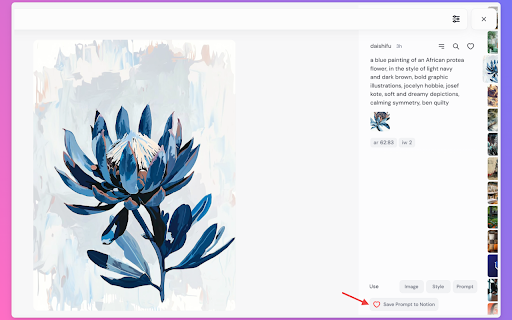
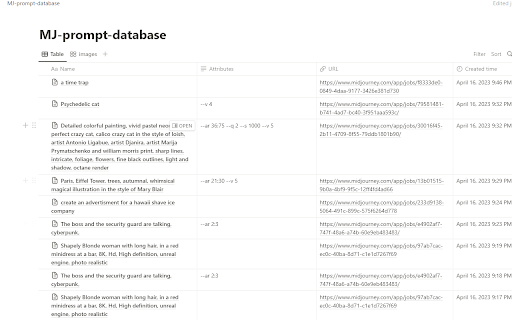
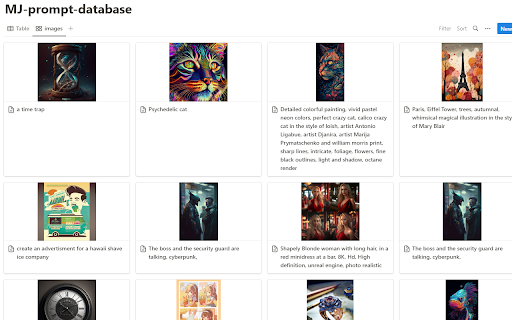
Midjourney Prompt Hunter is a powerful Google Chrome extension designed for Midjourney users. It allows you to effortlessly save, backup, export, and sync prompts, images, attributes, and author information from Midjourney directly into your Notion database with just one click. Whether you're saving your own creations, collecting inspiring prompts from others, or looking to backup and migrate your entire Midjourney history, this extension helps you efficiently manage, organize, and preserve your creative resources. With batch editing, tagging, grouping, and comprehensive backup features in Notion, your creative inspiration and valuable prompts are always within reach and safely stored!

Key Features:

1. 💡 One-click save of Midjourney prompts, images, attributes, and author information to Notion
2. 📋 Batch edit and manage creative resources in Notion
3. 📌 Collect and save useful prompts generated by others for reference
4. 🔄 Cross-platform sync to access and manage your creative content anytime, anywhere
5. ⏰ Automate tasks to save time and boost creativity
6. 📤 Batch export all historical Midjourney prompts to Notion with one click
7. 💾 Complete backup solution for your Midjourney prompt history
8. 🔄 Seamless synchronization between Midjourney and Notion

Use Cases:

- Creators saving and managing their own Midjourney prompts and creations
- Collecting and organizing excellent prompts generated by others to enhance creative inspiration
- Batch processing and categorizing creative resources in Notion to increase work efficiency
- Backing up and preserving your entire Midjourney prompt history
- Migrating and transferring prompts between different platforms
- Creating a searchable archive of your Midjourney journey
- Building a personal prompt library for future reference
- Sharing and collaborating on prompts with team members

How to Use:

1. Install the Midjourney Prompt Hunter extension.
2. Connect your Notion account and set up the save database.
3. Browse the Midjourney website and click the extension button to save content with one click.
4. Use the batch export feature to backup your entire prompt history.
5. View, edit, and manage your creative resources in Notion.

Midjourney Prompt Hunter is a powerful and easy-to-use extension that is suitable for all users of Midjourney. Whether you're a professional artist, AI enthusiast, or creative professional, this tool helps you save, backup, and organize your Midjourney prompts efficiently. With features like batch export, cross-platform sync, and comprehensive backup, you can ensure your valuable prompts are always safe and accessible. If you want to manage, backup, and view Midjourney prompts and images more efficiently, why not install this extension and experience the convenience it brings to you?

easily to save ai prompt , your best midjourney prompt, and with notion, you can make the midjourney image gallery fast way, and share to your friend.

If you want to back up all your Midjourney prompts history, export all Midjourney prompts, download all Midjourney prompts, or organize all Midjourney prompts in Notion, you have to try this extension now.

Support:
If you have any questions or suggestions, please contact us at:
Email: [email protected]

Changelog:

https://chatgptsave.notion.site/Change-Log-12110052f0c880eba0b8fc5f005b4b41?pvs=4

2025-11-17: fix the bug for midjourney video type prompt fetch .

2025-10-01: fix the bug for batch export to notion.

2025-06-18: Added the feature of automatically judging whether the Midjourney account is logged in. If not logged in, a prompt will be given to log in and open the Midjourney address https://www.midjourney.com/imagine.

2025-06-16: Added new feature to support batch export of all historical Midjourney prompts to Notion.

2024-12-27: Fixed issues and optimized the save button.

20241227:  Add support for save discord channel image to notion.

20240813:  Fixed issues: resolved the problem of saving images from the [midjourney.com](http://midjourney.com) official website; fixed issues with retrieving properties and version fields.

20240626: Fixed the issue of being unable to get image information caused by layout adjustments in discord.com.

20240526: Fixed the issue where the save button was not displaying due to updates on the https://www.midjourney.com/jobs page .

20240329: Fixed the issue where the save button was not displaying due to updates on the https://discord.com/channels page.

20240307-2: Fixed the issue of being unable to retrieve saved image information caused by layout adjustments in midjourney .

20240307: Added support for layout modifications in midjourney job page, enabling content saving on the create page in midjourney .

20240227: Fixed the issue of being unable to retrieve saved information caused by layout adjustments in MJ.

20240220:Fix the issue of not being able to retrieve saved information caused by layout adjustments in MJ.

20231221:add support https://www.midjourney.com/explore page save button.
20231214:fix add new field bug.
20231209:Added a new field called "Version" to filter prompts based on your preferred version. Upgrade today to unlock prompts specifically tailored to your selected version.
20231127: Fix the issue of not being able to retrieve saved information caused by layout adjustments in MJ.
20231108: Fix save image url bug.
20231101: Fix the issue of not being able to retrieve saved information caused by layout adjustments in MJ.
Technical
- Version
- 4.4.0
- Manifest
- V3
- Size
- 753KiB
- Min Chrome
- 88
- Languages
- 53
- Featured
- No
Metadata
- ID
- ceoifmkmbigkoodehbhfeegbngoomiae
- Developer ID
- u173c5bed9d6a3a6820bda30b163620fb
- Developer Email
- [email protected]
- Created
- Apr 19, 2023
- Last Updated (Store)
- Nov 17, 2025
- Last Scraped
- Jun 6, 2026
- Website
- https://chatgpt2notion.com/
- Support URL
- —
Similar extensions
Alternatives to midjourney to notion, ranked by description similarity.

Midjourney to Google Sheets
backup all your midjourney art prompts to google sheets with one-click.
29
★ 4.2

Midjourney to Obsidian - Export & Backup
Export & backup Midjourney AI art prompts to Obsidian. One-click batch export to Markdown files.
37
★ 5.0

Promptpicker: Midjourney prompt extractor
Automating Midjourney
48
★ 1.0

AutoSail for Midjourney - Auto Send Prompts & Batch Download
Midjourney tool. Auto send prompts, batch download, auto queue & upscale, --repeat in Relax Mode (Not affiliated with Midjourney)
20.0K
★ 4.5

ChatGPT Prompts Hub
ChatGPT Prompts Hub is your cheat code for ChatGPT. Adds a list of curated prompt templates and advanced features
1.0K
★ 5.0

Save ChatGPT to Notion
Save ChatGPT conversations to Notion with one click. Bulk Export ChatGPT conversations
8.0K
★ 4.5

PromptPack – Save, Enhance & Organize AI Prompts
Save, enhance, and organize AI prompts across ChatGPT, Claude, and Gemini with one click.
53
★ 4.0

MidJourney Prompt Generator
Generate creative prompts for MidJourney directly on their website
14
Data sourced from the Chrome Web Store · last verified Jun 6, 2026.