
Nexweave
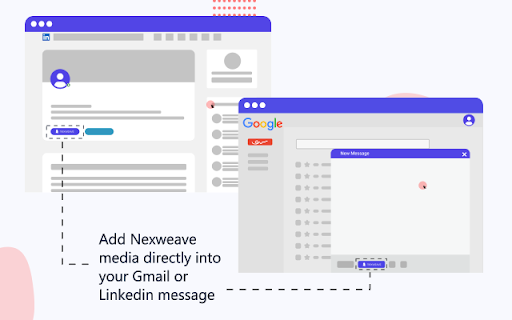
Nexweave plugin to create interactive experience right from the LinkedIn profile page and Gmail Inbox
As of May 2026, Nexweave has 399 users and a 5.00/5 rating from 2 reviews in the Social & Communication category.
Usersdown 11.1 percent−11.1%
399
399
Ratingno change0%
5.00
2 reviews
Reviewsno change0%
2
Version
1.0.19
Manifest V3
History
3 snapshotsTracking since Apr 1, 2026.
View as table
| Date | Users | Rating | Reviews | Version |
|---|---|---|---|---|
| Apr 1, 2026 | 449 | 5.00 | 2 | 1.0.19 |
| Apr 30, 2026 | 458 | 5.00 | 2 | 1.0.19 |
| May 29, 2026 | 417 | 5.00 | 2 | 1.0.19 |
| Now | 399 | 5.00 | 2 | 1.0.19 |
Permissions & access
- Permissions
- storage
- Host access
- https://*.linkedin.com/*, https://*.mail.google.com/*
Screenshots


About
Personalized Outreach with Nexweave | Send Hyper-personalized Images and Videos to your prospects over email and LinkedIn

How would you respond if …
You received an image in your e-mail or LinkedIn chat that contains your name, company logo and a screenshot of your website
You clicked on the image and it took you to a video that contains your name, logo and something that could help improve your website performance?

Would it make you more curious? Would it increase the chances of you replying to the messages?

Personalized Media causes a ‘Pattern interrupt’ is an extremely effective technique in sales that pushes recipients to not rely on their generic responses. Which is why we’ve observed that such communication gets a minimum of 300% better reply rates as compared to standard messages. Interesting isn’t it?

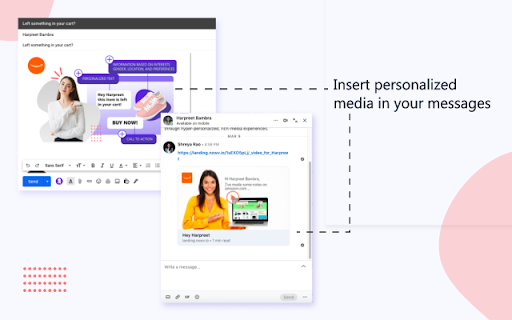
You can now serve hyper-personalized images & video links through Gmail or LinkedIn with the help of Nexweave’s Outreach Plugin and boost your reply rates & engagement.

Here is how you can put Nexweave to use for your Sales Outreach using Gmail

STEP 1 - Set up an Image Template
Create an image with placeholders for your prospect’s name, logo and company screenshot, if you want every recipient to see their name and company logo to be shown on the image. If you have other ideas, feel free to add your own personalization variables.

Step 2 - Set up a Video Template
Use the same personalization variables in the video to have coherence in the customer journey. When they feel like you’ve taken the effort to make something just for them, they will most likely want to respond to your video message. To make it easier for them to do so, keep the videos short and include a Call-To-Action in the video which will help then either ‘Book a Call’ or ‘Start a Trial’

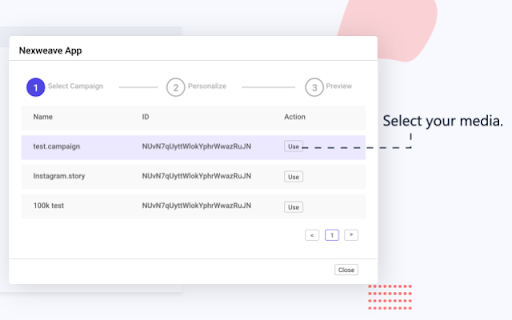
Step 3 - Create a Campaign
With Campaigns, you can have 3 flows -
Serve personalized images in emails
Serve clickable personalized images that redirect your prospects to a personalized video on your landing page.

If you’re using LinkedIn, you can use the same method to include either images or video links with personalized images as previews.

So go ahead and try them out. if you need assistance, send us an email on [email protected] or message us through the chat option on our website https://www.nexweave.com/
Technical
- Version
- 1.0.19
- Manifest
- V3
- Size
- 1.02MiB
- Min Chrome
- 88
- Languages
- 1
- Featured
- No
Metadata
- ID
- ceglbfefclnlbemejafdmehdjnejadlb
- Developer ID
- ub66c34cfa39aad6ede9f48db5b320ccf
- Developer Email
- [email protected]
- Created
- Oct 4, 2020
- Last Updated (Store)
- Apr 21, 2023
- Last Scraped
- May 29, 2026
- Website
- —
- Support URL
- https://www.nexweave.com/contact/
- Privacy Policy
- https://www.nexweave.com/privacy/
Similar extensions
Alternatives to Nexweave, ranked by description similarity.

Nexweave - LinkedIn AI Messages
Revamp your LinkedIn outreach with customized visuals and AI-powered messaging through the Nexweave plugin.
12

Networker.ai
Making quality connections just got a whole lot easier.
176
★ 5.0

OutreachAI
Scale Your LinkedIn Networking for Sales and Recruiting Professionals
371
★ 3.6

Neebify - LinkedIn Automation Tool
Neebify automates LinkedIn outreach, data extraction, and campaign management, boosting productivity and lead generation success.
22
★ 5.0

vidCAPTURE by vidREACH
Privacy-first screen, tab & camera recorder. On-device processing, AI background effects, MP4 download. No cloud required.
239
★ 5.0

SmartReach Task Manager
Sales Engagement Software for Outreach teams
334
★ 5.0

Leadsourcing - ChatGPT for LinkedIn
Supercharge your prospecting on LinkedIn with ChatGPT. Let Leadsourcing do the heavy lifting. Save time, close deals.
125
★ 5.0

intentleads - Engagement based LinkedIn Leads PREVIEW
Analyse the intent on your profile and generate hot leads on autopilot.
37
★ 5.0
Data sourced from the Chrome Web Store · last verified May 29, 2026.