
photo diet
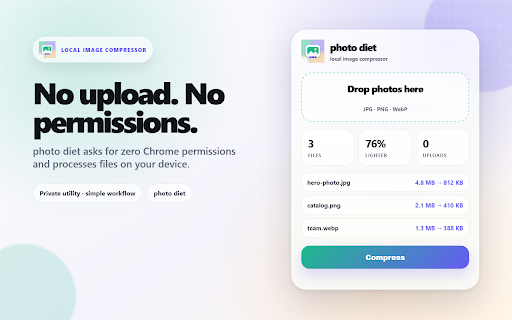
Shrink JPG, PNG, and WebP files locally with a clean before-and-after workspace.
As of June 2026, photo diet has — users in the Productivity category.
Usersno change0%
—
—
Ratingno change0%
—
— reviews
Reviewsno change0%
—
Version
1.0.0
Manifest V3
History
1 snapshotsTracking since May 29, 2026.
Not enough history yet for this metric — the chart fills in as we collect more snapshots.
View as table
| Date | Users | Rating | Reviews | Version |
|---|---|---|---|---|
| May 29, 2026 | — | — | — | 1.0.0 |
| Now | — | — | — | 1.0.0 |
Permissions & access
- Permissions
- None declared
- Host access
- None declared
Screenshots


About
photo diet is a small local image compressor for everyday screenshots, product photos, blog images, and share-ready files.

Drop JPG, PNG, or WebP images into the popup, choose how hard to compress, and download a clean ZIP of lighter files. The workflow is built for quick before-and-after decisions: original size, output size, dimensions, and savings are shown so you can see what changed before you send or upload anything.

What it does:
- Compress JPG, PNG, and WebP images locally
- Choose output format: Auto, JPG, or WebP
- Adjust compression quality
- Optionally limit the long edge for smaller share-ready images
- Review before-and-after file sizes and dimensions
- Download compressed results as one ZIP

Why use it:
- Make oversized images lighter before email, web upload, or documentation
- Keep a simple batch workflow inside Chrome
- Avoid account signups and upload-heavy web tools
- Work with a quiet, polished interface that stays focused on one job

Privacy:
photo diet processes selected image files in your browser. It does not require an account, does not request Chrome permissions, and does not upload your images to an external server.
Technical
- Version
- 1.0.0
- Manifest
- V3
- Size
- 20.29KiB
- Min Chrome
- 88
- Languages
- 1
- Featured
- No
Metadata
- ID
- cdnlpigpedgbemjdndpfgbccpikfffei
- Developer ID
- uc297273b2e08fe0f312a7c2728ee5488
- Developer Email
- [email protected]
- Created
- May 28, 2026
- Last Updated (Store)
- May 28, 2026
- Last Scraped
- Jun 10, 2026
- Website
- —
- Support URL
- —
Data sourced from the Chrome Web Store · last verified Jun 10, 2026.