
GitHub TOC Sidebar
Put the GitHub README TOC in the sidebar
As of June 2026, GitHub TOC Sidebar has 192 users and a 5.00/5 rating from 5 reviews in the Accessibility category.
Usersno change0%
192
192
Ratingno change0%
5.00
5 reviews
Reviewsno change0%
5
Version
2.3.0
Manifest V3
History
5 snapshotsTracking since Apr 18, 2026.
View as table
| Date | Users | Rating | Reviews | Version |
|---|---|---|---|---|
| Apr 18, 2026 | — | 5.00 | 5 | 2.3.0 |
| Apr 28, 2026 | 193 | 5.00 | 5 | 2.3.0 |
| May 8, 2026 | 189 | 5.00 | 5 | 2.3.0 |
| May 15, 2026 | 178 | 5.00 | 5 | 2.3.0 |
| Jun 3, 2026 | 190 | 5.00 | 5 | 2.3.0 |
| Now | 192 | 5.00 | 5 | 2.3.0 |
Permissions & access
- Permissions
- None declared
- Host access
- None declared
Screenshots

About
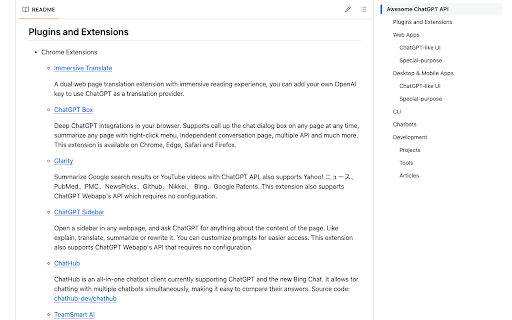
GitHub TOC Sidebar enhances the accessibility on the readme of GitHub projects. It utilizes the builtin TOC (Table of Contents) component in GitHub, when scrolling down, the TOC will be opened and stick on the right side of the page, making it easier to view the outline of the content, and quicker to navigate around different sections. It's quite helpful when viewing projects that has long readme with multi-level table of contents.

Please note that this extension only works when all the circumstances are met:
1. You are viewing the home page of a project on GitHub, meaning that the URL must match the format https://github.com/<user>/<project>, not subsidiary pages like https://github.com/<user>/<project>/blob/master/readme.md
2. The project has a readme file written in a markup language such as Markdown or RST
3. The readme file has headings that split content into multiple sections with titles
4. You scroll down the page further than the bottom of the right sidebar

To test if this extension works, you can open this page as an example: https://github.com/reorx/awesome-chatgpt-api
Technical
- Version
- 2.3.0
- Manifest
- V3
- Size
- 9.68KiB
- Min Chrome
- 88
- Languages
- 1
- Featured
- No
Metadata
- ID
- cdiiikhamhampcninkmmpgejjbgdgdnn
- Developer ID
- uc8a30dcc31145f81139d27e5b1b39f76
- Developer Email
- [email protected]
- Created
- May 25, 2023
- Last Updated (Store)
- Dec 13, 2025
- Last Scraped
- Jun 3, 2026
- Website
- —
- Support URL
- —
- Privacy Policy
- —
Similar extensions
Alternatives to GitHub TOC Sidebar, ranked by description similarity.

github-toc
Show the table of contents in github and make it possible to jump to headings.
—

Github Sidepanel - Tabbee
Use Github visible on every page in the side panel.
14

RestDocs TOC Extension
make 'Table Of Contents(TOC)' to highlight current position and provide some additional guidance
101
★ 5.0

TalkGuidanceGPT
TalkGuidance is a screen reader powered by GPT, which designed to make web browsing more accessible for visually impaired users.
5

Tablenator
Tablenator assists developers in making tables accessible. The extension illustrates how a screen reader would interpret each table…
83
★ 5.0

GPT3 Accessible Tables
GPT3 Accessible Tables is an extension that uses OpenAI's GPT3 technology to give insights on tables rendered in web pages.
The…
23

Confluence Float Table of Content
Adds a floating table of contents sidebar to Confluence pages for easy navigation
20

Read TTS
Reads text aloud directly in the browser, mimicking native Read Aloud.
3
Data sourced from the Chrome Web Store · last verified Jun 3, 2026.