
Web Design Ruler
Essential design tools for web designers: pixel-perfect measurements, font identification, and professional color picking.
As of June 2026, Web Design Ruler has 47 users in the Productivity category.
Usersup 9.3 percent+9.3%
47
47
Ratingno change0%
—
— reviews
Reviewsno change0%
—
Version
2.0.1
Manifest V3
90-day change · In the last 90 days this extension 1 version update.
History
8 snapshotsTracking since Apr 1, 2026.
View as table
| Date | Users | Rating | Reviews | Version |
|---|---|---|---|---|
| Apr 1, 2026 | 43 | — | — | 2.0.0 |
| Apr 10, 2026 | 44 | — | — | 2.0.0 |
| Apr 20, 2026 | 50 | — | — | 2.0.0 |
| Apr 29, 2026 | 45 | — | — | 2.0.0 |
| May 17, 2026 | 46 | — | — | 2.0.0 |
| May 26, 2026 | 50 | — | — | 2.0.0 |
| Jun 2, 2026 | 46 | — | — | 2.0.1 |
| Jun 8, 2026 | 48 | — | — | 2.0.1 |
| Now | 47 | — | — | 2.0.1 |
Permissions & access
- Permissions
- activeTabstoragecontextMenusscriptingclipboardWrite
- Host access
- http://*/*, https://*/*
Screenshots



About
Web Design Ruler 📏🎨🔠 | The Ultimate Design Assistant

The essential Chrome extension for web designers and developers who demand accuracy.

Web Design Ruler combines three powerful tools in one sleek extension, eliminating the need to switch between multiple applications during your design workflow:

🔍 Precise Measurement Tool

Measure any element's width, height, and diagonal dimensions with pixel-perfect accuracy
Get exact spacing and alignment information for any webpage element
Perfect for UI audits, responsive design testing, and detail-oriented layout work

🔤 Font Identifier

Instantly recognize any font used on a webpage with a single click
Discover complete typography details including font family, size, weight, and style
Save time searching for perfect typography matches for your projects

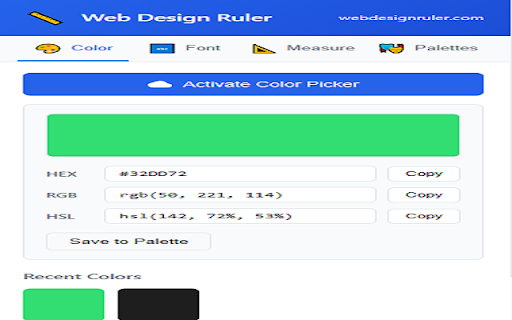
🎨 Color Picker

Extract exact colors from any webpage element
Get complete color values in HEX, RGB, and HSL formats
Maintain perfect color consistency across your designs

Simple, Intuitive, and Powerful
Web Design Ruler integrates seamlessly with Chrome, accessible via icon click or right-click context menu. No complicated setup or learning curve - just the essential design tools you need, when you need them.

Built with Privacy in Mind

✅ Works completely offline - no internet connection required
✅ No data collection or tracking
✅ Minimal permissions - only accesses your active tab when tools are explicitly activated
✅ No ads, bloatware, or unnecessary features


 What's New in Version 2.0.0

 🎨 Revolutionary Color Picker
- Pick colors from most ANY element - images, videos, backgrounds, text, and more (PLEASE provide feedback if this does not work optimally for you)
-Static image support - Extract exact pixel colors from photos, graphics, and screenshots
-One-click selection - Simply click anywhere on the page to capture the color
- Real-time preview - See HEX, RGB, and HSL values simultaneously

 🔤 Smarter Font Detection
- Actual rendered font detection - Shows the real font being displayed, not just the CSS font-family stack
- System font recognition - Properly identifies system fonts like San Francisco, Segoe UI, and more
- Complete typography info - Font size, weight, style, line height, and color
- One-click CSS copy - Export complete font styling instantly

 🎭 Color Palette Manager
- Create and organize custom color palettes
- Import/export palettes as JSON files
- Built-in starter palettes included
- Save colors from any website with one click

 ⚡ Performance & Reliability
- Rebuilt from the ground up for Manifest V3
- Faster tool activation and response times
- Improved error handling and user notifications
- Better keyboard shortcuts (ESC to cancel any tool)

 🎉 Complete UI Redesign
- Modern, professional interface with tab navigation
- Cleaner, more responsive popup design
- Visual measurement previews
- Recent colors tracking (last 20 picks)


Version 2.0 is a complete rewrite focused on reliability and precision. Whether you're sampling colors from product photos, identifying fonts on landing pages, or measuring spacing between elements - Web Design Ruler delivers accurate results every time.


Made with ❤️ by LXB Studio | Visit webdesignruler.com
Technical
- Version
- 2.0.1
- Manifest
- V3
- Size
- 30.6KiB
- Min Chrome
- 88
- Languages
- 1
- Featured
- No
Metadata
- ID
- cdheenjplgjmjfabnejeimmgdkajhadi
- Developer ID
- u30dfa55cd6ed857dc87b91a99f77c80c
- Developer Email
- [email protected]
- Created
- May 15, 2025
- Last Updated (Store)
- May 23, 2026
- Last Scraped
- Jun 8, 2026
- Website
- https://webdesignruler.com/
- Support URL
- https://lxb-studio.com/contact/
- Privacy Policy
- —
Similar extensions
Alternatives to Web Design Ruler, ranked by description similarity.

Pixel Size Measurer
Measure pixels, inspect elements, pick colors, detect fonts, check contrast, and annotate screenshots. No paywall, no analytics.
95

Ruler
Measure pixel distances on webpages with Ruler extension. Get precise Ruler instantly with Ruler tool for Chrome.
323

Dimensions
You will like Dimensions as it allows you to measure elements on a page in pixels, like a page ruler.
3.0K
★ 5.0

Digital Ruler
The ultimate online ruler app for precise on-screen measurements: Digital Ruler - measure pixel-perfect dimensions effortlessly!
10.0K
★ 4.8
PixGrid Ruler
Your Pixel-Perfect Ruler for Measuring Web Elements
30.0K
★ 4.3

color identifier
The color identifier app helps you to find hex code from images or web pages. Use our rgb color finder to detect a color in seconds
52

Grid Ruler
Display rulers and grid lines to help align elements on web pages
298
★ 5.0

Pixel Screen Ruler
Pixel-perfect screen measurement tool for web
2.0K
★ 5.0
Data sourced from the Chrome Web Store · last verified Jun 8, 2026.