
ChefScribe
Extract recipes from YouTube cooking videos into structured recipe cards.
As of June 2026, ChefScribe has 6 users in the Productivity category.
Usersup 50.0 percent+50.0%
6
6
Ratingno change0%
—
— reviews
Reviewsno change0%
—
Version
1.0.5
Manifest V3
90-day change · In the last 90 days this extension 2 version updates.
History
5 snapshotsTracking since Apr 1, 2026.
View as table
| Date | Users | Rating | Reviews | Version |
|---|---|---|---|---|
| Apr 1, 2026 | 4 | — | — | 1.0.2 |
| Apr 10, 2026 | 5 | — | — | 1.0.2 |
| Apr 20, 2026 | 4 | — | — | 1.0.2 |
| Apr 25, 2026 | 5 | — | — | 1.0.2 |
| May 20, 2026 | 5 | — | — | 1.0.3 |
| Now | 6 | — | — | 1.0.5 |
Changelog
- May 20, 2026description
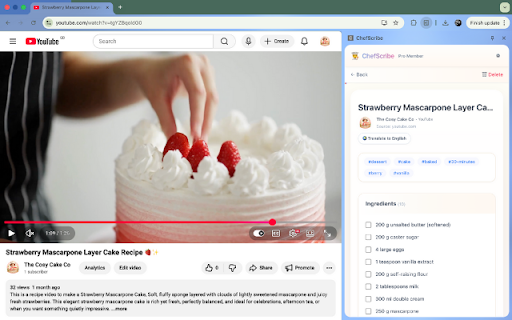
Stop fighting the pause button. Start cooking smarter. 👩🍳 ChefScribe turns YouTube cooking videos into clean, structured recipe cards in seconds — so you can cook without constantly pausing, rewinding, or scribbling notes. Whether a recipe is fast-paced, poorly explained, or in another language, ChefScribe pulls out the key details and lays them out in a format you can actually use. What you get Instant recipe extraction Open any YouTube cooking video and ChefScribe generates: a clear ingredients list simple step-by-step instructions a nutrition breakdown per serving No typing. No copy-pasting. No timeline wrestling match. Cook with confidence Get numbered steps that are easy to follow while you cook, even if the video moves too fast or skips around. Nutrition that adjusts with you See calories, fat, carbs, and protein per serving. Need more or fewer portions? Use the serving slider to recalculate instantly. Translate recipes into English Found a brilliant recipe in another language? ChefScribe can translate the ingredients and instructions, so you can actually make it. Build your own recipe library Save recipes and organise them into folders like Dinners, Baking, or Healthy. Add star ratings and use auto-tags to find favourites faster. Create shopping lists in one click Copy the ingredient list straight to your clipboard for Notes, Reminders, or a quick message before the shop. Use recipes across devices Copy a recipe link and open it on your phone or tablet for a cleaner cooking experience in the kitchen. How it works Open a cooking video on YouTube Click the ChefScribe extension Instantly view ingredients, steps, and nutrition alongside the video Free to try ChefScribe includes 6 free recipe extractions, so you can try the full experience before upgrading. Install ChefScribe today and turn YouTube videos into a cookbook you’ll actually use. 🍴
Stop fighting the pause button. Start cooking smarter. 👩🍳 ChefScribe is a YouTube recipe extractor and cooking Chrome extension that helps you turn YouTube cooking videos you already watch into clean, practical recipe cards. Instead of constantly pausing, rewinding, or scribbling notes, ChefScribe helps you follow the recipe more easily while keeping a link back to the original video. Whether a recipe is fast-paced, hard to follow, or in another language, ChefScribe lays out the key cooking details in a format you can actually use. What ChefScribe gives you Instant recipe help from YouTube videos Open a YouTube cooking video and ChefScribe creates: a clear ingredients list simple step-by-step instructions estimated nutrition per serving a clean recipe card you can save and use while cooking a link back to the original YouTube video No typing. No copy-pasting. No timeline wrestling match. Turn videos into recipe cards ChefScribe works like a YouTube recipe converter, helping you create easy-to-read recipe cards from cooking videos, complete with ingredients, method, servings, and estimated nutrition. Cook with confidence Follow clear numbered steps while you cook, even when the video moves too quickly, skips details, or jumps around. Estimated nutrition that adjusts with you See estimated calories, fat, carbs, and protein per serving. Change the number of portions and ChefScribe recalculates the figures instantly. Translate recipes into English Found a brilliant recipe in another language? ChefScribe can translate the ingredients and instructions so you can actually make it. Save recipes from YouTube Build your own recipe library from the cooking videos you love. Save recipes, organise them into folders, add star ratings, and use tags to find favourites faster. Create shopping lists quickly Copy the ingredient list straight to your clipboard for Notes, Reminders, or a quick message before the shop. Use recipes across devices Copy a recipe link and open it on your phone or tablet for a cleaner cooking experience in the kitchen. Creator-friendly by design ChefScribe keeps the original YouTube video linked to each saved recipe card, so you can always return to the creator’s full tutorial, tips, and presentation. How it works Open a cooking video on YouTube Click the ChefScribe extension View ingredients, steps, servings, and estimated nutrition alongside the video Revisit the original video whenever you need the full tutorial Free to try ChefScribe includes 6 free recipe extractions, so you can try the full experience before upgrading. Install ChefScribe today and save YouTube recipes as practical recipe cards you’ll actually use. 🍴
- Apr 25, 2026description
Stop fighting the pause button. Start cooking smarter. 👩🍳 ChefScribe is your digital sous-chef for YouTube. It instantly transforms cooking videos into clean, structured recipe cards—so you can focus on cooking, not scrubbing back and forth on the timeline. Whether a recipe is fast-paced, poorly explained, or in another language, ChefScribe extracts the key details you need and displays them neatly beside the video. 🌟 What ChefScribe Does ChefScribe automatically pulls essential cooking information directly from YouTube videos and turns it into something you can actually use. You get: A clear, organised ingredients list Simple, numbered step-by-step instructions A full nutrition breakdown per serving All without pausing, rewinding, or taking notes. 📋 Instant Recipe Extraction No typing required. ChefScribe generates a clean recipe card in seconds, including: Ingredients with interactive checkboxes Easy-to-follow numbered steps Perfect for fast tutorials, hands-only cooking, or messy kitchens. 🥗 Smart Nutrition Calculator Every recipe includes a complete nutritional breakdown: Calories Fat Carbohydrates Protein Cooking for more (or fewer) people? Use the serving size slider to instantly recalculate calories and macros for your exact batch size. 🌍 Translate International Recipes Found an amazing recipe in another language? Use the Translate to English toggle to convert ingredients and instructions instantly, so nothing gets lost in translation. 📂 Your Personal Cookbook Save recipes permanently and build a library you’ll actually use: Organise with custom folders (Dinners, Baking, Healthy, etc.) Add star ratings (1–5) to remember your favourites Recipes are auto-tagged with helpful labels like #baked, #citrus, or #under-1-hour No more hunting through bookmarks or watch history. 🛒 One-Click Shopping Lists Ready to cook? Copy the full ingredient list to your clipboard instantly—perfect for pasting into Notes, Reminders, or sending to a partner before a shop. 📲 Share & Sync Across Devices Food is better when shared. Share recipe cards directly to Facebook, X (Twitter), or Pinterest Copy a recipe link to open on your phone or tablet for hands-free kitchen viewing ⚙️ How It Works Open any cooking video on YouTube Click the ChefScribe extension Instantly view ingredients, steps, and nutrition alongside the video 🎁 Free to Try ChefScribe includes 6 full recipe extractions for free, so you can experience the complete workflow—ingredients, instructions, and nutrition—before deciding if you want more. Install ChefScribe today and turn your YouTube watch history into a working cookbook. 🍴
Stop fighting the pause button. Start cooking smarter. 👩🍳 ChefScribe turns YouTube cooking videos into clean, structured recipe cards in seconds — so you can cook without constantly pausing, rewinding, or scribbling notes. Whether a recipe is fast-paced, poorly explained, or in another language, ChefScribe pulls out the key details and lays them out in a format you can actually use. What you get Instant recipe extraction Open any YouTube cooking video and ChefScribe generates: a clear ingredients list simple step-by-step instructions a nutrition breakdown per serving No typing. No copy-pasting. No timeline wrestling match. Cook with confidence Get numbered steps that are easy to follow while you cook, even if the video moves too fast or skips around. Nutrition that adjusts with you See calories, fat, carbs, and protein per serving. Need more or fewer portions? Use the serving slider to recalculate instantly. Translate recipes into English Found a brilliant recipe in another language? ChefScribe can translate the ingredients and instructions, so you can actually make it. Build your own recipe library Save recipes and organise them into folders like Dinners, Baking, or Healthy. Add star ratings and use auto-tags to find favourites faster. Create shopping lists in one click Copy the ingredient list straight to your clipboard for Notes, Reminders, or a quick message before the shop. Use recipes across devices Copy a recipe link and open it on your phone or tablet for a cleaner cooking experience in the kitchen. How it works Open a cooking video on YouTube Click the ChefScribe extension Instantly view ingredients, steps, and nutrition alongside the video Free to try ChefScribe includes 6 free recipe extractions, so you can try the full experience before upgrading. Install ChefScribe today and turn YouTube videos into a cookbook you’ll actually use. 🍴
Permissions & access
- Permissions
- storagesidePanelidentitytabs
- Host access
- https://jfwwolnwcxdczsigyhxd.supabase.co/*
Screenshots



About
Stop fighting the pause button. Start cooking smarter. 👩🍳 ChefScribe is a YouTube recipe extractor and cooking Chrome extension that helps you turn YouTube cooking videos you already watch into clean, practical recipe cards. Instead of constantly pausing, rewinding, or scribbling notes, ChefScribe helps you follow the recipe more easily while keeping a link back to the original video. Whether a recipe is fast-paced, hard to follow, or in another language, ChefScribe lays out the key cooking details in a format you can actually use. What ChefScribe gives you Instant recipe help from YouTube videos Open a YouTube cooking video and ChefScribe creates: a clear ingredients list simple step-by-step instructions estimated nutrition per serving a clean recipe card you can save and use while cooking a link back to the original YouTube video No typing. No copy-pasting. No timeline wrestling match. Turn videos into recipe cards ChefScribe works like a YouTube recipe converter, helping you create easy-to-read recipe cards from cooking videos, complete with ingredients, method, servings, and estimated nutrition. Cook with confidence Follow clear numbered steps while you cook, even when the video moves too quickly, skips details, or jumps around. Estimated nutrition that adjusts with you See estimated calories, fat, carbs, and protein per serving. Change the number of portions and ChefScribe recalculates the figures instantly. Translate recipes into English Found a brilliant recipe in another language? ChefScribe can translate the ingredients and instructions so you can actually make it. Save recipes from YouTube Build your own recipe library from the cooking videos you love. Save recipes, organise them into folders, add star ratings, and use tags to find favourites faster. Create shopping lists quickly Copy the ingredient list straight to your clipboard for Notes, Reminders, or a quick message before the shop. Use recipes across devices Copy a recipe link and open it on your phone or tablet for a cleaner cooking experience in the kitchen. Creator-friendly by design ChefScribe keeps the original YouTube video linked to each saved recipe card, so you can always return to the creator’s full tutorial, tips, and presentation. How it works Open a cooking video on YouTube Click the ChefScribe extension View ingredients, steps, servings, and estimated nutrition alongside the video Revisit the original video whenever you need the full tutorial Free to try ChefScribe includes 6 free recipe extractions, so you can try the full experience before upgrading. Install ChefScribe today and save YouTube recipes as practical recipe cards you’ll actually use. 🍴
Technical
- Version
- 1.0.5
- Manifest
- V3
- Size
- 310KiB
- Min Chrome
- 88
- Languages
- 1
- Featured
- No
Metadata
- ID
- cdcpjjmmichcpmmngegipbgbpflbmkbd
- Developer ID
- u8fa38824fde1cb1cfeee8f6707a8b103
- Developer Email
- [email protected]
- Created
- Feb 10, 2026
- Last Updated (Store)
- May 18, 2026
- Last Scraped
- Jun 8, 2026
- Website
- https://www.chefscribe.com/
- Support URL
- https://chefscribe.com/contact/
- Privacy Policy
- https://chefscribe.com/privacy-policy/
Similar extensions
Alternatives to ChefScribe, ranked by description similarity.

Eggcellent - Recipe Converter
Convert YouTube, Facebook, Instagram videos and recipe websites into formatted recipes. Save and sync.
10
★ 5.0

justcook: Free Recipe Saver
Skip the Story. Save the Recipe. Instantly save and organize recipes in a clean digital cookbook.
18
★ 5.0

Cocotte - Carnet de Recettes
Sauvegardez en 1 clic toutes vos recettes trouvées en ligne dans votre carnet Cocotte, sans pubs ni mise en forme inutile.
9
★ 5.0

Cookbook: Recipe Cleaner & Library
Your digital cookbook for the web. Clean recipes, save favorites, scale servings, and build your personal collection.
29
★ 5.0

Recipe Keeper
Extract structured recipe data from YouTube cooking videos and Shorts with AI.
24
★ 5.0

Chef's Vision Culinary Assistant
Save recipes and generate new ideas with the Chef's Vision AI.
—

Recipe Finder with Ingredients: Cook With What You Have
Don't know what to cook? Type your ingredients to find delicious recipes in seconds. Supports Keto, Gluten-Free & Air Fryer.
15
★ 5.0

DishPal
AI-powered shopping list manager for meal planning
—
Data sourced from the Chrome Web Store · last verified Jun 8, 2026.