
Comment Generator
Generate comment according to LinkedIn post content and also rewrite comment.
As of May 2026, Comment Generator has 22 users and a 5.00/5 rating from 2 reviews in the Communication category.
Usersno change0%
22
22
Ratingno change0%
5.00
2 reviews
Reviewsno change0%
2
Version
1.5
Manifest V3
History
2 snapshotsTracking since Apr 1, 2026.
View as table
| Date | Users | Rating | Reviews | Version |
|---|---|---|---|---|
| Apr 1, 2026 | 22 | 5.00 | 2 | 1.5 |
| Apr 30, 2026 | 21 | 5.00 | 2 | 1.5 |
| Now | 22 | 5.00 | 2 | 1.5 |
Permissions & access
- Permissions
- None declared
- Host access
- https://www.linkedin.com/*
Screenshots


About
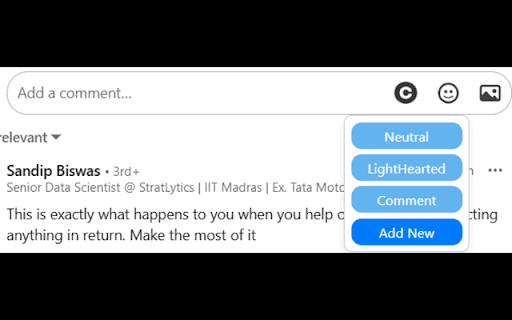
Comment Generator is a powerful Chrome extension designed to help you generate thoughtful and relevant comments for LinkedIn posts quickly and effortlessly and also rewrite comment. Whether you want to provide a neutral comment, offer lighthearted, or show empathy, this extension has you covered.

Features:

- Automated Comment Generation: Based on the content of LinkedIn posts, generate comments in various styles such as Neutral, lighthearted, or Empathetic.
- Custom Comment Styles: Add and save custom comment styles to suit your specific needs.
- Easy-to-Use Interface: The extension integrates seamlessly with LinkedIn, providing a user-friendly interface to generate comments directly within the LinkedIn platform.
- Prompt Options: Display options dynamically below text areas where comments are to be entered, offering quick access to different comment styles.
- Custom Prompts: Create and save custom prompts using a modal window, allowing for personalized comment generation.

Usage:

1. Install the Comment Generator extension.
2. Navigate to any LinkedIn post.
3. Click on the comment section, and you will see options appear below the text area.
4. Choose a comment style or add a new custom prompt.
5. The extension will generate a comment based on the chosen style and the content of the post.
6. Edit if necessary and post your comment.
Technical
- Version
- 1.5
- Manifest
- V3
- Size
- 38.28KiB
- Min Chrome
- 88
- Languages
- 1
- Featured
- No
Metadata
- ID
- cdaknpfogiemnhdlkjflcbcfldnecjac
- Developer ID
- uba5ee105a6e1a111bddebff0e7021e9e
- Developer Email
- [email protected]
- Created
- Jul 2, 2024
- Last Updated (Store)
- Nov 28, 2024
- Last Scraped
- May 29, 2026
- Website
- —
- Support URL
- —
Similar extensions
Alternatives to Comment Generator, ranked by description similarity.

LinkedIn Comment Pro
LinkedIn Comment Pro helps you craft professional LinkedIn comments using AI.
6
★ 4.0

ReplyWise: AI Comment Generator
Maintain an authentic social presence using AI. Save time, boost your engagement, and stay genuinely you.
1.0K
★ 4.3

Commenty – AI LinkedIn Comment Generator That Sounds Like You
Write better LinkedIn comments in seconds. AI-powered, fully customizable, and sounds like you - not a bot.
152
★ 4.9

Linkgage Ai
An intelligent LinkedIn commenter.
21
★ 5.0

Repli AI Pro - Your AI-Powered Social Media Assistant
Write better social media replies instantly. Get AI suggestions for LinkedIn, Twitter & Facebook comments in your preferred style.
1

LinkedIn AI Commenter
Suggest thoughtful LinkedIn comments using an AI backend.
2

AI Commenter
AI commenter for commenting on LinkedIn post with upcoming support for social media platform like Facebook, Instagram, and Twitter.
135
★ 4.1

CommentLikeMe - AI LinkedIn Comments
Generate human-like AI comments on LinkedIn posts directly in your feed.
9
★ 5.0
Data sourced from the Chrome Web Store · last verified May 29, 2026.