
Playtext — Text to Speech
Save articles to listen to them later.
As of June 2026, Playtext — Text to Speech has 1,000 users and a 4.43/5 rating from 7 reviews in the Productivity category.
Usersno change0%
1.0K
1,000
Ratingno change0%
4.43
7 reviews
Reviewsno change0%
7
Version
2.1.1
Manifest V3
90-day change · In the last 90 days this extension 1 version update.
History
2 snapshotsTracking since Apr 1, 2026.
View as table
| Date | Users | Rating | Reviews | Version |
|---|---|---|---|---|
| Apr 1, 2026 | 1.0K | 4.43 | 7 | 2.1.0 |
| Apr 20, 2026 | 1.0K | 4.43 | 7 | 2.1.1 |
| Now | 1.0K | 4.43 | 7 | 2.1.1 |
Changelog
- Apr 1, 2026description
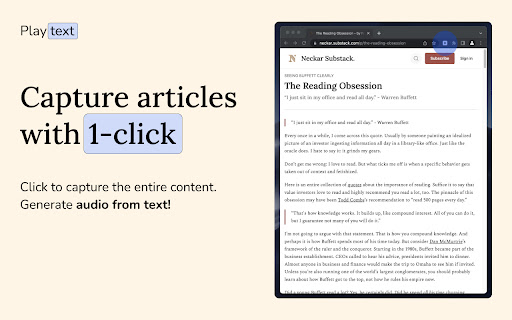
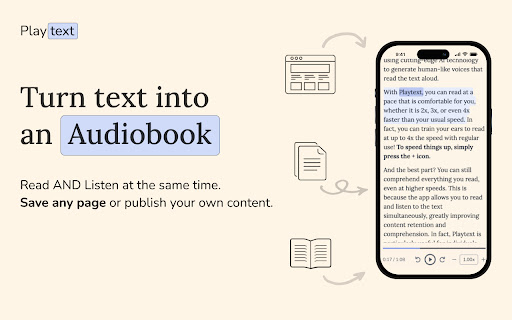
Turn Articles into Audiobooks. Playtext is a text-to-speech reader, that turns any Articles into Audio using AI-generated voices.

1. Save any Article.
2. Listen at 3x the speed.
3. Make reading your superpower!

—
What can you do with Playtext?

🎧 Text to Speech: Read AND Listen at the same time. Information sticks more in your brain.
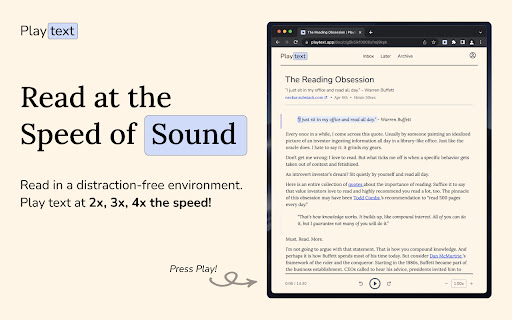
✨ Distraction-free Environment: Designed to help you focus. Free of ads or any clunky UI.
🚀 Read Faster: Increase the speed up to 3x.
💻 Keyboard Shortcuts: Control your reading pace with a keystroke.
🌎 Available in 6 Languages: English, Spanish, Portuguese, German, Italian, and French.
Playtext – Turn any webpage into an audiobook with AI voices.

1. Save any page.
2. Press play.
3. Listen at up to 3x speed.

—
What can you do with Playtext?
🎧 Read + Listen Together – Follow along as you listen. Dual input helps you retain more of what you read.
✨ Distraction-Free Reader – A clean, focused reading environment. No ads, no clutter.
🚀 Speed Up Your Reading – Adjust playback up to 3x to get through content faster.
💻 Keyboard Shortcuts – Control playback without leaving the keyboard.
🌎 6 Languages – English, Spanish, Portuguese, German, Italian, and French.
Permissions & access
- Permissions
- None declared
- Host access
- None declared
Screenshots
About
Playtext – Turn any webpage into an audiobook with AI voices.

1. Save any page.
2. Press play.
3. Listen at up to 3x speed.

—
What can you do with Playtext?
🎧 Read + Listen Together – Follow along as you listen. Dual input helps you retain more of what you read.
✨ Distraction-Free Reader – A clean, focused reading environment. No ads, no clutter.
🚀 Speed Up Your Reading – Adjust playback up to 3x to get through content faster.
💻 Keyboard Shortcuts – Control playback without leaving the keyboard.
🌎 6 Languages – English, Spanish, Portuguese, German, Italian, and French.
Technical
- Version
- 2.1.1
- Manifest
- V3
- Size
- 77.66KiB
- Min Chrome
- 88
- Languages
- 1
- Featured
- Yes
Metadata
- ID
- ccocbkipkgmgmpjnjnhkhkdojodbbcck
- Developer ID
- ubdf3a0a4068165689a27c89ca0b7cf07
- Developer Email
- [email protected]
- Created
- Apr 10, 2023
- Last Updated (Store)
- Mar 30, 2026
- Last Scraped
- Jun 15, 2026
- Website
- playtext.app
- Support URL
- —
- Privacy Policy
- https://playtext.app/privacy
Similar extensions
Alternatives to Playtext — Text to Speech, ranked by description similarity.

Article - Text Reader
Modern text-to-speech reader for articles. Plays in background.
22
★ 5.0

Text-Read - AI Text to Speech
Convert selected text to natural AI speech Free tier: 5,000 chars/day with browser voices. Premium: Unlimited AI voices.
3

Text2Audio: Convert text to audio
Text to audio conversion tool that convert any text to voice audio
56

Audioread: Ultra-Realistic Text-to-Speech
Convert articles, PDFs, emails, or any text into audio
5.0K
★ 4.0

SpeakIt - Text to Speech
Highlight any text and listen with natural AI voices. 5-min daily free limit, then ₹500 lifetime.
63
★ 5.0
StorySpeaker
Read selected text aloud. Free voices + Premium natural AI voices.
3
★ 5.0

ElevenReader — Text Reader
Read aloud any Google Doc, PDF, webpage, or book with text to speech (TTS). Natural sounding voices in 30+ languages & 130 voices.
10.0K
★ 4.3

Reading Text - Simple Text to Speech
A simple, lightweight text-to-speech extension that reads selected text aloud.
4
★ 5.0
Data sourced from the Chrome Web Store · last verified Jun 15, 2026.