
MOM Shield - Privacy & PII Mask for ChatGPT, Claude, Gemini, Grok
Masks PII, API keys, IBAN in text, files and images (OCR) locally before sending to ChatGPT, Claude, Gemini, Grok. Fully offline.
As of June 2026, MOM Shield - Privacy & PII Mask for ChatGPT, Claude, Gemini, Grok has — users in the Privacy & Security category.
Usersno change0%
—
—
Ratingno change0%
—
— reviews
Reviewsno change0%
—
Version
0.6.0
Manifest V3
90-day change · In the last 90 days this extension 2 version updates, changed permissions.
History
5 snapshotsTracking since May 10, 2026.
View as table
| Date | Users | Rating | Reviews | Version |
|---|---|---|---|---|
| May 10, 2026 | — | — | — | 0.5.1 |
| May 21, 2026 | — | — | — | 0.5.1 |
| May 27, 2026 | 1 | — | — | 0.5.1 |
| Jun 3, 2026 | 2 | — | — | 0.5.3 |
| Jun 9, 2026 | 3 | — | — | 0.5.3 |
| Now | — | — | — | 0.6.0 |
Changelog
- Jun 9, 2026short_description
Masks PII, API keys, IBAN & credentials locally before they leave the browser to ChatGPT, Claude, Gemini, Grok. Fully offline.
Masks PII, API keys, IBAN in text, files and images (OCR) locally before sending to ChatGPT, Claude, Gemini, Grok. Fully offline.
- Jun 3, 2026description
MOM Shield helps you use AI chat tools more safely by masking sensitive data before it is sent. If you work with ChatGPT, Claude, Gemini, or Grok and sometimes paste customer data, internal notes, credentials, IDs, or private documents into prompts, MOM Shield adds a local privacy layer directly in your browser.

The extension detects and replaces sensitive values on-device before they leave your computer. That means prompts and supported uploads are processed locally in the browser, without sending your raw data to a separate masking server.

Why install MOM Shield?

Because AI tools are fast, and that is exactly when privacy mistakes happen. A rushed prompt, an uploaded client file, a pasted API key, or a support log with personal data can be sent in seconds. MOM Shield reduces that risk by automatically masking recognized sensitive information before submission.

What MOM Shield does

- Automatically masks sensitive data before you send a prompt
- Works on supported AI chat websites
- Masks supported file uploads before they are passed to the target site
- Supports manual mask and unmask actions in the composer
- Optionally unmasks responses locally when history is enabled
- Processes everything locally in the browser

Supported websites

- ChatGPT
- Claude
- Gemini
- Grok
- Perplexity


Examples of detected data

- email addresses
- phone numbers
- IBANs
- account numbers
- IDs in matching contexts
- credit card numbers with validation
- API keys
- access tokens
- JWTs
- password and secret fields
- names, company names, and addresses in matching contexts

How it works

MOM Shield watches the send flow and upload flow on supported sites. Before content is submitted, detected values are replaced with masked placeholders. This helps prevent accidental disclosure of personal, financial, or credential-related information.

For PDFs, the extension extracts text, masks it locally, and uploads the result as a masked text file. If a PDF cannot be safely processed or has no usable text layer, it can be blocked instead of being passed through unchanged.

Key privacy benefits

- Local browser-side processing
- No external masking backend required
- Reduced risk of sending raw personal or confidential data
- Configurable privacy behavior for stricter workflows
- Useful for freelancers, consultants, agencies, teams, researchers, and internal business use

Why users should install it

Install MOM Shield if you use AI tools in real work and want an extra privacy safeguard. It is especially useful when your prompts or uploads may contain customer details, business information, financial data, credentials, or internal documents. Instead of relying on memory and caution every time you send something, MOM Shield adds an automatic protective step.

Important notes

- PDF support is focused on text-based PDFs
- Scanned PDFs without a text layer are not OCR-processed
- If strict privacy behavior is enabled, maskable files can be blocked when processing fails
- Automatic unmasking depends on local history being active

MOM Shield is designed for people who want AI productivity without treating privacy as an afterthought.
MOM Shield protects sensitive data when using AI tools like ChatGPT, Claude, Gemini, or Grok. The extension detects confidential information directly in your browser — such as names, email addresses, phone numbers, IBANs, credentials, customer data, or internal business content — and automatically masks it before it is sent to the AI. This allows users to work productively with AI without accidentally exposing sensitive information. Why users should install MOM Shield 🔒 Prevents accidental data leaks in AI chats ⚡ Works automatically in the background 🖥 Fully local browser-side processing — no external cloud required 📄 Protects supported file and PDF uploads 🛡 Provides more control, privacy, and security for everyday AI usage 👨💼 Ideal for businesses, freelancers, law firms, healthcare, finance, and all privacy-sensitive industries MOM Shield makes AI usage safer — without slowing down your workflow.
- May 27, 2026description
MOM Shield helps you use AI chat tools more safely by masking sensitive data before it is sent. If you work with ChatGPT, Claude, Gemini, or Grok and sometimes paste customer data, internal notes, credentials, IDs, or private documents into prompts, MOM Shield adds a local privacy layer directly in your browser.

The extension detects and replaces sensitive values on-device before they leave your computer. That means prompts and supported uploads are processed locally in the browser, without sending your raw data to a separate masking server.

Why install MOM Shield?

Because AI tools are fast, and that is exactly when privacy mistakes happen. A rushed prompt, an uploaded client file, a pasted API key, or a support log with personal data can be sent in seconds. MOM Shield reduces that risk by automatically masking recognized sensitive information before submission.

What MOM Shield does

- Automatically masks sensitive data before you send a prompt
- Works on supported AI chat websites
- Masks supported file uploads before they are passed to the target site
- Supports manual mask and unmask actions in the composer
- Optionally unmasks responses locally when history is enabled
- Processes everything locally in the browser

Supported websites

- ChatGPT
- Claude
- Gemini
- Grok


Examples of detected data

- email addresses
- phone numbers
- IBANs
- account numbers
- IDs in matching contexts
- credit card numbers with validation
- API keys
- access tokens
- JWTs
- password and secret fields
- names, company names, and addresses in matching contexts

How it works

MOM Shield watches the send flow and upload flow on supported sites. Before content is submitted, detected values are replaced with masked placeholders. This helps prevent accidental disclosure of personal, financial, or credential-related information.

For PDFs, the extension extracts text, masks it locally, and uploads the result as a masked text file. If a PDF cannot be safely processed or has no usable text layer, it can be blocked instead of being passed through unchanged.

Key privacy benefits

- Local browser-side processing
- No external masking backend required
- Reduced risk of sending raw personal or confidential data
- Configurable privacy behavior for stricter workflows
- Useful for freelancers, consultants, agencies, teams, researchers, and internal business use

Why users should install it

Install MOM Shield if you use AI tools in real work and want an extra privacy safeguard. It is especially useful when your prompts or uploads may contain customer details, business information, financial data, credentials, or internal documents. Instead of relying on memory and caution every time you send something, MOM Shield adds an automatic protective step.

Important notes

- PDF support is focused on text-based PDFs
- Scanned PDFs without a text layer are not OCR-processed
- If strict privacy behavior is enabled, maskable files can be blocked when processing fails
- Automatic unmasking depends on local history being active

MOM Shield is designed for people who want AI productivity without treating privacy as an afterthought.
MOM Shield helps you use AI chat tools more safely by masking sensitive data before it is sent. If you work with ChatGPT, Claude, Gemini, or Grok and sometimes paste customer data, internal notes, credentials, IDs, or private documents into prompts, MOM Shield adds a local privacy layer directly in your browser.

The extension detects and replaces sensitive values on-device before they leave your computer. That means prompts and supported uploads are processed locally in the browser, without sending your raw data to a separate masking server.

Why install MOM Shield?

Because AI tools are fast, and that is exactly when privacy mistakes happen. A rushed prompt, an uploaded client file, a pasted API key, or a support log with personal data can be sent in seconds. MOM Shield reduces that risk by automatically masking recognized sensitive information before submission.

What MOM Shield does

- Automatically masks sensitive data before you send a prompt
- Works on supported AI chat websites
- Masks supported file uploads before they are passed to the target site
- Supports manual mask and unmask actions in the composer
- Optionally unmasks responses locally when history is enabled
- Processes everything locally in the browser

Supported websites

- ChatGPT
- Claude
- Gemini
- Grok
- Perplexity


Examples of detected data

- email addresses
- phone numbers
- IBANs
- account numbers
- IDs in matching contexts
- credit card numbers with validation
- API keys
- access tokens
- JWTs
- password and secret fields
- names, company names, and addresses in matching contexts

How it works

MOM Shield watches the send flow and upload flow on supported sites. Before content is submitted, detected values are replaced with masked placeholders. This helps prevent accidental disclosure of personal, financial, or credential-related information.

For PDFs, the extension extracts text, masks it locally, and uploads the result as a masked text file. If a PDF cannot be safely processed or has no usable text layer, it can be blocked instead of being passed through unchanged.

Key privacy benefits

- Local browser-side processing
- No external masking backend required
- Reduced risk of sending raw personal or confidential data
- Configurable privacy behavior for stricter workflows
- Useful for freelancers, consultants, agencies, teams, researchers, and internal business use

Why users should install it

Install MOM Shield if you use AI tools in real work and want an extra privacy safeguard. It is especially useful when your prompts or uploads may contain customer details, business information, financial data, credentials, or internal documents. Instead of relying on memory and caution every time you send something, MOM Shield adds an automatic protective step.

Important notes

- PDF support is focused on text-based PDFs
- Scanned PDFs without a text layer are not OCR-processed
- If strict privacy behavior is enabled, maskable files can be blocked when processing fails
- Automatic unmasking depends on local history being active

MOM Shield is designed for people who want AI productivity without treating privacy as an afterthought.
- May 27, 2026short_description
Privacy for ChatGPT, Claude, Gemini & Grok. Mask PII, API keys, IBAN, and credentials locally before they leave your browser.
Masks PII, API keys, IBAN & credentials locally before they leave the browser to ChatGPT, Claude, Gemini, Grok. Fully offline.
- May 27, 2026host_permissions
(empty)
https://chatgpt.com/*, https://chat.openai.com/*, https://claude.ai/*, https://claude.com/*, https://gemini.google.com/*, https://bard.google.com/*, https://grok.com/*, https://x.com/*, https://www.perplexity.ai/*, https://perplexity.ai/*
- May 27, 2026permissions
storage
storage, clipboardWrite
Permissions & access
- Permissions
- storageclipboardWrite
- Host access
- https://chatgpt.com/*, https://chat.openai.com/*, https://claude.ai/*, https://claude.com/*, https://gemini.google.com/*, https://bard.google.com/*, https://grok.com/*, https://x.com/*, https://www.perplexity.ai/*, https://perplexity.ai/*
Screenshots

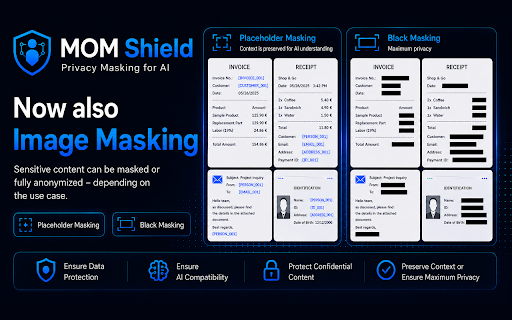


About
MOM Shield protects sensitive data when using AI tools like ChatGPT, Claude, Gemini, or Grok. The extension detects confidential information directly in your browser — such as names, email addresses, phone numbers, IBANs, credentials, customer data, or internal business content — and automatically masks it before it is sent to the AI. This allows users to work productively with AI without accidentally exposing sensitive information. Why users should install MOM Shield 🔒 Prevents accidental data leaks in AI chats ⚡ Works automatically in the background 🖥 Fully local browser-side processing — no external cloud required 📄 Protects supported file and PDF uploads 🛡 Provides more control, privacy, and security for everyday AI usage 👨💼 Ideal for businesses, freelancers, law firms, healthcare, finance, and all privacy-sensitive industries MOM Shield makes AI usage safer — without slowing down your workflow.
Technical
- Version
- 0.6.0
- Manifest
- V3
- Size
- 6.14MiB
- Min Chrome
- 88
- Languages
- 1
- Featured
- No
Metadata
- ID
- cbogcmmcpmhjggmpdbmipncdpmigfjaj
- Developer ID
- u2d94e90df927ca4c0ea7da9e8ea0d010
- Developer Email
- [email protected]
- Created
- May 9, 2026
- Last Updated (Store)
- Jun 4, 2026
- Last Scraped
- Jun 9, 2026
- Website
- —
- Privacy Policy
- https://michiwerkmann.github.io/mom-shield/privacy.html
Data sourced from the Chrome Web Store · last verified Jun 9, 2026.