
ToDo
This todo extention uses local storage to store your data.
As of May 2026, ToDo has 2 users and a 5.00/5 rating from 1 reviews in the Workflow & Planning category.
Usersdown 50.0 percent−50.0%
2
2
Ratingno change0%
5.00
1 reviews
Reviewsno change0%
1
Version
1.2.1
Manifest V3
History
1 snapshotsTracking since Apr 30, 2026.
View as table
| Date | Users | Rating | Reviews | Version |
|---|---|---|---|---|
| Apr 30, 2026 | 4 | 5.00 | 1 | 1.2.1 |
| Now | 2 | 5.00 | 1 | 1.2.1 |
Permissions & access
- Permissions
- None declared
- Host access
- None declared
Screenshots


About
The best simplest to-do list for easy access in the browser.

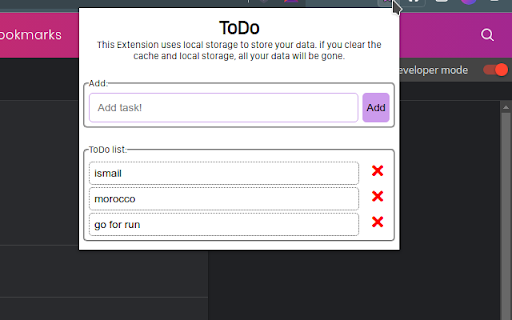
ToDo tasks list is the best way to manage a to-do list in Chrome. Now it’s simple to check in with your most important todos or create a reminder or to-do list on the fly. Creating to-do lists is easier than ever — just click the button in your browser bar.

This extension lets you create tasks from any Chrome tab.
This extension does not collect any data and does not have any access to your browser besides the data stored by the extension on your browser's local storage.

This project is open-source, you can find the code at Github in this repo -> https://github.com/Ismailco/Todo-Chrome-Extension
______________________________________________


FEATURES

- Create a task instantly
- Safe and easy to use
- Top tasks are a click away in the chrome bar
- Convenient task popup
- Sample and clean task list
- open-source

HELP & SUGGESTIONS

Contact me at https://ismailcourr.ml/#contact_section or open an issue in Github.
Technical
- Version
- 1.2.1
- Manifest
- V3
- Size
- 89.54KiB
- Min Chrome
- 88
- Languages
- 1
- Featured
- No
Metadata
- ID
- cbodikmkpephblbhpdcbdjhcmkjocpai
- Developer ID
- ub63ae227c1832542b25396ff8ddd6d61
- Developer Email
- [email protected]
- Created
- Feb 8, 2022
- Last Updated (Store)
- Feb 21, 2022
- Last Scraped
- May 29, 2026
- Website
- —
- Support URL
- —
- Privacy Policy
- —
Similar extensions
Alternatives to ToDo, ranked by description similarity.

Todo List
A simple todo list with context menu integration, drag-to-reorder, and auto URL detection.
3
★ 5.0

ToDo Kanban Tasker
A simple Kanban-style task manager or a Todo List in Chrome side panel.
6
★ 5.0

Let's ToDo
Let's ToDo - a customizable, user-friendly Chrome task manager.
—

Daily Tasks
A simple Chrome Daily Tasks extension with local storage support
12

Tasks - To do & task list by Workona
The best task list for work in the browser.
30.0K
★ 4.8

Simple To-Do List
A simple browser extension to manage tasks.
20

Tasky
A simple to-do list as a Chrome extension.
16

EZ Todo List
Stay organized with EZ Todo List – a simple and intuitive task manager right in your Chrome browser.
1
Data sourced from the Chrome Web Store · last verified May 29, 2026.