
Bulk Save and Rename Images
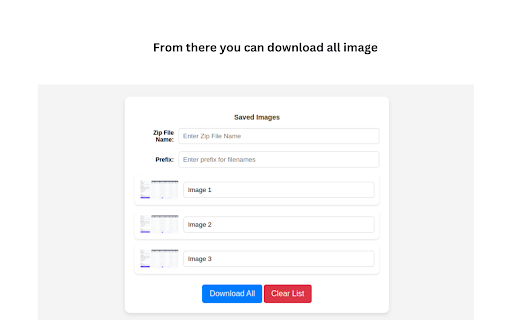
Bulk Save image URLs, rename them, and download all images.
As of June 2026, Bulk Save and Rename Images has 35 users in the Productivity category.
Usersup 16.7 percent+16.7%
35
35
Ratingno change0%
—
— reviews
Reviewsno change0%
—
Version
1.3
Manifest V3
History
8 snapshotsTracking since Apr 1, 2026.
View as table
| Date | Users | Rating | Reviews | Version |
|---|---|---|---|---|
| Apr 1, 2026 | 30 | — | — | 1.3 |
| Apr 10, 2026 | 33 | — | — | 1.3 |
| Apr 26, 2026 | 35 | — | — | 1.3 |
| May 15, 2026 | 34 | — | — | 1.3 |
| May 21, 2026 | 35 | — | — | 1.3 |
| May 27, 2026 | 31 | — | — | 1.3 |
| Jun 3, 2026 | 32 | — | — | 1.3 |
| Jun 9, 2026 | 34 | — | — | 1.3 |
| Now | 35 | — | — | 1.3 |
Permissions & access
- Permissions
- storageactiveTabcontextMenus
- Host access
- None declared
Screenshots

About
Bulk Save and Rename Images — The Fastest Image Downloader for Chrome
Tired of saving images one by one? Bulk Save and Rename Images is a free, lightweight Chrome extension that lets you download all images from any webpage instantly — with full control over naming, format, and folder organisation.
Whether you're a designer collecting inspiration, an e-commerce manager saving product photos, or just someone who needs images fast, this extension saves you hours of manual work.

🚀 Key Features:
⚡ One-Click Bulk Download
Select and download all visible images from any webpage with a single click. No more right-click, save, repeat.
🔍 Filter by Size & Format
Only want high-resolution images? Filter by pixel dimensions or file type — JPG, PNG, WEBP, GIF, and more.
👁️ Preview Before You Download
Browse all detected images in a clean grid layout before saving, so you only get what you actually need.
✏️ Custom File Naming & Folder Selection
Rename images in bulk using custom naming patterns. Organise downloads into specific folders automatically.
🛡️ Privacy-First & Ad-Free
No data collection. No ads. No tracking. Your browsing activity stays completely private.

🔑 Perfect For:

Web designers & UI/UX professionals
E-commerce sellers saving product images
Content creators & bloggers
Researchers & data collectors
Anyone who downloads images regularly


📥 Install Bulk Save and Rename Images today and stop wasting time saving images one at a time. Fast, free, and built for efficiency.
Technical
- Version
- 1.3
- Manifest
- V3
- Size
- 198KiB
- Min Chrome
- 88
- Languages
- 1
- Featured
- No
Metadata
- ID
- cbfciolcffhcffddndcaooikdbiafapm
- Developer ID
- u83704631c287bb97eae043e51a5db5b6
- Developer Email
- [email protected]
- Created
- Apr 9, 2025
- Last Updated (Store)
- Mar 11, 2026
- Last Scraped
- Jun 9, 2026
- Website
- —
- Support URL
- —
Similar extensions
Alternatives to Bulk Save and Rename Images, ranked by description similarity.

Image Downloader Pro
Image Downloader Pro is a tool for downloading images from websites.
2.0K
★ 4.6

Bulk Image Downloader
Save all images from a page in one click. Filter by size/type, rename by pattern, download directly or as a ZIP.
806
★ 5.0

Bulk Image Downloader
Bulk Image Downloader - Fast one-click tool to save all images from any website. Easy, powerful, and free image downloader.
173
★ 5.0

BulkSnap - Bulk Image Downloader
Download all images from any webpage as a ZIP file. Fast and efficient
6

Save All Images: Bulk Downloader
Download all images from any website in 1 click. Fast, simple, works everywhere.
794
★ 5.0

Image Downloader 4 You
Download all images from any webpage with ease
4

Bulk Image Downloader
Download multiple images as a ZIP file from a list of URLs
29

Image Downloader - Batch Save All Photos
Find and download all images from any website. Batch save photos, bulk download to ZIP. Free image extractor tool.
52
Data sourced from the Chrome Web Store · last verified Jun 9, 2026.