
Visilant
Protection against lookalike and impersonation sites (homograph attacks & clone phishing) based on your personal visit history
As of June 2026, Visilant has 16 users and a 5.00/5 rating from 1 reviews in the Privacy & Security category.
Usersdown 15.8 percent−15.8%
16
16
Ratingno change0%
5.00
1 reviews
Reviewsno change0%
1
Version
2.0.1
Manifest V3
90-day change · In the last 90 days this extension 1 version update, changed permissions.
History
6 snapshotsTracking since Apr 18, 2026.
View as table
| Date | Users | Rating | Reviews | Version |
|---|---|---|---|---|
| Apr 18, 2026 | 19 | — | — | 1.1.1 |
| Apr 28, 2026 | 14 | — | — | 1.1.1 |
| May 8, 2026 | 13 | — | — | 1.1.1 |
| May 24, 2026 | 14 | — | — | 1.1.1 |
| Jun 3, 2026 | 15 | — | — | 1.1.1 |
| Jun 9, 2026 | 13 | 5.00 | 1 | 2.0.1 |
| Now | 16 | 5.00 | 1 | 2.0.1 |
Changelog
- Jun 3, 2026description
Visilant is a lightweight, open-source extension designed to protect you from phishing sites and homograph attacks. It helps you spot fake websites that try to steal your credentials by visually mimicking legitimate services.

How it works:
Most phishing websites are those you have never visited or visit very rarely. Visilant tracks your visit history locally and provides immediate visual cues when you interact with an "unfamiliar" site. Unlike traditional antivirus solutions, it can alert you about phishing sites the moment they are created, without waiting for blacklist updates.

Key Features:
* Homograph Protection: Visilant highlights the actual domain name and supports Punycode display to prevent attacks where special characters look like Latin letters (e.g., a fake amazon.com).
* Interactive Dashboard: Click the icon to view detailed visit statistics, sort your site history, and adjust display settings on the fly.
* Hardened Security: Includes anti-tampering protection that detects and alerts you if a malicious website attempts to disable or hide the extension.

GETTING STARTED
1. Install the extension.
2. (Highly Recommended) Pin the Visilant icon to your browser toolbar for constant visibility.
3. Click the Visilant icon to open the Dashboard (Popup).
4. Click the Settings (gear) icon to configure preferences.
5. Import your browser history to initialize the visit counter. This drastically reduces false positives for sites you already use.

CONFIGURATION INCLUDES:
1. Safety Threshold: How many visits make a site "familiar" (default is 10).
2. Display & Sorting:
* Toggle Domain Highlighting to easily spot the real domain extension.
* Switch between Unicode and Punycode for international domains.
* Sort site history by name or visit count.
3. Notifications:
* Triggers: Typing, copying, or both.
* Style: Browser notifications, in-page warnings, or both.

PRIVACY & PERMISSIONS
Visilant is open-source and operates locally:
1. All data remains on your computer. Nothing is sent to external servers.
2. Permissions:
* Tabs, Storage, Host Permissions: Required for core functionality (tracking visits, detecting inputs).
* Notifications: Required to alert you if a malicious site attempts to tamper with the extension.
* Browser History: Optional. Required only if you choose to import history (recommended).

LIMITATIONS
1. Not a Malware Blocker: Visilant focuses on social engineering and spoofing. It does not block malware downloads or trackers.
2. Relies on Awareness: The extension warns you, but you must decide to act on that warning.
3. False Positives and Negatives: Legitimate sites with low visit counts may trigger warnings (false positives), while phishing sites visited repeatedly (or hijacked sites) may go unflagged (false negatives).
4. Script Injection: Visilant injects a script to detect inputs. While the extension includes Anti-Tampering Protection to detect if a site tries to remove this script, pinning the extension icon remains the most reliable visual indicator.
Visilant is a lightweight, open-source extension designed to protect you from phishing sites, clone phishing, and homograph attacks. It helps you spot fake websites that try to steal your credentials by visually mimicking legitimate services.

How it works:
Most phishing websites are those you have never visited or visit very rarely. Visilant tracks your visit history locally and provides two layers of protection:
* Proactive — analyzes links on the page before you click them, revealing the destination domain, your familiarity with it, and flagging URL mismatches and suspicious domains.
* Reactive — alerts you when you interact with an "unfamiliar" site (typing, pasting, copying).

Unlike traditional antivirus solutions, Visilant can alert you about phishing sites the moment they are created — without waiting for blacklist updates.

Key Features:
* Link Safety (Proactive): A tooltip on hover (or click) shows each link's destination domain, your visit count, and familiarity status. Detects URL mismatches where visible link text differs from the real destination, flags homograph-attack domains, and can intercept navigation to unfamiliar sites with a full-screen confirmation dialog.
* Shortened URL Detection: Resolves short links (bit.ly, t.co, and others) to reveal the real destination — a classic trick in clone phishing. Works on-demand or automatically, supports custom shortener lists and remote-updated lists.
* Homograph Protection: Visilant highlights the actual domain name and supports Punycode display to prevent attacks where special characters look like Latin letters (e.g., a fake amazon.com).
* Interactive Dashboard: Click the icon to view detailed visit statistics, sort your site history, toggle per-site anti-tampering, and adjust display settings on the fly.
* Hardened Security: Includes anti-tampering protection that detects and alerts you if a malicious website attempts to disable or hide the extension. Can be disabled per-site for trusted sites that trigger false alarms.
* Theming & Responsive UI: Light, dark, or system-matching theme. Works in popup, in a tab, and on mobile-form-factor windows.

GETTING STARTED
1. Install the extension.
2. (Highly Recommended) Pin the Visilant icon to your browser toolbar for constant visibility.
3. Click the Visilant icon to open the Dashboard (Popup).
4. Click the Settings (gear) icon to configure preferences.
5. Import your browser history to populate the visit counter. This drastically reduces false positives for sites you already use.

CONFIGURATION INCLUDES:
1. Familiarity Threshold: How many visits make a site "familiar" (default is 10).
2. Link Safety:
* Tooltip trigger: hover, left-click (safest — prevents navigation until review), or right-click (context-menu item).
* Visit count visibility in tooltips: always, never, only for unfamiliar, or only for familiar.
* Optional navigation intercept before visiting unfamiliar sites.
* Shortened URL detection: off, on-demand button, or automatic; full URL or domain only; redirect chain trace; arbitrary URL resolution; custom shortener domains; remote lists.
* Scope: all websites, whitelist, or blacklist.
3. Display & Sorting:
* Toggle Domain Highlighting to easily spot the real domain extension.
* Switch between Unicode and Punycode for international domains.
* Sort site history by name or visit count.
4. Notifications:
* When to show: typing, copying, or both.
* Style: browser notifications, in-page warnings, or both.
5. Anti-Tampering: Exclude specific domains from tamper detection.
6. Appearance: Light, dark, or system theme.

PRIVACY & PERMISSIONS
Visilant is open-source and operates locally:
1. All data remains on your computer. Nothing is sent to external servers.
2. Permissions:
* Tabs, Storage, Host Permissions: Required for core functionality (tracking visits, analyzing links, detecting inputs).
* Notifications: Required to alert you if a malicious site attempts to tamper with the extension.
* Context Menus: Required to provide the "Check link safety" right-click option.
* Browser History: Optional. Required only if you choose to import history (recommended).

LIMITATIONS
1. Not a Malware Blocker: Visilant focuses on social engineering and spoofing. It does not block malware downloads or trackers.
2. Relies on Awareness: The extension warns you, but you must decide to act on that warning.
3. False Positives and Negatives: Legitimate sites with low visit counts may trigger warnings (false positives), while phishing sites visited repeatedly (or hijacked sites) may go unflagged (false negatives).
4. Script Injection: Visilant injects a script to detect inputs and analyze links. While the extension includes Anti-Tampering Protection to detect if a site tries to remove this script, pinning the extension icon remains the most reliable visual indicator.
- Jun 3, 2026short_description
Protection against Homograph Attack & Clone Phishing based on your site visiting statistics
Protection against lookalike and impersonation sites (homograph attacks & clone phishing) based on your personal visit history
- Jun 3, 2026permissions
tabs, storage, activeTab, notifications
tabs, storage, activeTab, notifications, contextMenus
Permissions & access
- Permissions
- tabsstorageactiveTabnotificationscontextMenus
- Host access
- *://*/*
Screenshots


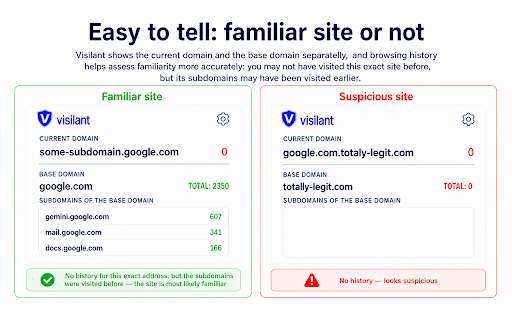


About
Visilant is a lightweight, open-source extension designed to protect you from phishing sites, clone phishing, and homograph attacks. It helps you spot fake websites that try to steal your credentials by visually mimicking legitimate services.

How it works:
Most phishing websites are those you have never visited or visit very rarely. Visilant tracks your visit history locally and provides two layers of protection:
* Proactive — analyzes links on the page before you click them, revealing the destination domain, your familiarity with it, and flagging URL mismatches and suspicious domains.
* Reactive — alerts you when you interact with an "unfamiliar" site (typing, pasting, copying).

Unlike traditional antivirus solutions, Visilant can alert you about phishing sites the moment they are created — without waiting for blacklist updates.

Key Features:
* Link Safety (Proactive): A tooltip on hover (or click) shows each link's destination domain, your visit count, and familiarity status. Detects URL mismatches where visible link text differs from the real destination, flags homograph-attack domains, and can intercept navigation to unfamiliar sites with a full-screen confirmation dialog.
* Shortened URL Detection: Resolves short links (bit.ly, t.co, and others) to reveal the real destination — a classic trick in clone phishing. Works on-demand or automatically, supports custom shortener lists and remote-updated lists.
* Homograph Protection: Visilant highlights the actual domain name and supports Punycode display to prevent attacks where special characters look like Latin letters (e.g., a fake amazon.com).
* Interactive Dashboard: Click the icon to view detailed visit statistics, sort your site history, toggle per-site anti-tampering, and adjust display settings on the fly.
* Hardened Security: Includes anti-tampering protection that detects and alerts you if a malicious website attempts to disable or hide the extension. Can be disabled per-site for trusted sites that trigger false alarms.
* Theming & Responsive UI: Light, dark, or system-matching theme. Works in popup, in a tab, and on mobile-form-factor windows.

GETTING STARTED
1. Install the extension.
2. (Highly Recommended) Pin the Visilant icon to your browser toolbar for constant visibility.
3. Click the Visilant icon to open the Dashboard (Popup).
4. Click the Settings (gear) icon to configure preferences.
5. Import your browser history to populate the visit counter. This drastically reduces false positives for sites you already use.

CONFIGURATION INCLUDES:
1. Familiarity Threshold: How many visits make a site "familiar" (default is 10).
2. Link Safety:
* Tooltip trigger: hover, left-click (safest — prevents navigation until review), or right-click (context-menu item).
* Visit count visibility in tooltips: always, never, only for unfamiliar, or only for familiar.
* Optional navigation intercept before visiting unfamiliar sites.
* Shortened URL detection: off, on-demand button, or automatic; full URL or domain only; redirect chain trace; arbitrary URL resolution; custom shortener domains; remote lists.
* Scope: all websites, whitelist, or blacklist.
3. Display & Sorting:
* Toggle Domain Highlighting to easily spot the real domain extension.
* Switch between Unicode and Punycode for international domains.
* Sort site history by name or visit count.
4. Notifications:
* When to show: typing, copying, or both.
* Style: browser notifications, in-page warnings, or both.
5. Anti-Tampering: Exclude specific domains from tamper detection.
6. Appearance: Light, dark, or system theme.

PRIVACY & PERMISSIONS
Visilant is open-source and operates locally:
1. All data remains on your computer. Nothing is sent to external servers.
2. Permissions:
* Tabs, Storage, Host Permissions: Required for core functionality (tracking visits, analyzing links, detecting inputs).
* Notifications: Required to alert you if a malicious site attempts to tamper with the extension.
* Context Menus: Required to provide the "Check link safety" right-click option.
* Browser History: Optional. Required only if you choose to import history (recommended).

LIMITATIONS
1. Not a Malware Blocker: Visilant focuses on social engineering and spoofing. It does not block malware downloads or trackers.
2. Relies on Awareness: The extension warns you, but you must decide to act on that warning.
3. False Positives and Negatives: Legitimate sites with low visit counts may trigger warnings (false positives), while phishing sites visited repeatedly (or hijacked sites) may go unflagged (false negatives).
4. Script Injection: Visilant injects a script to detect inputs and analyze links. While the extension includes Anti-Tampering Protection to detect if a site tries to remove this script, pinning the extension icon remains the most reliable visual indicator.
Technical
- Version
- 2.0.1
- Manifest
- V3
- Size
- 282KiB
- Min Chrome
- 88
- Languages
- 3
- Featured
- No
Metadata
- ID
- cangpjiaklckllaeppbdhhpcmhjambak
- Developer ID
- u646a06261d57288cab4ea1e35d3036f6
- Developer Email
- [email protected]
- Created
- Feb 26, 2025
- Last Updated (Store)
- May 25, 2026
- Last Scraped
- Jun 9, 2026
- Website
- —
- Support URL
- —
- Privacy Policy
- —
Similar extensions
Alternatives to Visilant, ranked by description similarity.

Vigilant
Phishing and malware detection extension
11
★ 5.0

Vision® by StopTheScam®
Protect yourself from scams, phishing, and dangerous links. Vision® analyzes links before you click.
12
★ 5.0

Security Insights : Phishing Protection
Blocks known phishing URLs
15

Threat Detector
A lightweight extension that detects threats and vulnerabilities on websites which allows you to keep your data safe and secure
4
★ 5.0

Website Safety Checker
Checks website safety automatically.
7

AntiPhish - Phishing Site Checker
Checks if the current site is safe using the latest phishing data from trusted sources.
12

CheckupSite
We check if the websites you visit are safe
8
★ 5.0

Phishing Detection Extension
Detects phishing websites using machine learning.
18
Data sourced from the Chrome Web Store · last verified Jun 9, 2026.