
PI Summarize
Chrome extension adding a right-click option 'Summarize' to get text summaries using ChatGPT, Gemini or Claude
As of June 2026, PI Summarize has 1,000 users and a 3.50/5 rating from 10 reviews in the Workflow & Planning category.
Usersno change0%
1.0K
1,000
Ratingno change0%
3.50
10 reviews
Reviewsno change0%
10
Version
2.2.2
Manifest V3
90-day change · In the last 90 days this extension 1 version update.
History
2 snapshotsTracking since Apr 18, 2026.
View as table
| Date | Users | Rating | Reviews | Version |
|---|---|---|---|---|
| Apr 18, 2026 | 1.0K | 3.50 | 10 | 2.2.1 |
| May 3, 2026 | 1.0K | 3.50 | 10 | 2.2.1 |
| Now | 1.0K | 3.50 | 10 | 2.2.2 |
Changelog
- May 3, 2026description
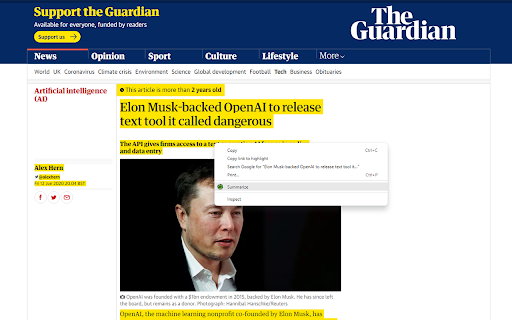
This extension adds a right-click option when a text selected on any webpage. After clicking 'Summarize' the extension redirects to ChatGPT or Google Gemini and enters the selected text to the AI engine and initiates the request.

This way you may only read the short, summarized content, which will make your life much easier.

In settings (Clicking the Extension link in Extension toolbar), you can toggle or set:
✅ Summarize with ChatGPT (Context Menu)
✅ Summarize with Google Gemini (Context Menu)
✅ Get PI Prompts Chrome Extension link (Context Menu)
⚙️ Desired length of the summarized text (one line, one paragraph, two paragraphs or three paragraphs)

📢 Summarize is more powerful with 'PI Prompts' free extension, which adds a right hand side panel to ChatGPT or Google Gemini to access your prompt library.

Please note that currently there are the following input character limits:
- ChatGPT: ~80,000 words
- Google Gemini: ~100,000 words
Chrome extension adding a right-click option 'Summarize' to get text summaries using ChatGPT, Gemini or Claude

This extension adds a right-click option when text is selected on any webpage. After clicking 'Summarize' the extension redirects to ChatGPT, Google Gemini or Claude and enters the selected text to the AI engine and initiates the request.

This way you may only read the short, summarized content, which will make your life much easier.

In settings (Clicking the Extension link in Extension toolbar), you can toggle or set:
✅ Summarize with ChatGPT (Context Menu)
✅ Summarize with Google Gemini (Context Menu)
✅🆕 Summarize with Claude (Context Menu)
✅ Get PI Prompts Chrome Extension link (Context Menu)
⚙️ Desired length of the summarized text (one line, one paragraph, two paragraphs or three paragraphs)

📢 Summarize is more powerful with 'PI Prompts' free extension, which adds a right hand side panel to ChatGPT, Google Gemini or Claude to access your prompt library.

Please note that currently there are the following input character limits:

ChatGPT: ~80,000 words
Google Gemini: ~100,000 words
Claude: ~100,000 words
- May 3, 2026name
PI Summarize (ChatGPT or Gemini)
PI Summarize
- May 3, 2026short_description
Chrome extension adding a right-click option 'Summarize' to get text summaries using ChatGPT or Gemini
Chrome extension adding a right-click option 'Summarize' to get text summaries using ChatGPT, Gemini or Claude
Permissions & access
- Permissions
- scriptingactiveTabcontextMenusstorageunlimitedStoragemanagement
- Host access
- <all_urls>
Screenshots
About
Chrome extension adding a right-click option 'Summarize' to get text summaries using ChatGPT, Gemini or Claude

This extension adds a right-click option when text is selected on any webpage. After clicking 'Summarize' the extension redirects to ChatGPT, Google Gemini or Claude and enters the selected text to the AI engine and initiates the request.

This way you may only read the short, summarized content, which will make your life much easier.

In settings (Clicking the Extension link in Extension toolbar), you can toggle or set:
✅ Summarize with ChatGPT (Context Menu)
✅ Summarize with Google Gemini (Context Menu)
✅🆕 Summarize with Claude (Context Menu)
✅ Get PI Prompts Chrome Extension link (Context Menu)
⚙️ Desired length of the summarized text (one line, one paragraph, two paragraphs or three paragraphs)

📢 Summarize is more powerful with 'PI Prompts' free extension, which adds a right hand side panel to ChatGPT, Google Gemini or Claude to access your prompt library.

Please note that currently there are the following input character limits:

ChatGPT: ~80,000 words
Google Gemini: ~100,000 words
Claude: ~100,000 words
Technical
- Version
- 2.2.2
- Manifest
- V3
- Size
- 23.24KiB
- Min Chrome
- 88
- Languages
- 1
- Featured
- Yes
Metadata
- ID
- caicahkimjnhcepnhnipgbcbigdpeifi
- Developer ID
- u55a1e78c4dd41e2d8d288220da8e90b6
- Developer Email
- [email protected]
- Created
- Feb 28, 2023
- Last Updated (Store)
- Apr 23, 2026
- Last Scraped
- Jun 12, 2026
- Website
- http://www.joelbooks.com/
- Support URL
- https://joelbooks.com/contact/
- Privacy Policy
- https://joelbooks.com/privacy-policy/
Similar extensions
Alternatives to PI Summarize, ranked by description similarity.

GPT Summarizer
Summarize a text selection with Chat-GPT
12

SummariseGPT
Unlock More Time with Instant Webpage Summaries and Chat!
126
★ 5.0

Page summary
Summarizes page content using ChatGPT
144
★ 1.7

Summarize: AI-Powered Text Summary Tool
Instantly summarize any webpage with a sleek, modern AI tool. Get concise summaries in seconds and even listen to them!
282
★ 4.0

ReaderGPT: ChatGPT based Web Page Summariser
Generates summary of any readable web page using ChatGPT with just a single click.
50.0K
★ 3.4

GPT Summarizer
A Chrome extension that utilizes ChatGPT to provide a summarized version of web articles.
719
★ 3.5
InstantGPT - ChatGPT Powered Assistant
Access ChatGPT instantly! Summarize articles with one click.
InstantGPT is a chrome extension that utilizes the power of OpenAI's…
1.0K
★ 3.4

SummarizeIt
Summarize any webpage with GPT-3 API.
201
Data sourced from the Chrome Web Store · last verified Jun 12, 2026.