
ResearchQ
Tool to provide easier access to research work
As of June 2026, ResearchQ has 4,000 users and a 4.20/5 rating from 10 reviews in the Workflow & Planning category.
Usersno change0%
4.0K
4,000
Ratingno change0%
4.20
10 reviews
Reviewsno change0%
10
Version
1.3.0
Manifest V3
90-day change · In the last 90 days this extension 1 version update, changed permissions.
History
2 snapshotsTracking since Apr 16, 2026.
View as table
| Date | Users | Rating | Reviews | Version |
|---|---|---|---|---|
| Apr 16, 2026 | 4.0K | 4.20 | 10 | 1.2.7 |
| Jun 10, 2026 | 4.0K | 4.20 | 10 | 1.2.7 |
| Now | 4.0K | 4.20 | 10 | 1.3.0 |
Changelog
- Jun 10, 2026description
Update Feb 2026: Updated to working mirror links for SciHub and Anna's Archive.
Note: Since SciHub is banned is few countries now, use VPN or Tor to access the links.

A simple extension to help research work that does the following:

1. Using context menu (right-click):
     1.1 Redirect to Scihub page of research paper
     1.2 Redirect to Anna's Archive page of research paper
     1.3 Search for the selected article on Google Scholar
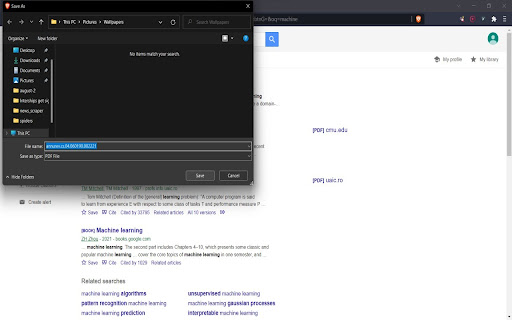
     1.4 Direct download article, if available on Scihub, with filename saved as title of article
     1.5 Find meaning, noun and pos tag of a selected English word from dictionary

2. Using keyboard shortcut
    3.1 Alt+Q - opens current window URL quickly in incognito mode and deletes that url record from the browser history. (P.S: The permission to manage browser history is for this purpose).
Update June 2026: Users can now edit and save URLs directly within the extension via the extension popup. Note: Since Sci-Hub is now banned is few countries, use VPN or Tor to access the links in case they don't work normally. A simple extension to assist with research, offering the following features: A. Context menu (right-click) 1. Open the Scihub page for a research paper 2. Open the Anna's Archive page for a research paper (For DOIs, right-click directly on the link) 3. Search the selected article title on Google Scholar 4. Directly download the article from Scihub (if available), saved with the article title as the filename 4. Look up the definition, part of speech, and noun forms of a selected English word B. Keyboard shortcut 1. Alt+Q — Opens the current page in incognito mode and removes it from your browser history (Note: browser history permission is used solely for this feature)
- Jun 10, 2026permissions
contextMenus, tabs, downloads, history
contextMenus, tabs, downloads, history, storage
Permissions & access
- Permissions
- contextMenustabsdownloadshistorystorage
- Host access
- None declared
Screenshots


About
Update June 2026: Users can now edit and save URLs directly within the extension via the extension popup.
Note: Since Sci-Hub is now banned is few countries, use VPN or Tor to access the links in case they don't work normally.

A simple extension to assist with research, offering the following features:

A. Context menu (right-click)
1. Open the Scihub page for a research paper
2. Open the Anna's Archive page for a research paper (For DOIs, right-click directly on the link)
3. Search the selected article title on Google Scholar
4. Directly download the article from Scihub (if available), saved with the article title as the filename
4. Look up the definition, part of speech, and noun forms of a selected English word

B. Keyboard shortcut

1. Alt+Q — Opens the current page in incognito mode and removes it from your browser history (Note: browser history permission is used solely for this feature)
Technical
- Version
- 1.3.0
- Manifest
- V3
- Size
- 53.62KiB
- Min Chrome
- 99
- Languages
- 1
- Featured
- Yes
Metadata
- ID
- cagminlaghifppfobnfpjfddengkdnhd
- Developer ID
- u2eb883c250a456b4963af3809f80dc55
- Developer Email
- [email protected]
- Created
- May 18, 2022
- Last Updated (Store)
- Jun 9, 2026
- Last Scraped
- Jun 22, 2026
- Website
- —
- Support URL
- —
Similar extensions
Alternatives to ResearchQ, ranked by description similarity.

Enhancer for Sci-Hub
Open links with Sci-Hub and more!
8.0K
★ 5.0

Open in Sci-Hub
Quickly opens link or page in Sci-Hub
20.0K
★ 3.7

ScienceHelper (download millions of papers)
With ScienceHelper, you can download millions of scientific articles
10.0K
★ 5.0

Historium - Browser History Manager
Beautifully organize your browsing history
350
★ 5.0

Paper Memory
Automatically record papers and their codes from Arxiv, OpenReview & more! Organize your library with tags, links and quick notes.
1.0K
★ 5.0

ArchiveClick
Opens Link in archive.today
556
★ 5.0

Url Shortener
Quickly create and share short URLs with the added option to generate QR codes for them.
80.0K
★ 4.8

Allow Right-Click
Re-enable the possibility to use the context menu, copy, paste, and text selection on sites that prevent them.
400.0K
★ 4.3
Data sourced from the Chrome Web Store · last verified Jun 22, 2026.