
Double Subtitles works with Paramount
Independent educational tool - not linked to Paramount. Learn languages with MovieLingo using two subtitle tracks at once.
As of June 2026, Double Subtitles works with Paramount has 254 users and a 4.25/5 rating from 4 reviews in the Education category.
Usersup 2.0 percent+2.0%
254
254
Ratingno change0%
4.25
4 reviews
Reviewsno change0%
4
Version
1.0.4
Manifest V3
History
7 snapshotsTracking since Apr 7, 2026.
View as table
| Date | Users | Rating | Reviews | Version |
|---|---|---|---|---|
| Apr 7, 2026 | 249 | 4.25 | 4 | 1.0.4 |
| Apr 19, 2026 | 251 | 4.25 | 4 | 1.0.4 |
| Apr 29, 2026 | 235 | 4.25 | 4 | 1.0.4 |
| May 9, 2026 | 247 | 4.25 | 4 | 1.0.4 |
| May 17, 2026 | 256 | 4.25 | 4 | 1.0.4 |
| May 25, 2026 | 245 | 4.25 | 4 | 1.0.4 |
| Jun 4, 2026 | 236 | 4.25 | 4 | 1.0.4 |
| Now | 254 | 4.25 | 4 | 1.0.4 |
Permissions & access
- Permissions
- storage
- Host access
- *://*.paramountplus.com/*, https://translate.googleapis.com/*
Screenshots



About
Double Subtitles by MovieLingo – Language learning while watching on Paramount+

This is an independent educational project. It is not affiliated with, authorized, or sponsored by Paramount Global or Paramount+. All product names and trademarks belong to their respective owners.

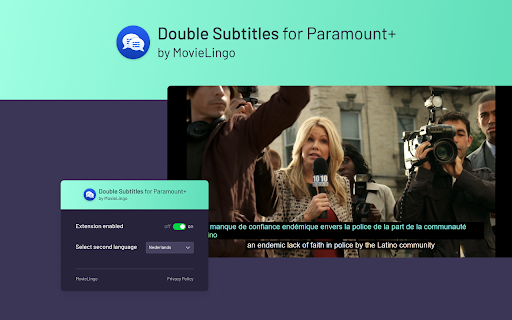
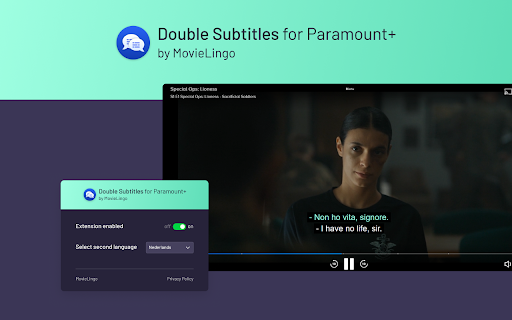
Double Subtitles was created with one purpose: to make language practice easier by showing two sets of subtitles at the same time. While Paramount+ displays the original captions, the extension can add another line in a language you want to study.

You simply pick a translation from the list in the MovieLingo popup, and the extra subtitles appear on screen. This way you can follow the story while comparing languages side by side.

The extension is meant for learners at all stages – beginners, who benefit from direct translation, and advanced users, who want to check details or idioms. It turns regular viewing into a subtle form of practice without interrupting the show.

Getting started:

Install Double Subtitles in Chrome

Open Paramount+ and refresh the page

Choose your learning language from the MovieLingo popup

Watch, read, and learn naturally

MovieLingo’s goal is to merge entertainment with education, letting you enjoy your favorite content while improving your skills step by step.
Technical
- Version
- 1.0.4
- Manifest
- V3
- Size
- 45.3KiB
- Min Chrome
- 88
- Languages
- 10
- Featured
- No
Metadata
- ID
- caglbfclcmmigklidjcgndkknbofdpbm
- Developer ID
- u04d4fee914ab858dccf27dee90ef6729
- Developer Email
- [email protected]
- Created
- Oct 4, 2023
- Last Updated (Store)
- Jan 9, 2026
- Last Scraped
- Jun 4, 2026
- Website
- —
- Support URL
- —
- Privacy Policy
- https://www.movielingo.app/privacy-policy
Similar extensions
Alternatives to Double Subtitles works with Paramount, ranked by description similarity.

Double Subtitles for Prime by MovieLingo
Extension allows for displaying additional subtitles above the standard Prime Video ones.
6.0K
★ 4.0

Double Subtitles for Peacock TV by MovieLingo
Extension allows for displaying additional subtitles above the standard Peacock ones.
186
★ 3.0

Double Subtitles for Shahid by MovieLingo
Extension allows for displaying additional subtitles above the standard Shahid ones.
101
Double Subtitles for Hulu by MovieLingo
Extension allows for displaying additional subtitles above the standard Hulu ones.
478
★ 4.0

Double Subtitles for Polsat Box Go by MovieLingo
Extension allows for displaying additional subtitles above the standard Polsat Box Go ones.
1

Double Subtitles for HBO Max by MovieLingo
Extension allows for displaying additional subtitles above the standard HBO ones.
4.0K
★ 3.0

FluentAI: Dual Subtitles for Netflix & more
Discover the best way to learn a new language while watching your favorite movies and series on Netflix, YouTube, and Disney+.
10.0K
★ 3.9
Adaptive Netflix Subs
Adaptive Subs for Netflix: Master Languages as You Watch
56
★ 4.0
Data sourced from the Chrome Web Store · last verified Jun 4, 2026.