
GhostFlow GEX Overlay
Shows GEX levels on TradingView syncs with GhostFlow dashboard
As of June 2026, GhostFlow GEX Overlay has 2 users and a 5.00/5 rating from 1 reviews in the Productivity category.
Usersno change0%
2
2
Ratingno change0%
5.00
1 reviews
Reviewsno change0%
1
Version
1.3
Manifest V3
History
2 snapshotsTracking since Jun 6, 2026.
Not enough history yet for this metric — the chart fills in as we collect more snapshots.
View as table
| Date | Users | Rating | Reviews | Version |
|---|---|---|---|---|
| Jun 6, 2026 | — | — | — | 1.3 |
| Jun 16, 2026 | — | — | — | 1.3 |
| Now | 2 | 5.00 | 1 | 1.3 |
Permissions & access
- Permissions
- activeTabstorage
- Host access
- https://www.tradingview.com/*, https://www.theghostflow.com/*
Screenshots


About
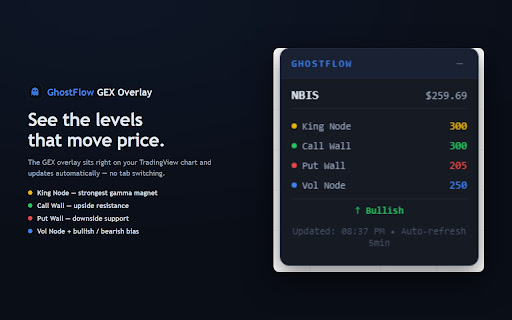
GhostFlow GEX Overlay puts options gamma-exposure (GEX) levels directly on your TradingView charts, so you can see where dealer hedging is concentrated without leaving your chart.

What it does:
• Detects the ticker you're viewing on TradingView automatically.
• Overlays key GEX levels — 👑 King Node, 📈 Call Wall, 📉 Put Wall — as a clean, draggable panel on the chart.
• Syncs the active ticker to your GhostFlow dashboard (Ultra Mode), so switching symbols on TradingView updates your dashboard in real time.
• Refreshes GEX data automatically every few minutes during market hours.

Requirements:
• A free GhostFlow account (sign up at theghostflow.com). Free accounts include a starter set of tickers; a paid plan unlocks all tickers.
• Sign in once through the extension popup with your GhostFlow username and password.

The overlay only appears on TradingView, and all market data is served from theghostflow.com. The extension does not modify your trades, place orders, or read anything outside TradingView.
Technical
- Version
- 1.3
- Manifest
- V3
- Size
- 20.63KiB
- Min Chrome
- 88
- Languages
- 1
- Featured
- No
Metadata
- ID
- caemgmhgbloacmijfhimicgacfmjkdio
- Developer ID
- u50e1fbf5443701a6f6ac6628e865cb97
- Developer Email
- [email protected]
- Created
- Jun 5, 2026
- Last Updated (Store)
- Jun 5, 2026
- Last Scraped
- Jun 16, 2026
- Website
- —
- Support URL
- https://www.theghostflow.com/#contact
- Privacy Policy
- https://www.theghostflow.com/privacy
Data sourced from the Chrome Web Store · last verified Jun 16, 2026.