
Tab Grid
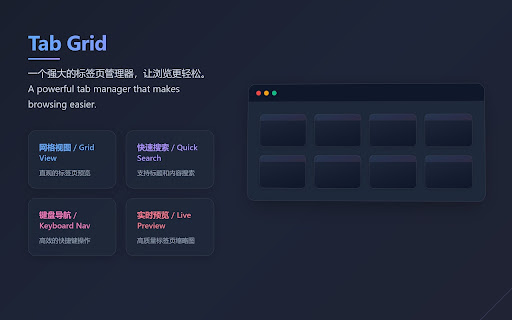
快速导航标签页的网格管理器,支持搜索、键盘导航和预览。 A grid-based tab manager with search, keyboard navigation and preview support.
As of June 2026, Tab Grid has 95 users in the Productivity category.
Usersup 26.7 percent+26.7%
95
95
Ratingno change0%
—
— reviews
Reviewsno change0%
—
Version
1.1.1
Manifest V3
History
3 snapshotsTracking since Apr 20, 2026.
View as table
| Date | Users | Rating | Reviews | Version |
|---|---|---|---|---|
| Apr 20, 2026 | 75 | — | — | 1.1.1 |
| May 11, 2026 | 84 | — | — | 1.1.1 |
| Jun 6, 2026 | 86 | — | — | 1.1.1 |
| Now | 95 | — | — | 1.1.1 |
Permissions & access
- Permissions
- tabsactiveTabstoragescripting
- Host access
- None declared
Screenshots
About
# English Description

Tab Grid - Visual Tab Manager

A powerful tab manager that displays browser tabs in an elegant grid layout, making tab switching a breeze.

Key Features:
• Grid Layout: Clear visual preview of all tabs
• Smart Search:
- Multi-keyword logical search (AND/OR/NOT)
- Regular expression support (re: mode)
- Search both titles and page content
• Keyboard Navigation: Full keyboard support
• Quick Switch: Letter shortcuts for fast access
• Pinned Tabs: Smart management of pinned tabs
• HD Preview: High-quality page thumbnails
• Dynamic Effects: Color-changing selection highlight

How to Use:
1. Press Alt+Z or click toolbar icon to open grid
2. Search Features:
- Multiple keywords: chrome firefox (contains both)
- Logic operators: chrome or firefox (either one)
- Exclusions: chrome not edge (has first, not second)
- Regex search: re:chrome.*firefox (regex pattern mode)
3. Use arrow keys to navigate grid
4. Press Tab to toggle search/grid mode
5. Use letter shortcuts for direct access
6. Press Enter to activate selected tab

Keyboard Shortcuts:
• Arrow Keys: Navigate grid
• Tab: Toggle search/grid mode
• Enter: Activate tab
• Letter Keys: Quick jump
• Alt+Z: Toggle grid view

# 中文描述

Tab Grid - 网格化标签页管理器

以优雅的网格布局展示和管理浏览器标签页,让标签页切换变得轻松愉快。

主要特性:
• 网格布局:清晰展示所有标签页的实时预览
• 智能搜索:
- 支持多关键词逻辑搜索(AND/OR/NOT)
- 支持正则表达式搜索(re:模式)
- 同时搜索标题和页面内容
• 键盘导航:完整的键盘支持,无需鼠标操作
• 快捷切换:字母快捷键快速定位标签页
• 固定标签:智能管理固定标签页
• 高清预览:高质量的页面预览缩略图
• 炫彩效果:动态变化的选中高亮效果

使用方法:
1. 按 Alt+Z 或点击工具栏图标打开网格
2. 搜索功能:
- 多关键词:chrome firefox(同时包含两个词)
- 逻辑运算:chrome or firefox(任一词)
- 排除内容:chrome not edge(包含前者不包含后者)
- 正则搜索:re:chrome.*firefox(正则匹配模式)
3. 使用方向键在网格间导航
4. Tab 键切换搜索/网格模式
5. 使用字母快捷键直接跳转
6. Enter 键打开选中的标签页

键盘快捷键:
• 方向键:导航网格
• Tab:切换搜索/网格模式
• Enter:激活标签页
• 字母键:快速跳转
• Alt+Z:打开/关闭网格
Technical
- Version
- 1.1.1
- Manifest
- V3
- Size
- 40.48KiB
- Min Chrome
- 88
- Languages
- 1
- Featured
- No
Metadata
- ID
- bppjajjoffbpekfdhebmnmfajhcgdhdk
- Developer ID
- ufdff0b551f2b6c6b4ea194280d6fa4e3
- Developer Email
- [email protected]
- Created
- Jan 23, 2025
- Last Updated (Store)
- Apr 8, 2025
- Last Scraped
- Jun 6, 2026
- Website
- —
- Support URL
- —
- Privacy Policy
- https://potamio.github.io/chrome-privacy/tab-grid.html
Similar extensions
Alternatives to Tab Grid, ranked by description similarity.

Tab Thumbnails
Visual thumbnail overview of your tabs
198
★ 5.0

Tabay
一个强大的标签页管理工具,帮助你更好地组织浏览器标签
4

Tab Manager Plus
Auto-group tabs by domain or custom rules. One-click manual grouping, workspaces to filter by context. Fewer tabs, better focus.
6
★ 4.0

tab manager
tab管理
5

TabSearcher
A powerful Chrome extension with smart search, grouping, history, bookmarks, and advanced tab management features
15

TabX - Make tab management and use easier!
A amazing chrome extension for manage all tabs.Make tab management and use easier!
39
★ 5.0

Tab Assistant
Manage and open multiple URLs in new tabs
27

QuickTab
Fast tab switcher for Chrome
2
Data sourced from the Chrome Web Store · last verified Jun 6, 2026.