
Typollama – AI Spell-Check & Text Processing
Enhance your writing with Typollama – an AI-powered Chrome extension for spell-checking and advanced text processing.
As of May 2026, Typollama – AI Spell-Check & Text Processing has 225 users in the Productivity category.
Usersup 21.6 percent+21.6%
225
225
Ratingno change0%
—
— reviews
Reviewsno change0%
—
Version
1.3
Manifest V3
History
2 snapshotsTracking since Apr 29, 2026.
View as table
| Date | Users | Rating | Reviews | Version |
|---|---|---|---|---|
| Apr 29, 2026 | 185 | — | — | 1.3 |
| May 26, 2026 | 205 | — | — | 1.3 |
| Now | 225 | — | — | 1.3 |
Permissions & access
- Permissions
- storagecontextMenus
- Host access
- https://api.openai.com/v1/*, https://api.anthropic.com/*, https://generativelanguage.googleapis.com/*, http://localhost:11434/*, http://localhost:1234/*, https://api.deepseek.com/*, https://api.mistral.ai/*, https://api.perplexity.ai/*
Screenshots


About
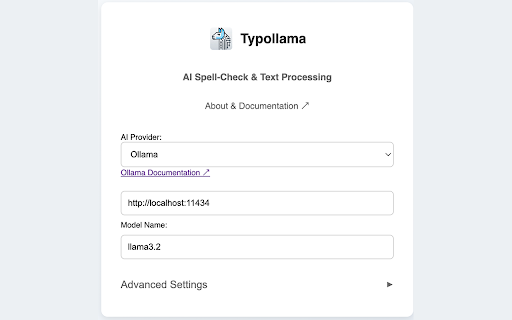
Typollama is an open-source easy to use Chrome extension that helps you improve your writing with smart corrections and customizable AI enhancements. Compatible with any language, it allows you to configure your preferred AI provider and simply Double-tap CTRL for seamless corrections. Whether you're working online or offline, Typollama keeps your data private—we never collect or share it.

💵 Is it Free to Use?
Typollama itself doesn’t process your text directly but leverages third-party AI providers for text analysis. Some AI providers, like Google Gemini, offer limited free usage, while you can also run local AI models like Ollama or LM Studio for no extra cost. Chrome’s built-in AI model, which is available in preview, operates locally and is free to use. You can enable it easily with a few settings adjustments. For more details, check out Google's AI Developer Guide: https://developer.chrome.com/docs/ai/get-started#use_apis_on_localhost

Why Use Typollama?
⚡ Fast and Easy Fixes
Double-tap CTRL to quickly correct grammar, spelling, and clarity. Need a rewrite without changing the meaning? Triple-tap CTRL for an instant refresh.

🔄 Choose Your AI Provider
Pick the AI solution that works best for you:
Local Processing: Ollama, LM Studio, Chrome AI
Cloud-Based Options: OpenAI, Google Gemini, and many others

🛠️ Three Key Features
✔ Spellcheck: Fix grammar and spelling mistakes effortlessly.
✔ Rewrite: Improve readability while keeping your original meaning.
✔ Custom Tool: Create an AI assistant that matches your writing style

🎨 Fully Customizable
Control the AI’s style, tone, and behavior to fit your needs.

🔒 Privacy First
Use local offline tools for security or cloud-based AI for more features—you decide.

As an open-source tool, Typollama is built with transparency and flexibility in mind. Whether you're writing emails, reports, or messages, it helps you communicate more clearly and efficiently. Try it today!
Technical
- Version
- 1.3
- Manifest
- V3
- Size
- 1.59MiB
- Min Chrome
- 88
- Languages
- 26
- Featured
- No
Metadata
- ID
- bpfbfpkchkmgladnfmgmhapainhcokel
- Developer ID
- u56df10dafe00f94062bc518a446ef212
- Developer Email
- [email protected]
- Created
- Feb 6, 2025
- Last Updated (Store)
- Feb 20, 2025
- Last Scraped
- May 26, 2026
- Website
- —
- Support URL
- https://github.com/adamtash/typollama
Similar extensions
Alternatives to Typollama – AI Spell-Check & Text Processing, ranked by description similarity.

TextLLaMA - Your Personal Offline Grammar Fixer & Email Writer
Simplifies communication with word explanations, email composition, grammar check, and multi-language translation.
85
★ 4.0

TypeMagic - AI Text Corrector
Instant AI text correction. Use Cmd+Option+T (Mac) or Ctrl+Alt+T (Win/Linux) to fix spelling, grammar, and formatting.
19

Local AI: Private Spell Checker & Chat
Privacy-first AI spell checker and webpage summarizer running 100% locally using WebGPU.
9

AI Message Enhancer
Enhance, correct typos, fix grammar, and beautify your text for Slack, Teams, email, and any website using AI
3

AI Grammar Fixer - Text Polisher
Fix grammar, improve writing, and translate text with AI. Professional grammar checker and text refinement tool.
8
★ 5.0

ClipAI
Smart text processing powered by AI - Copy text and choose your transformation
3

TextBoost-AI
Right-click in any editable field to rewrite, summarize, or expand text using AI.
—
★ 5.0

Open Grammar Checker
AI-powered grammar checker with privacy-first design. Polish your writing instantly using your own OpenRouter API key.
1
★ 5.0
Data sourced from the Chrome Web Store · last verified May 26, 2026.