
DocxPacer — Auto Typer for Docs from .docx Files
Type your .docx draft into Google Docs at an adjustable speed. Keeps bold, italic, alignment, and incremental edit history.
As of June 2026, DocxPacer — Auto Typer for Docs from .docx Files has — users in the Productivity category.
Usersno change0%
—
—
Ratingno change0%
—
— reviews
Reviewsno change0%
—
Version
1.0.2
Manifest V3
History
1 snapshotsTracking since Jun 20, 2026.
Not enough history yet for this metric — the chart fills in as we collect more snapshots.
View as table
| Date | Users | Rating | Reviews | Version |
|---|---|---|---|---|
| Jun 20, 2026 | — | — | — | 1.0.2 |
| Now | — | — | — | 1.0.2 |
Permissions & access
- Permissions
- activeTabdebuggerstoragetabs
- Host access
- https://docs.google.com/*, https://*.googleusercontent.com/*
Screenshots



About
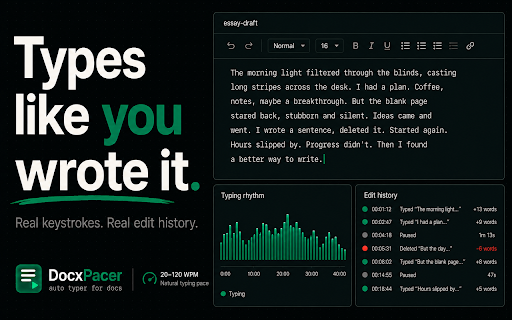
DocxPacer types your .docx draft into Google Docs at a natural, adjustable pace — keystroke by keystroke, with the bold, italic, alignment, and paragraph structure preserved.

────────────────────────────────────────
WHY DOCXPACER

Your draft. Untouched.
DocxPacer never rewrites, paraphrases, or alters your content. It reads the .docx you give it and types those exact words into your Google Doc. The text that lands in the document is the text you wrote — character for character.

Natural pace, not robotic.
You set a target like "200 words in 40 minutes". DocxPacer types in bursts and pauses the way a person actually drafts, with sentence-level slowdowns, paragraph breaks, and optional natural corrections (occasionally mistyping a letter and fixing it, or rewriting a sentence after a re-read). The keystrokes show up in the document's edit history the way they would if you typed it yourself.

Keeps your formatting.
Bold, italic, underline, left/center/right/justify alignment, first-line indentation, and paragraph breaks come across from the .docx into the Doc.

Resume across days.
Long document? Run a short session today, close the tab, come back tomorrow. With "Resume where you left off" enabled, DocxPacer reads what's already in the Doc and continues from there.

100% local. Nothing leaves your browser.
DocxPacer does not collect, transmit, or sell any data. Your .docx is parsed inside your browser. The optional paraphrase pass uses Chrome's on-device Gemini Nano model when available — your draft never touches an external server. See the privacy policy for the exact technical details.

────────────────────────────────────────
HOW TO USE

1. Have your draft in Google Docs (or any source) → File → Download → Microsoft Word (.docx).
2. Open the destination Google Doc and click where typing should start.
3. Open DocxPacer, pick the .docx, set your pace (e.g. 200 words in 40 minutes), click Start.
4. Drag the DocxPacer window aside. Watch progress live, or close it — typing keeps running.

────────────────────────────────────────
WHAT IT IS GOOD FOR

- Writers transferring a finished draft from a separate editor into Docs without a single bulk paste that flattens the version history.
- Researchers and analysts moving long-form notes from Word into a shared Google Doc at a deliberate pace.
- Anyone who finds it tiring to retype long content manually but wants the edit history of the destination doc to reflect a genuine, deliberate composition process.
- Accessibility — reducing the physical burden of long typing sessions while keeping authorship intact.

────────────────────────────────────────
WHAT IT DOES NOT DO

- Does not rewrite, summarise, paraphrase, or alter the content you give it.
- Does not collect, upload, sell, or share your document.
- Does not run any analytics, telemetry, or third-party tracker.
- Does not access any tab other than the Google Docs tab you have open.

────────────────────────────────────────
PERMISSIONS, EXPLAINED

- "Read and change your data on docs.google.com" — DocxPacer sends keystrokes into the active Google Docs tab, and (for resume) fetches the plain-text export of that one document. Nothing else.
- "Debug" — Google Docs uses a canvas-based editor that ignores ordinary input events. The Chrome debugger API is the only reliable way to deliver keystrokes to it. DocxPacer attaches only while a typing session is running and detaches the moment you click Stop.
- "Storage" — your pace settings and the last .docx you loaded are kept locally so you don't have to re-pick them.

────────────────────────────────────────
PRICING

DocxPacer is free during launch. Core typing is and will remain free — typing your .docx into Docs is the core feature and is not gated behind a paywall. Optional advanced features (Gemini Nano paraphrase pass, multi-day sessions, advanced rhythm presets) may be offered as a paid Pro tier in a future version, with an in-extension preview and a clear monthly/yearly price before anything is charged. No dark patterns, no surprise renewals.

────────────────────────────────────────

DocxPacer is not affiliated with, sponsored by, or endorsed by Google. Google Docs is a trademark of Google LLC. Please use DocxPacer in accordance with the policies of any institution, employer, or platform your work is being submitted to.
Technical
- Version
- 1.0.2
- Manifest
- V3
- Size
- 82.89KiB
- Min Chrome
- 88
- Languages
- 1
- Featured
- No
Metadata
- ID
- bpdilfcebpecmmhneelnhdojnkhheiaj
- Developer ID
- ucd3d95b046961188c2553b42557e1109
- Developer Email
- [email protected]
- Created
- Jun 19, 2026
- Last Updated (Store)
- Jun 19, 2026
- Last Scraped
- Jun 20, 2026
- Website
- docxpacer.xyz
- Support URL
- https://docxpacer.xyz/support
- Privacy Policy
- https://docxpacer.xyz/privacy
Data sourced from the Chrome Web Store · last verified Jun 20, 2026.