
Copy URL with Title (plain text/markdown)
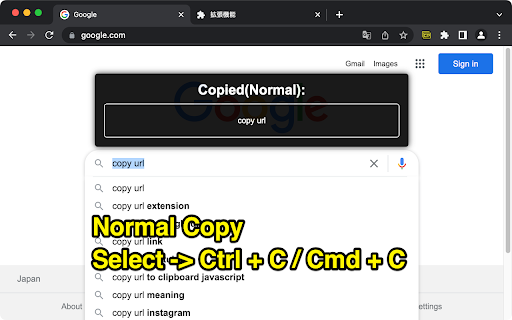
Copy the title and URL in plain text/markdown format by keyboard shortcuts: Ctrl+C/Cmd+C for plain text, Alt+C/Opt+C for markdown.
As of May 2026, Copy URL with Title (plain text/markdown) has 1,000 users and a 3.00/5 rating from 15 reviews in the Workflow & Planning category.
Usersno change0%
1.0K
1,000
Ratingdown 4.2 percent−4.2%
3.00
15 reviews
Reviewsdown 6.3 percent−6.3%
15
Version
1.1.1.1
Manifest V3
History
1 snapshotsTracking since Apr 29, 2026.
View as table
| Date | Users | Rating | Reviews | Version |
|---|---|---|---|---|
| Apr 29, 2026 | 1.0K | 3.13 | 16 | 1.1.1.1 |
| Now | 1.0K | 3.00 | 15 | 1.1.1.1 |
Permissions & access
- Permissions
- storage
- Host access
- None declared
Screenshots


About
--------------------------------------------------------------------------------
UPDATES
--------------------------------------------------------------------------------
Ver 1.1.1.1:
FIX: Description on chrome web store

Ver 1.1.1.0:
ADD: Duration settings for notification

Ver 1.1.0.6:
FIX: Workaround for non-https pages

Ver 1.1.0.5:
FIX:   Correction of the phenomenon that text is not copied to the clipboard
ADD: Option menu
ADD: New customizable toast UI
--------------------------------------------------------------------------------
FEATURES
--------------------------------------------------------------------------------
1. Copy title and URL in text format
Control+C(Win/Linux) / Command+C(Mac)

2. Copy in markdown link format
Alt+C(Win/Linux) / Option+C(Mac)

3. Normal copy
Select -> Control+C(Win/Linux) / Command+C(Mac)

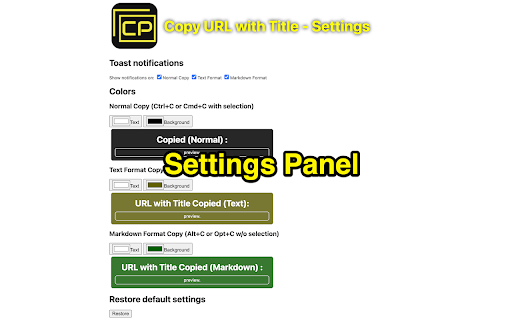
4.Settings
Right click the extension icon -> Options
--------------------------------------------------------------------------------
Technical
- Version
- 1.1.1.1
- Manifest
- V3
- Size
- 16.72KiB
- Min Chrome
- 88
- Languages
- 1
- Featured
- Yes
Metadata
- ID
- bpcogbhmkdjaohcmlghhkiohmldpnkoh
- Developer ID
- u0376cc7701b7e0d202226f23e442b1a2
- Developer Email
- [email protected]
- Created
- Dec 11, 2015
- Last Updated (Store)
- Aug 20, 2022
- Last Scraped
- May 26, 2026
- Website
- http://takashyx.com/
- Support URL
- —
- Privacy Policy
- —
Similar extensions
Alternatives to Copy URL with Title (plain text/markdown), ranked by description similarity.
BlogLinkClipper
This extension copies to clipboard URL, and Title for various formats. For link shareling with title or writing documentation.
2.0K
★ 4.1

Copy Text Easily
Extension that lets you view and reuse clipboard history with drag and drop, and copy text with one click
30.0K
★ 3.9

Annotate web pages/CONTEXT
Use this extension to annotate (edit, highlight, popup/embedded notes & page notes) your web-pages.
1.0K
★ 3.5

InfiniteCopy
Copy anything, infinitely.
41
★ 5.0

Copy as Plain Text
Extension to copy selected text as plain text. Also option to Append as plain text. Keeps carriage returns and line feeds.
7.0K
★ 3.6

Notepad
A very simple notepad for Chrome with sync functionality.
100.0K
★ 3.8

Highlight Magic
Enables user to highlight words
8.0K
★ 4.1

Tab-Snap
Get open tab URLs for window, or load a list of URLs into new tabs on this window.
30.0K
★ 4.5
Data sourced from the Chrome Web Store · last verified May 26, 2026.