
HTML Attributes Replacer
This extension allowing for easy replacement of HTML attributes values.
As of June 2026, HTML Attributes Replacer has 38 users in the Productivity category.
Usersup 5.6 percent+5.6%
38
38
Ratingno change0%
—
— reviews
Reviewsno change0%
—
Version
1.0.0
Manifest V3
History
5 snapshotsTracking since Apr 1, 2026.
View as table
| Date | Users | Rating | Reviews | Version |
|---|---|---|---|---|
| Apr 1, 2026 | 36 | — | — | 1.0.0 |
| Apr 21, 2026 | 35 | — | — | 1.0.0 |
| May 6, 2026 | 31 | — | — | 1.0.0 |
| May 18, 2026 | 36 | — | — | 1.0.0 |
| Jun 1, 2026 | 40 | — | — | 1.0.0 |
| Now | 38 | — | — | 1.0.0 |
Permissions & access
- Permissions
- storage
- Host access
- None declared
Screenshots
About
Description:
HTML Attributes Replacer is a powerful, privacy-focused browser extension that allows users to easily rewrite or replace HTML attribute values on any web page. Create your own custom rules to dynamically update attributes such as URLs, image sources, or any HTML attribute in real time, without any coding knowledge. Designed for flexibility and advanced user control, it empowers you to automate and customize your browsing experience.

How to Use:
- Install the extension and click the extension icon in your browser toolbar.
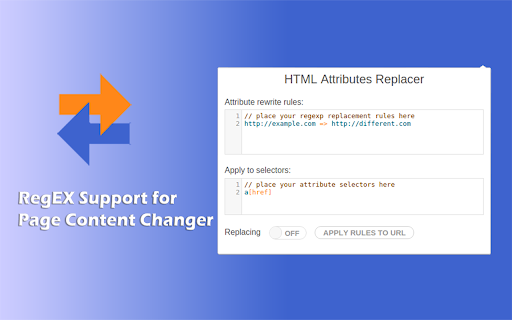
- Define rewrite rules in the "Rewrite Rules" section using simple syntax (pattern => replacement).
- Specify target selectors to choose which elements or attributes are affected.
- Enable or disable the replacer anytime with the toggle switch.
- Apply rules instantly to the current page by clicking "Apply Rules to URL".
- Your rules and settings are automatically synchronized across devices where you use the same browser profile and account.

Features:
- Attribute Value Replacement: Change, rewrite, or redirect any HTML attribute (e.g., links, images, etc.).
- Custom CSS Selectors: Target specific elements and attributes with precise control.
- Regex Support: Use regular expressions for advanced replacements.
- Easy Enable/Disable: Instantly toggle replacements on or off.
- Real-time Application: Apply rules to current pages with one click.
- Multi-language Interface: Fully localized in 17 languages.
- Settings Sync: Automatically syncs your rules/settings across devices using the same browser account.
- No Coding Required: User-friendly interface with integrated editor and syntax highlighting.
- Dark Mode Compatible: Seamless appearance in both light and dark browser themes.

Privacy:
- No user tracking, no analytics, no ads.
- No data leaves your browser.
- All extension settings are stored using browser sync and remain private to your own accounts.
- For more details, see our Privacy Policy on the extension listing.

Privacy First:
- All operations are performed locally in your browser. The extension does not collect, transmit, or share any personal data or browsing activity. Your configurations and rules are securely stored using browser sync, ensuring privacy and data portability across your own devices only.

Frequently Asked Questions (FAQ):
- Q: Does this extension track or collect my data?
A: No. All processing is performed locally. Your rules and browsing activity are never collected, transmitted, or shared.
- Q: How do I sync my rules and settings across browsers?
A: Just log into the same account and enable browser sync. Your settings will automatically be available across all devices using the same profile.
- Q: Can I target only specific elements or attributes?
A: Yes, you can use CSS selectors to precisely define which elements and attributes the rules should affect.
- Q: Is any coding knowledge required?
A: No. The interface is designed for everyone, with an easy-to-use editor and helpful syntax highlighting.
- Q: Can I use regular expressions?
A: Yes. The rules field accepts patterns using regular expression syntax for advanced replacements.
- Q: Will this extension slow down my browser?
A: No. It is optimized for performance and runs only when enabled, affecting only the specified elements on the pages you visit.
- Q: How do I disable or remove the extension?
A: Click the extension icon and use the toggle switch to disable. To remove, go to your browser's extensions page and uninstall as usual.
Technical
- Version
- 1.0.0
- Manifest
- V3
- Size
- 156KiB
- Min Chrome
- 88
- Languages
- 17
- Featured
- No
Metadata
- ID
- bokadpdpicdmegkojnhngpboibidhgdk
- Developer ID
- ub8480eeab3fb12ce929f0bd4e7f7a630
- Developer Email
- [email protected]
- Created
- Jun 4, 2025
- Last Updated (Store)
- Jun 4, 2025
- Last Scraped
- Jun 1, 2026
- Website
- —
- Support URL
- —
- Privacy Policy
- —
Similar extensions
Alternatives to HTML Attributes Replacer, ranked by description similarity.

Simple Text Replacer
Replace text on pages using CSS selectors, with optional original text in parentheses.
8
★ 5.0

Auto Text Replacer
Automatically replace any words or texts with new texts on any website
4.0K
★ 4.0

Auto Replacer
Replace webpage text according to your personal preferences
14

Auto Text Replacer
Automatically replace words and phrases in real-time as you browse the web.
17

Element Modifier Pro
Modify HTML element attributes, styles, and properties on any website
9

Text & Image Replacer Extension
Replace webpage text and images with custom content. Clean, fast, and configurable.
523
★ 5.0

Advanced RegEx URL Redirector and Text Replace
Redirect URLs and replace text or links on web pages using Regular Expressions.
157
★ 5.0

Hide That Name Search & Replace (Local)
Replaces specified text on web pages, entirely on your device. No tracking, no data sent anywhere.
10
Data sourced from the Chrome Web Store · last verified Jun 1, 2026.