
Kick Chat for Twitch
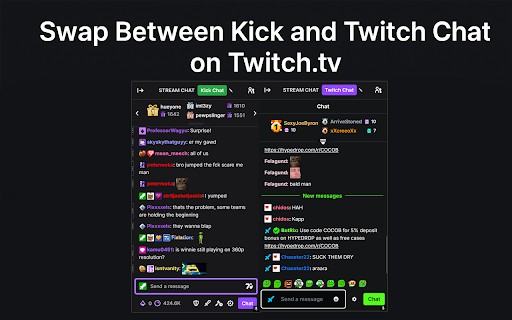
Swap between Twitch chat and Kick chat without leaving Twitch.
As of June 2026, Kick Chat for Twitch has 26 users and a 5.00/5 rating from 2 reviews in the Functionality & UI category.
Usersup 36.8 percent+36.8%
26
26
Ratingno change0%
5.00
2 reviews
Reviewsup 100.0 percent+100.0%
2
Version
1.1.0
Manifest V3
History
3 snapshotsTracking since Apr 1, 2026.
View as table
| Date | Users | Rating | Reviews | Version |
|---|---|---|---|---|
| Apr 1, 2026 | 19 | 5.00 | 1 | 1.1.0 |
| May 18, 2026 | 20 | 5.00 | 2 | 1.1.0 |
| Jun 1, 2026 | 25 | 5.00 | 2 | 1.1.0 |
| Now | 26 | 5.00 | 2 | 1.1.0 |
Permissions & access
- Permissions
- storagecookies
- Host access
- https://www.twitch.tv/*, https://kick.com/*
Screenshots
About
Kick Chat for Twitch adds a simple toggle button to every Twitch channel’s chat panel, allowing you to flip between the native Twitch chat and a fully functional embedded Kick chat box – all without leaving Twitch.

Once you have added the extension click the extension from the drop down and login to Kick, If it doesn't work/tells you to login to Kick then make sure you allow all cookies on Twitch and Kick and try again.

The Kick chat will default to whatever Twitch channel you are currently on, if their usernames aren't the same on both platforms then you can edit the Kick chat username by clicking the pencil icon next to the toggle button, this will be saved on that specific channel.
Technical
- Version
- 1.1.0
- Manifest
- V3
- Size
- 2.57MiB
- Min Chrome
- 88
- Languages
- 1
- Featured
- No
Metadata
- ID
- boaklbonokjlghdimdagnkgmfglpgkod
- Developer ID
- u9c7261602deefbd2267d6af721698cbe
- Developer Email
- [email protected]
- Created
- Jun 17, 2025
- Last Updated (Store)
- Jun 17, 2025
- Last Scraped
- Jun 1, 2026
- Website
- —
- Support URL
- —
- Privacy Policy
- —
Similar extensions
Alternatives to Kick Chat for Twitch, ranked by description similarity.

KickTwitch Style Kit
The Kick UI extension gives the Kick Streaming Platform a Twitch-inspired makeover, transforming key elements for a seamless interfa
72
★ 5.0

Enhancer
Enhancer is open-sourced and free extension, which adds what is missing on streaming platforms.
100.0K
★ 3.9

Better Kick
A better Kick.com experience.
269
★ 4.0

Kick Chat Manager - Anti-Spam, Mod, History [Add-on for Kick.com]
Kick.com add-on: anti-spam, mod tools, chat history, block creators, ban words & emotes, highlight, profiles.
433
★ 5.0

Chinko's Cross Chat Inlay
A convenient extension to see your favorite streamers' Youtube chats in Twitch's native chat window!
62
★ 5.0

Twitch Stream Preview
Preview Twitch streams by hovering over them
12
★ 5.0

Kick Embed Fix
Improves Kick.com embedded players by redirecting to the main Kick site and enhancing the viewing experience.
35
★ 5.0

KICKER
Enhance Kick: custom chat layout, mention notifications, keyword highlights, unique username colors, and live stream stats.
102
★ 5.0
Data sourced from the Chrome Web Store · last verified Jun 1, 2026.