Uniclip
Clip and export web content as Markdown or CSV files.
As of June 2026, Uniclip has 8 users and a 5.00/5 rating from 1 reviews in the Productivity category.
Usersup 33.3 percent+33.3%
8
8
Ratingno change0%
5.00
1 reviews
Reviewsno change0%
1
Version
1.0.1
Manifest V3
History
6 snapshotsTracking since Apr 1, 2026.
View as table
| Date | Users | Rating | Reviews | Version |
|---|---|---|---|---|
| Apr 1, 2026 | 6 | 5.00 | 1 | 1.0.1 |
| Apr 18, 2026 | 5 | 5.00 | 1 | 1.0.1 |
| Apr 28, 2026 | 8 | 5.00 | 1 | 1.0.1 |
| May 8, 2026 | 6 | 5.00 | 1 | 1.0.1 |
| May 15, 2026 | 10 | 5.00 | 1 | 1.0.1 |
| May 24, 2026 | 9 | 5.00 | 1 | 1.0.1 |
| Now | 8 | 5.00 | 1 | 1.0.1 |
Permissions & access
- Permissions
- storagesidePanelidentityactiveTabcookiestabs
- Host access
- https://*/*, https://internal-api-space.feishu.cn/*, https://www.feishu.cn/*, https://feishu.cn/*
Screenshots


About
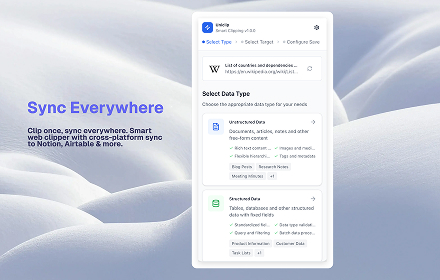
Uniclip is a powerful browser extension that revolutionizes how you save and organize web content. With intelligent content extraction and seamless cross-platform synchronization, Uniclip makes web clipping effortless and efficient.

🚀 Key Features:

Smart Content Extraction
• Automatically detects page type (articles, news, blogs, product pages)
• Extracts titles, content, authors, publish dates, and tags
• Intelligent reading time estimation
• Captures website icons and metadata

Multiple Clipping Modes
• 📄 Article Mode: Extract main content intelligently
• 🌐 Full Page Mode: Save complete page information
• 📷 Screenshot Mode: Interactive area selection with drag & drop
• 🔖 Bookmark Mode: Save page metadata and links

Modern User Experience
• Clean, intuitive interface with 360px optimized popup
• Side panel support for better workflow
• Real-time content preview
• Responsive design for all screen sizes
• Dark/light theme support

Advanced Features
• Custom field mapping between platforms
• Template system for consistent formatting
• Batch operations and bulk export
• Usage statistics and analytics
• Offline mode with sync when online

Privacy & Security
• Local data storage with encryption
• No tracking or data collection
• Secure API integrations
• GDPR compliant

Perfect for:
• Researchers and students collecting references
• Content creators gathering inspiration
• Professionals organizing industry insights
• Anyone who wants to save web content efficiently

Transform your web browsing into a powerful knowledge management system with Uniclip!
Technical
- Version
- 1.0.1
- Manifest
- V3
- Size
- 880KiB
- Min Chrome
- 88
- Languages
- 3
- Featured
- No
Metadata
- ID
- bnlhmjhomlobglpegkekfohpdofghakp
- Developer ID
- u7acecbdc532eb8c385f70e8b881d8f8a
- Developer Email
- [email protected]
- Created
- Nov 20, 2025
- Last Updated (Store)
- Nov 20, 2025
- Last Scraped
- Jun 6, 2026
- Website
- uniclip.top
- Support URL
- https://www.uniclip.top/faq
- Privacy Policy
- https://www.uniclip.top/privacy-policy
Similar extensions
Alternatives to Uniclip, ranked by description similarity.

SnapClipper
Capture, organize, and retrieve contextual web clips with one click.
10
★ 5.0

SuperCurate Web Clipper
Save web content to your SuperCurate library with one click. Clip articles, text snippets, images and PDFs from any webpage.
3

Clippe.me: Save posts in just one click
Save and organize posts from LinkedIn, Reddit, X and across the web - just by clicking an icon below the post.
1.0K
★ 4.8

Web Content Clipper
Save web content locally
2

Web Clipper
Save web pages in multiple formats: HTML, Markdown, or Plain Text
5

BeeSave Web Clipper
Save, organize and reuse text from any web page. Tags, voice typing, PDF/TXT export
53
★ 5.0

Easy Clipper
Minimal Chrome clipboard manager to copy, edit, delete, and reorder clips easily.
8
★ 5.0

miClip - The Minimalist Web Clipper
miClip is a plain-text web clipper for focused reading and clean note-taking.
—
Data sourced from the Chrome Web Store · last verified Jun 6, 2026.