
PerfTestFlow Recorder
Record, inspect, filter, and export browser API calls (XHR/Fetch) for performance testing with JMeter, HAR, and JSON export.
As of June 2026, PerfTestFlow Recorder has 20 users and a 5.00/5 rating from 1 reviews in the Developer Tools category.
Usersup 400.0 percent+400.0%
20
20
Ratingno change0%
5.00
1 reviews
Reviewsdown 50.0 percent−50.0%
1
Version
1.0.1
Manifest V3
History
9 snapshotsTracking since Apr 6, 2026.
View as table
| Date | Users | Rating | Reviews | Version |
|---|---|---|---|---|
| Apr 6, 2026 | 4 | 5.00 | 2 | 1.0.1 |
| Apr 18, 2026 | 6 | 5.00 | 2 | 1.0.1 |
| Apr 23, 2026 | 11 | 5.00 | 2 | 1.0.1 |
| May 7, 2026 | 11 | 5.00 | 2 | 1.0.1 |
| May 12, 2026 | 12 | 5.00 | 2 | 1.0.1 |
| May 17, 2026 | 13 | 5.00 | 2 | 1.0.1 |
| May 24, 2026 | 18 | 5.00 | 2 | 1.0.1 |
| Jun 6, 2026 | 20 | 5.00 | 2 | 1.0.1 |
| Jun 15, 2026 | 16 | 5.00 | 1 | 1.0.1 |
| Now | 20 | 5.00 | 1 | 1.0.1 |
Permissions & access
- Permissions
- storageactiveTabscriptingdownloadstabswindows
- Host access
- <all_urls>
Screenshots



About
PerfTestFlow Recorder – Record browser API calls for performance testing

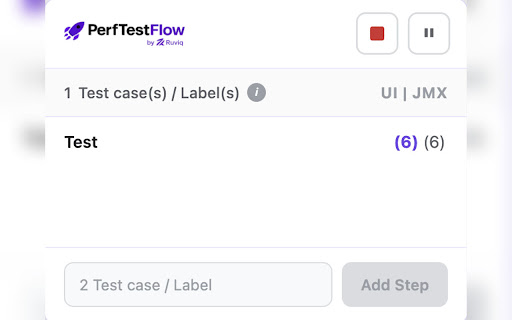
PerfTestFlow Recorder helps QA engineers and developers capture real API traffic from the browser and turn it into scripts and artifacts for performance testing—no manual logging or copy-paste.

What it does
✔ Records API calls – Captures XHR and Fetch requests (URL, method, status, headers, request/response bodies, timing) as you use your web app.
✔Inspect and filter – View all captured requests, filter by domain, method, status code, or ignore static assets to focus on APIs.
✔Edit before export – Change method, URL, headers, and body so the exported file matches the scenario you want to run.
✔Export in standard formats – Download as JSON, HAR 1.2, or JMeter JMX and use the same data in PerfTestFlow, Apache JMeter, k6, Postman, or other tools.

Why use it
✔ One-click capture – Start recording, use your app, stop and export. No proxy setup or manual request logging.
✔ 100% local – Recording and export stay on your device. No data is sent to our or any other servers.
✔ Fits your workflow – Export JMX for JMeter, HAR for other tools, or JSON for PerfTestFlow and custom analysis.

How to use
✔ Install the extension and open your web app in Chrome.
✔ Click the extension icon, name your session, and start recording.
✔ Use the app (login, search, submit forms, etc.); requests are captured automatically.
✔ Stop recording, optionally edit or filter, then export as JSON, HAR, or JMX.
✔ Open the exported file in PerfTestFlow (https://perftestFlow.ruviq.com/) or load the JMX in JMeter to run and analyze performance.

Limits
• Up to 2,000 requests per session; response bodies capped at 1 MB.
• For full response bodies and network timing, use the extension with the DevTools panel open on the tab you’re recording.

Privacy
No analytics, no tracking, no upload of your recorded data. Everything is stored and exported locally on your machine.
Technical
- Version
- 1.0.1
- Manifest
- V3
- Size
- 575KiB
- Min Chrome
- 88
- Languages
- 1
- Featured
- No
Metadata
- ID
- bnioinjcpojmhgobogfnpcgkpmbhjool
- Developer ID
- u4a8a68a21d3680df8bc872fea1d9e1ab
- Developer Email
- [email protected]
- Created
- Mar 3, 2026
- Last Updated (Store)
- Mar 15, 2026
- Last Scraped
- Jun 15, 2026
- Support URL
- —
- Privacy Policy
- https://perftestflow.ruviq.com/privacy
Similar extensions
Alternatives to PerfTestFlow Recorder, ranked by description similarity.

API Recorder
API Call Recorder: Export API Calls to Postman Effortlessly!
Automatically record and export API calls from your web application…
1.0K
★ 4.0

Request Time-Lapse
DevTools panel that records, groups, and replays network request history for API regression debugging.
2

FlowTrace
FlowTrace is a versatile tool implemented as a Google Chrome extension designed for recording and tracking website navigation flows
76
★ 5.0

API Call Recorder
Record and analyze API calls directly from your browser.
56

FlowTrace(NFP)
FlowTrace by QBurst is a powerful Chrome extension built to capture and analyze real user navigation across websites.
—

API Reverse Engineer
Captura todas las llamadas API mientras navegas. Record → usa el sitio → descarga JSON.
140
Preflight Recorder
Preflight Chrome Extension
823
★ 4.2

Auto Test Recorder for Robot & Playwright
Record web interactions and instantly generate automated test scripts for Robot Framework and Playwright.
16
Data sourced from the Chrome Web Store · last verified Jun 15, 2026.