
Indeed Scraper
Unlock Indeed's job data potential. Export to CSV, JSON, Excel. Perfect for seekers, recruiters, and HR. Easy-to-use extractor.
As of June 2026, Indeed Scraper has 2,000 users and a 4.58/5 rating from 33 reviews in the Productivity category.
Usersno change0%
2.0K
2,000
Ratingno change0%
4.58
33 reviews
Reviewsno change0%
33
Version
1.2.6
Manifest V3
90-day change · In the last 90 days this extension 1 version update.
History
1 snapshotsTracking since Apr 18, 2026.
View as table
| Date | Users | Rating | Reviews | Version |
|---|---|---|---|---|
| Apr 18, 2026 | 2.0K | 4.58 | 33 | 1.2.5 |
| Now | 2.0K | 4.58 | 33 | 1.2.6 |
Permissions & access
- Permissions
- storageidentity
- Host access
- *://*.indeed.com/*, *://*.extensionsbox.com/*
Screenshots


About
Introducing the Indeed Scraper Browser Extension: Your Ultimate Job Data Extraction and Saving Solution

Whether you're a job seeker, HR manager, recruiter, or business owner, the Browser Extension is your go-to tool for in-depth job market analysis. With the ability to save and export data not only in CSV format but also in JSON and XLSX (Excel), this extension unlocks a wealth of information from Indeed's vast job listings. Our scraper simplifies the process of searching and extracting detailed job data, requiring no coding expertise.

Why Choose the Indeed Scraper?
Harness the full potential of Indeed's database to identify job trends, track hiring patterns, and pinpoint job openings that meet your specific needs. Our extension gives you the power to:
- Effortlessly access up-to-date, extensive job data.
- Analyze job market trends and recruitment practices.
- Locate targeted job vacancies and craft more effective job listings.

What Data Formats Can You Export?
Our extension is adept at extracting crucial information from job postings, allowing you to save and export data in the following formats:
- CSV
- JSON
- XLSX (Excel)
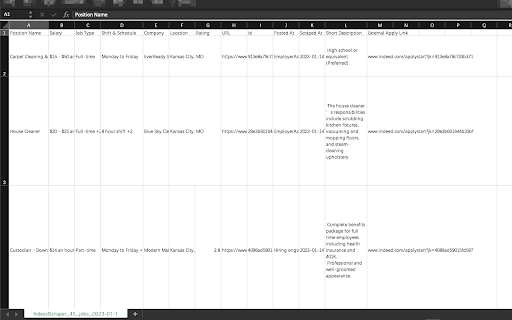
This includes details like Position Name, Company, Location, Rating, URL, Id, Posted At, Scraped At, and External Apply Link.
With the Pro version and settings activated, you can obtain additional columns such as:
Salary, Job Type, Shift & Schedule, Description Text, Description HTML.

How to Use the Indeed Scraper?
Operating our extension is straightforward and user-friendly. Simply:
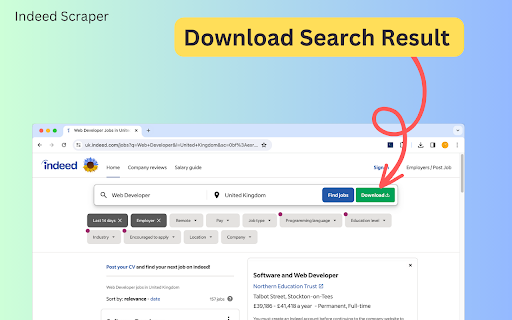
1. Navigate to indeed.com and conduct a search with basic parameters like job title, company name, and location.
2. Click the Download button next to the “Find Jobs” button. ( or you can copy the search results page’s URL from your browser's address bar, Paste the URL into our extension's input field).
3. select "EXPORT JOBS" and choose your desired format (CSV, JSON, or XLSX).
4. Wait for the scraping process to complete.
5. Click "Download Jobs" to receive your data in the chosen format, ready for thorough analysis.

The Benefits of Our Extension
Opting for our extension offers a multitude of advantages:
- No need for coding expertise – we manage all the technical aspects.
- Instantaneous results – obtain the latest data in a flash.
- Customizable searches – refine your queries to fulfill your specific requirements.
- Time-saving – bypass the lengthy hours of manual data gathering or scraper development.
- Consistent updates – our tool is regularly enhanced to keep pace with Indeed's site modifications.

Speed of Delivery
Your data is just a few clicks away once you start the scraping process. The duration of extraction depends on the data volume, but our tool is optimized for swift and efficient performance.

Prepare to revolutionize your approach to job market data access. The Indeed Scraper is the ideal solution for anyone aiming to optimize their job data collection and analysis process. Give it a try now and witness the impact firsthand!

Data Privacy
The data you work with remains confined to your local machine and does not traverse our servers at any point.

In-App Purchases
Our Extension is a freemium product with a nominal subscription fee. With a paid subscription,  you can export up to 3000 items at a time and receive premium support. The exact cost is displayed in the extension's interface, ensuring transparency and ease of understanding.

Disclaimer
This extension is an independently developed product by ExtensionsBox and has no association with INDEED.
Technical
- Version
- 1.2.6
- Manifest
- V3
- Size
- 2.45MiB
- Min Chrome
- 88
- Languages
- 54
- Featured
- Yes
Metadata
- ID
- bneijclffbjaigpohjfnfmjpnaadchdd
- Developer ID
- u1556a74f586c7aa470faf80f1aa662ae
- Developer Email
- [email protected]
- Created
- Feb 2, 2023
- Last Updated (Store)
- Apr 1, 2026
- Last Scraped
- Jun 14, 2026
- Website
- indeedscraper.com
- Support URL
- https://indeedscraper.com/
- Privacy Policy
- https://indeedscraper.com/privacy
Similar extensions
Alternatives to Indeed Scraper, ranked by description similarity.

Indeed Job Scraper
Easily extract and export Indeed job listings to CSV, JSON, or Excel. Automate Indeed Job Scraping.
31
★ 5.0

Indeed Jobs Scraper
Scrape Indeed jobs, salaries, locations, and application links, then save to CSV or Excel files. Easy to use.
17

Jobs Scraper for Indeed
Scrape, extract jobs from Indeed and export to CSV/Excel
55
★ 5.0

Indeed Reviews Scraper
Powerful Indeed reviews extractor: Streamline data collection, export to CSV/JSON/XLSX, empower HR, jobseekers, and analysts.
49
★ 5.0

Indeed Jobs Exporter
One-click extract Indeed jobs data from the search result page as Excel/CSV/JSON/HTML/XML file.
145

Jobs Scraper – Hiring & Recruitment Lead Extractor
A simple jobs scraper and hiring lead extractor that helps you scrape recruitment data from popular job platforms.
66

Indeed Scraper Pro – Unlimited Job Data Extractor
Scrape unlimited Indeed job data instantly. Export job titles, companies, salaries, locations & requirements in real-time to CSV.
13

Indeed Job Scraper
Scrape Indeed jobs, salaries, locations, and apply links and save to CSV or Excel. Easy to use.
180
★ 4.6
Data sourced from the Chrome Web Store · last verified Jun 14, 2026.