
PagePilot Capture
Full-page screenshot capture. Preview, download as PNG, export as PDF, or copy to clipboard.
As of June 2026, PagePilot Capture has — users in the Developer Tools category.
Usersno change0%
—
—
Ratingno change0%
—
— reviews
Reviewsno change0%
—
Version
1.0.0
Manifest V3
History
2 snapshotsTracking since Apr 16, 2026.
Not enough history yet for this metric — the chart fills in as we collect more snapshots.
View as table
| Date | Users | Rating | Reviews | Version |
|---|---|---|---|---|
| Apr 16, 2026 | — | — | — | 1.0.0 |
| Apr 22, 2026 | — | — | — | 1.0.0 |
| Now | — | — | — | 1.0.0 |
Permissions & access
- Permissions
- activeTabtabsscriptingdownloadsstorageclipboardWrite
- Host access
- None declared
Screenshots

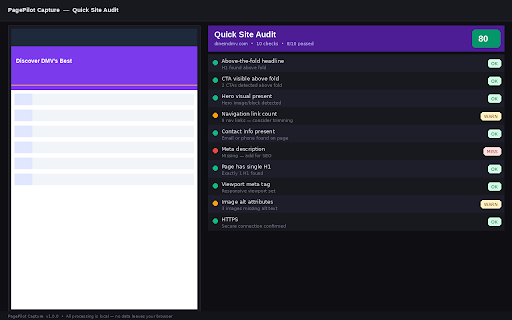

About
PagePilot Capture takes the screenshot you actually want — the whole page, not just the part that fits on screen.

Click the toolbar icon or press Alt+Shift+P. The extension automatically scrolls the page, captures each viewport section, and stitches everything together into one seamless image. A preview tab opens immediately when the capture is done.

From there, you have full control:
- Download as PNG — full-resolution, clean filename, instant.
- Export as PDF — tall pages are split automatically across A4 pages. No library, no watermarks.
- Copy to clipboard — paste directly into Figma, Notion, Slack, or any email client.

Built for marketers, designers, developers, and operators who need reliable page captures without friction.

FEATURES
─────────
✓ Full-page capture — scrolls and stitches automatically
✓ One-click from toolbar or keyboard shortcut (Alt+Shift+P)
✓ Preview before you export — see exactly what you captured
✓ PNG download with clean, datestamped filenames
✓ Multi-page PDF export — no external library required
✓ Clipboard copy — paste anywhere instantly
✓ Handles sticky headers — fixed/sticky elements are hidden during capture and fully restored after
✓ Quick Site Audit — run a 10-point conversion check on any captured page
✓ Supports lazy-loaded content — settle delay ensures images render before each frame is taken
✓ 100% local processing — screenshots never leave your browser
✓ No account, no sign-up, no watermarks

PRIVACY
───────
All processing happens locally inside your browser using Chrome's Canvas API. No screenshot data, no page content, and no personal information is sent to any server. See our full privacy policy at the support URL below.

PERMISSIONS
───────────
- activeTab — access the current tab when you trigger a capture
- tabs — open the preview tab and call Chrome's screenshot API
- scripting — inject the scroll-control script into the page
- storage — hold slice data temporarily between capture and preview
- clipboardWrite — copy the screenshot image to your clipboard
- downloads — save PNG and PDF files to your Downloads folder

KEYBOARD SHORTCUT
─────────────────
Default: Alt+Shift+P
Customizable at chrome://extensions/shortcuts

LIMITATIONS
───────────
- Cannot capture chrome:// system pages (browser security restriction)
- Very long pages (30,000px+) are capped at the capture limit
- Output canvas is capped at 16,384px height due to browser GPU limits
Technical
- Version
- 1.0.0
- Manifest
- V3
- Size
- 34.03KiB
- Min Chrome
- 88
- Languages
- 1
- Featured
- No
Metadata
- ID
- bncdedhnedojmmmbcmlmdedgocgnhgcd
- Developer ID
- u6dac4a041e2ddd2ab529ed363e82fa2e
- Developer Email
- [email protected]
- Created
- Apr 15, 2026
- Last Updated (Store)
- Apr 15, 2026
- Last Scraped
- Jun 13, 2026
- Website
- medspalumina.com
- Support URL
- https://tyris77.github.io/pagepilot-capture/
- Privacy Policy
- https://tyris77.github.io/pagepilot-capture/privacy.html
Data sourced from the Chrome Web Store · last verified Jun 13, 2026.