
AutoScroll
유튜브 동영상 탭에서 첫 영상으로 자동 스크롤, 톱으로 가기, 천천히 톱으로 가기 기능
As of June 2026, AutoScroll has 14 users in the Productivity category.
Usersdown 22.2 percent−22.2%
14
14
Ratingno change0%
—
— reviews
Reviewsno change0%
—
Version
2.0
Manifest V3
History
4 snapshotsTracking since Apr 18, 2026.
View as table
| Date | Users | Rating | Reviews | Version |
|---|---|---|---|---|
| Apr 18, 2026 | 18 | — | — | 2.0 |
| Apr 27, 2026 | 16 | — | — | 2.0 |
| May 23, 2026 | 15 | — | — | 2.0 |
| Jun 2, 2026 | 16 | — | — | 2.0 |
| Now | 14 | — | — | 2.0 |
Permissions & access
- Permissions
- tabsscriptingactiveTabstoragewindows
- Host access
- https://www.youtube.com/*
Screenshots


About
Autoscroll is a powerful Chrome extension designed for YouTube enthusiasts who want to quickly and easily access the earliest videos on any YouTube channel. Instead of endlessly scrolling through pages of videos, Autoscroll automates the process, taking you directly to a channel’s first uploads with minimal effort.

Key Features:
Automatic Scrolling: No more manual scrolling. With one click, the extension takes you straight to the bottom of a YouTube channel’s video list.
Time Saver: Ideal for users who want to explore the origin of their favorite content creators without wasting time scrolling through hundreds of videos.
User-Friendly: A simple and intuitive interface that makes navigating YouTube’s extensive video libraries hassle-free.
Efficient: Whether you're a researcher, content creator, or just curious about a channel's beginnings, this tool helps you find what you're looking for fast.

Why Install Autoscroll?
If you’ve ever tried to find the first video on a YouTube channel, you know how tedious and time-consuming it can be. Autoscroll eliminates the need for endless scrolling, saving you time and letting you focus on discovering the earliest videos of any creator with ease. It's a must-have tool for anyone interested in diving deep into a channel's history or exploring how a YouTuber started.
Technical
- Version
- 2.0
- Manifest
- V3
- Size
- 84.58KiB
- Min Chrome
- 88
- Languages
- 1
- Featured
- No
Metadata
- ID
- bmmcighajnkjaclccoiklcbmihldelni
- Developer ID
- u7150624a8ed54a0c36bd394da2de7ffb
- Developer Email
- [email protected]
- Created
- Sep 14, 2024
- Last Updated (Store)
- Dec 9, 2025
- Last Scraped
- Jun 2, 2026
- Website
- —
- Support URL
- —
- Privacy Policy
- https://nocomplain.tistory.com/5
Similar extensions
Alternatives to AutoScroll, ranked by description similarity.

ShortScroll - Shorts Auto Scroll
Effortlessly scroll through your favorite short videos with this extension, enhancing your viewing experience without interruptions!
16

Auto Scroll Extension
Automatically scrolls the webpage every 10 seconds.
1.0K
★ 3.9

Infinite Auto Scroll
Automatically scrolls a webpage with user-defined speed.
439
★ 5.0

Auto Scroll Extension
Automatically scroll webpages with customizable speed.
48
★ 5.0

YouTube Ad Auto Skipper
Auto-skips and mutes YouTube ads with customizable timing for different channels. No ad blocking.
106
★ 3.0

SmartSeek
Resume YouTube videos from the exact timestamp, even with history turned off.
83
★ 4.5
AutoScroll – Video Auto-Scroller
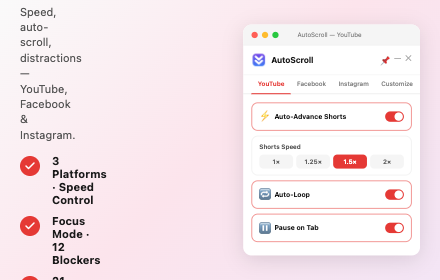
Auto-scroll extension for YouTube, Facebook & Instagram — smooth scrolling through video feeds with customizable speed.
266

Auto Scroll
Toggle smooth auto‑scroll with Shift+S and adjust speed on the fly.
430
Data sourced from the Chrome Web Store · last verified Jun 2, 2026.