
Worldwide Clock Extension
An extension that groups together clocks from all the time zones that are relevant to you and conveniently shows
As of June 2026, Worldwide Clock Extension has 20,000 users and a 4.46/5 rating from 13 reviews in the Accessibility category.
Usersno change0%
20.0K
20,000
Ratingno change0%
4.46
13 reviews
Reviewsno change0%
13
Version
1.0.2
Manifest V3
Permissions & access
- Permissions
- storage
- Host access
- *://*.worldwideclockextension.com/*
Screenshots
About
The ultimate extension that helps you stay connected with every part of the world. Perfect for people who's relatives or loved ones live overseas, or to those who conduct business internationally in their line of work.

By Clicking "add to Chrome", I accept and agree to installing Worldwide Clock Extension and setting Chrome New Tab search provider to Microsoft Bing as described by the services in terms of use https://onlineleonz.com/terms-of-use/ and privacy policy https://onlineleonz.com/privacy-policy/

How it works:
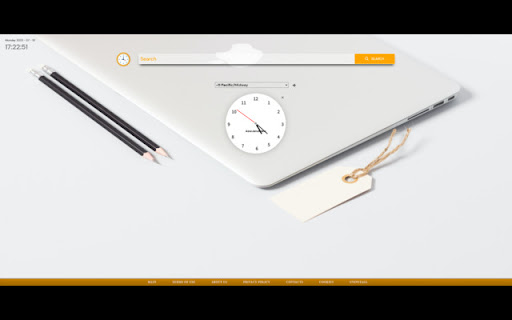
Users can choose which clocks they want to showcase every time they open a new window or tab by clicking on the drop down menu and choosing their desired time zones. After a time zone is chosen, users need to click the "+" sign on the right side of the menu to add the clock. Users can remove certain clocks by clicking the "X" button on the top right corner of each clock. The clocks chosen will carry over to new tabs or windows, so no need to choose them again every time a new one is opened.

Alongside the worldwide clocks, users will be show a digital clock on the top left corner of the screen which tells the current time in their location, as well as the current date.

You may uninstall the extension at any time
To remove our extension from Google Chrome:

1) Click on the three vertical dots icon in the upper right-hand corner of your Chrome browser
2) Go to "Settings"
3) In the left menu that appears, click on "Extensions"
4) From the list of installed Extensions, locate the extension you would like to uninstall
Technical
- Version
- 1.0.2
- Manifest
- V3
- Size
- 639KiB
- Min Chrome
- 88
- Languages
- 1
- Featured
- No
Metadata
- ID
- bmjohpdlphnlajmceppkgnfddpkbaanl
- Developer ID
- u8f5327e6eb112f88e1c7240a30d5eaba
- Developer Email
- [email protected]
- Created
- Jul 11, 2023
- Last Updated (Store)
- Jul 17, 2023
- Last Scraped
- Jun 8, 2026
- Website
- —
- Support URL
- https://onlineleonz.com/contacts/
- Privacy Policy
- https://onlineleonz.com/privacy-policy/
Similar extensions
Alternatives to Worldwide Clock Extension, ranked by description similarity.

Timezone
Timezone - track the time across the globe
25
★ 4.6

Timezones Live
Shows different timezones date and time on new tab.
4

Toolbar Clock Icon, World Clocks, Alerts & Alarms, Timer, Stopwatch, Notes
A digital clock that displays the current time in the extension icon. Set World Clocks, Alarms, Timers, Stopwatch, and create Notes.
447
★ 4.8
Quick Workspace
Access popular Google Workspace instantly from your new tab page!
161
★ 5.0

What Time Is It There?
Easily see the localtime of many countries
128
★ 5.0

MySites
MySites is a convenient Chrome extension which pre-organizes the most frequently visited websites.
10.0K
★ 4.9

High-Custom New Tab
Custom New Tab
Custom New Tab control for Chrome. Set custom new tab of your Chrome browser. It is minimalistic page without news…
20.0K
★ 4.2

Grimmli
Dictionary and Translation in your browser
3
Data sourced from the Chrome Web Store · last verified Jun 8, 2026.