
TextFromImage - Extract text from images locally
Copy text from web images, files & clipboard. Local OCR (EN+ES), optional crop, copy or download. No cloud. By AI4Context.
As of June 2026, TextFromImage - Extract text from images locally has 2 users in the Productivity category.
Usersno change0%
2
2
Ratingno change0%
—
— reviews
Reviewsno change0%
—
Version
1.0.0
Manifest V3
History
3 snapshotsTracking since May 28, 2026.
View as table
| Date | Users | Rating | Reviews | Version |
|---|---|---|---|---|
| May 28, 2026 | — | — | — | 1.0.0 |
| Jun 4, 2026 | — | — | — | 1.0.0 |
| Jun 9, 2026 | 1 | — | — | 1.0.0 |
| Now | 2 | — | — | 1.0.0 |
Permissions & access
- Permissions
- storagecontextMenuswindows
- Host access
- None declared
Screenshots




About
TextFromImage helps you copy readable text from images on your device—without sending them to the cloud.

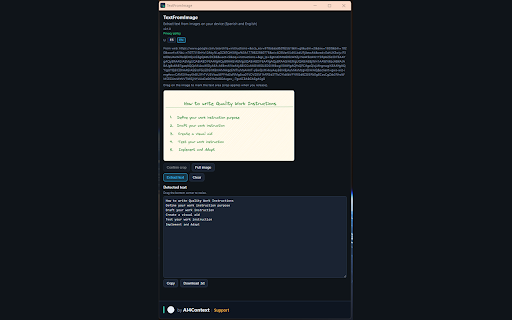
Open the floating panel from the toolbar icon: drop an image, paste from the clipboard (Ctrl+V), or pick a local file. Right-click any image on a web page and choose “Extract text from image (TextFromImage)”. Optionally drag on the preview to crop a text block, then extract. Copy the result or download a .txt file.

What you get
• Local OCR with Tesseract (English + Spanish bundled).
• Web images via context menu (optional per-site permission when required).
• Optional crop before OCR for better accuracy.
• Copy to clipboard or download as .txt.
• Resizable image preview and result areas.
• UI in Spanish or English.

What it does not do
• No cloud OCR APIs—processing stays in your browser.
• No developer backend; images and extracted text are not uploaded to AI4Context servers.
• It does not translate text (planned as a separate extension).

Tips
• For posters or book covers, crop tightly to the text block before extracting.
• The first OCR run may take a few seconds while language models load locally.

Privacy policy: https://mapicallo.github.io/textFromImage/privacy.html
Technical
- Version
- 1.0.0
- Manifest
- V3
- Size
- 24.67MiB
- Min Chrome
- 88
- Languages
- 1
- Featured
- No
Metadata
- ID
- bmjhbollcbphjidnhlegiiiegbnicghg
- Developer ID
- ud1978c43bbed3ccdd651b78227feeac6
- Developer Email
- [email protected]
- Created
- May 27, 2026
- Last Updated (Store)
- May 27, 2026
- Last Scraped
- Jun 9, 2026
- Website
- https://ai4context.com/
- Privacy Policy
- https://mapicallo.github.io/textFromImage/privacy.html
Data sourced from the Chrome Web Store · last verified Jun 9, 2026.