
OroCommerce DevTools
The ultimate toolkit for OroCommerce developers and QA: Smart Form Filler, A11y & SEO Inspectors, HTML Validator, and more.
As of June 2026, OroCommerce DevTools has 31 users and a 5.00/5 rating from 1 reviews in the Developer Tools category.
Usersup 72.2 percent+72.2%
31
31
Ratingno change0%
5.00
1 reviews
Reviewsno change0%
1
Version
3.0.2
Manifest V3
90-day change · In the last 90 days this extension 2 version updates, changed permissions.
History
8 snapshotsTracking since Apr 20, 2026.
View as table
| Date | Users | Rating | Reviews | Version |
|---|---|---|---|---|
| Apr 20, 2026 | 18 | 5.00 | 1 | 2.1.0 |
| Apr 25, 2026 | 25 | 5.00 | 1 | 3.0.1 |
| May 9, 2026 | 29 | 5.00 | 1 | 3.0.1 |
| May 14, 2026 | 28 | 5.00 | 1 | 3.0.1 |
| May 20, 2026 | 27 | 5.00 | 1 | 3.0.1 |
| May 26, 2026 | 25 | 5.00 | 1 | 3.0.1 |
| Jun 2, 2026 | 26 | 5.00 | 1 | 3.0.1 |
| Jun 8, 2026 | 28 | 5.00 | 1 | 3.0.1 |
| Now | 31 | 5.00 | 1 | 3.0.2 |
Changelog
- Jun 8, 2026description
OroCommerce DevTools is a productivity-focused Chrome extension for QA engineers, developers, and automation specialists working with OroCommerce and modern web applications.

It helps teams fill forms faster, validate page quality earlier, and keep repetitive test workflows consistent across environments.

What's new in v3.0.0:

- Rebranding: OroCommerce Forms Filler is now OroCommerce DevTools.
- Domain-scoped dark mode controls for supported sites.
- Accessibility checks powered by axe-core with issue tracking and navigation.
- SEO analyzer with automated scan flow and browser/tab badge updates.
- HTML validator powered by htmlhint for rendered page HTML validation.
- Extension theming system with 8 selectable UI themes.
- Technical upgrade: migrated from npm to pnpm and updated core dependencies.

Core features:

Universal custom forms:
- Create and manage custom form configs for any website.
- Target fields with CSS selectors or XPath expressions.
- Reuse form mappings across multiple projects and domains.

OroCommerce-specific productivity:
- Generate and manage Users, Addresses, Products, and Integrations test data.
- Speed up common OroCommerce form scenarios during manual and automated QA.

Automated quality analysis:
- Accessibility tab: run axe-core checks and review issues directly on the page.
- SEO tab: run SEO scans with tab-level status visibility.
- HTML validator tab: validate rendered HTML using htmlhint.
- Configurable domain scope per analyzer with auto-check support.

Utilities:
- JSON Formatter: fast formatting, syntax highlighting, collapsible structure, clickable links.
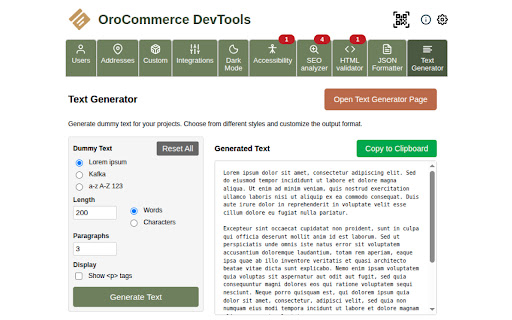
- Text Generator: generate content by words/chars with paragraph and formatting options.
- QR Code generation: instantly share current URLs across devices.

Theming and UX:

- 8 built-in visual themes, including Refreshing Teal and newer 2026-inspired palettes.
- Consistent themed controls across popup tabs and settings pages.
OroCommerce DevTools is a productivity-focused Chrome extension for QA engineers, developers, and automation specialists working with OroCommerce and modern web applications. It helps teams fill forms faster, validate page quality earlier, and keep repetitive test workflows consistent across environments. What's new in v3.0.2: - Added CSS styling injection for OroCommerce storefronts - Added 8 predefined storefront styling presets - Added AI-powered theme generation based on natural language prompts - Added support for multiple AI providers: - Gemini 2.5 Flash with a built-in key - OpenRouter with a built-in key and 13 free models - OpenRouter custom API key support for using any supported model - OpenAI support with the user’s own API key - Added the ability to review, edit, and apply AI-generated styles directly to the storefront - Improved the user experience across popup tabs and settings pages Core features: Universal custom forms: - Create and manage custom form configs for any website. - Target fields with CSS selectors or XPath expressions. - Reuse form mappings across multiple projects and domains. OroCommerce-specific productivity: - Generate and manage Users, Addresses, Products, and Integrations test data. - Speed up common OroCommerce form scenarios during manual and automated QA. CSS styling injection and AI theme creation: - Inject predefined CSS styling presets into OroCommerce storefronts - Apply ready-to-use storefront styles without code changes or deployment - Generate new storefront styles with AI using natural language prompts - Review, edit, and apply generated styles directly from the extension - Quickly prototype branding ideas, design concepts, and storefront customization options Automated quality analysis: - Accessibility tab: run axe-core checks and review issues directly on the page. - SEO tab: run SEO scans with tab-level status visibility. - HTML validator tab: validate rendered HTML using htmlhint. - Configurable domain scope per analyzer with auto-check support. Utilities: - JSON Formatter: fast formatting, syntax highlighting, collapsible structure, clickable links. - Text Generator: generate content by words/chars with paragraph and formatting options. - QR Code generation: instantly share current URLs across devices. Theming and UX: - 8 built-in visual themes, including Refreshing Teal and newer 2026-inspired palettes. - Consistent themed controls across popup tabs and settings pages. - Apr 20, 2026short_description
A productivity extension for OroCommerce form filling
The ultimate toolkit for OroCommerce developers and QA: Smart Form Filler, A11y & SEO Inspectors, HTML Validator, and more.
- Apr 20, 2026name
OroCommerce Forms Filler
OroCommerce DevTools
- Apr 20, 2026permissions
activeTab, storage, scripting
activeTab, storage, scripting, tabs
- Apr 20, 2026description
OroCommerce Forms Filler is a powerful productivity extension designed for QA engineers, developers, and automation specialists working with OroCommerce and any web application. This tool revolutionizes testing and development processes by automatically filling out forms with predefined or randomized data, saving time and effort across any website.

🎯 NEW in v2.1.0: Game-Changing Features

Universal Form Filling
- Fill ANY form on ANY website using CSS selectors and XPath expressions
- Define form mappings once and reuse them across multiple sites
- Perfect for cross-platform testing and automation workflows

Instant QR Code Generation
- Generate QR codes instantly for any page URL with one click
- Perfect for sharing test URLs between devices and team members
- Essential for mobile testing and cross-device workflows
- Streamlines collaboration and URL sharing in development teams

Features:

Universal Custom Forms
- Custom Form Creation: Build and manage custom form configurations for any website
- CSS/XPath Selector Support: Use powerful CSS selectors and XPath expressions to target specific form fields
- Cross-Site Compatibility: Define form mappings once and use them across multiple platforms

OroCommerce Specialized Features
- Users, Addresses, Products, and Integrations: Create, update, delete of Users, Addresses, Products, and Integrations. The data can be used for filling forms in OroCommerce.
- Auto-Fill Sign-Up Form: Support for auto-filling the Sign-Up form on the storefront
- Auto-Fill Create User Form: Auto-fill functionality for the Create User form on the storefront

JSON Formatter
The JSON Formatter feature provides a fast and efficient way to format and view JSON data. It includes:
- Fast Performance: Optimized for speed, even on very long JSON pages.
- Syntax Highlighting: Enhanced readability with syntax highlighting.
- Collapsible Trees: Easily navigate JSON structures with collapsible trees and indent guides.
- Clickable URLs: URLs within JSON are now clickable for quick access.
- Local Storage: User JSON data is stored locally, allowing it to persist even after reopening the extension.
- Versatile Usage: Works both within the extension and on the settings extension page.

Text Generator
The Text Generator feature allows users to generate text with specified character or word limits. It includes:
- Flexible Text Generation: Generate text with specified character or word limits.
- Paragraph Formation: Automatically splits text into paragraphs based on user settings.
- Punctuation and Capitalization: Ensures proper punctuation and capitalization for generated text.
- Tag Display Option: Option to display generated text with HTML paragraph tags for better formatting.
OroCommerce DevTools is a productivity-focused Chrome extension for QA engineers, developers, and automation specialists working with OroCommerce and modern web applications.

It helps teams fill forms faster, validate page quality earlier, and keep repetitive test workflows consistent across environments.

What's new in v3.0.0:

- Rebranding: OroCommerce Forms Filler is now OroCommerce DevTools.
- Domain-scoped dark mode controls for supported sites.
- Accessibility checks powered by axe-core with issue tracking and navigation.
- SEO analyzer with automated scan flow and browser/tab badge updates.
- HTML validator powered by htmlhint for rendered page HTML validation.
- Extension theming system with 8 selectable UI themes.
- Technical upgrade: migrated from npm to pnpm and updated core dependencies.

Core features:

Universal custom forms:
- Create and manage custom form configs for any website.
- Target fields with CSS selectors or XPath expressions.
- Reuse form mappings across multiple projects and domains.

OroCommerce-specific productivity:
- Generate and manage Users, Addresses, Products, and Integrations test data.
- Speed up common OroCommerce form scenarios during manual and automated QA.

Automated quality analysis:
- Accessibility tab: run axe-core checks and review issues directly on the page.
- SEO tab: run SEO scans with tab-level status visibility.
- HTML validator tab: validate rendered HTML using htmlhint.
- Configurable domain scope per analyzer with auto-check support.

Utilities:
- JSON Formatter: fast formatting, syntax highlighting, collapsible structure, clickable links.
- Text Generator: generate content by words/chars with paragraph and formatting options.
- QR Code generation: instantly share current URLs across devices.

Theming and UX:

- 8 built-in visual themes, including Refreshing Teal and newer 2026-inspired palettes.
- Consistent themed controls across popup tabs and settings pages.
Permissions & access
- Permissions
- activeTabstoragescriptingtabs
- Host access
- <all_urls>
Screenshots




About
OroCommerce DevTools is a productivity-focused Chrome extension for QA engineers, developers, and automation specialists working with OroCommerce and modern web applications.

It helps teams fill forms faster, validate page quality earlier, and keep repetitive test workflows consistent across environments.

What's new in v3.0.2:

- Added CSS styling injection for OroCommerce storefronts
- Added 8 predefined storefront styling presets
- Added AI-powered theme generation based on natural language prompts
- Added support for multiple AI providers:
    - Gemini 2.5 Flash with a built-in key
    - OpenRouter with a built-in key and 13 free models
    - OpenRouter custom API key support for using any supported model
    - OpenAI support with the user’s own API key
- Added the ability to review, edit, and apply AI-generated styles directly to the storefront
- Improved the user experience across popup tabs and settings pages

Core features:

Universal custom forms:
- Create and manage custom form configs for any website.
- Target fields with CSS selectors or XPath expressions.
- Reuse form mappings across multiple projects and domains.

OroCommerce-specific productivity:
- Generate and manage Users, Addresses, Products, and Integrations test data.
- Speed up common OroCommerce form scenarios during manual and automated QA.

CSS styling injection and AI theme creation:
- Inject predefined CSS styling presets into OroCommerce storefronts
- Apply ready-to-use storefront styles without code changes or deployment
- Generate new storefront styles with AI using natural language prompts
- Review, edit, and apply generated styles directly from the extension
- Quickly prototype branding ideas, design concepts, and storefront customization options

Automated quality analysis:
- Accessibility tab: run axe-core checks and review issues directly on the page.
- SEO tab: run SEO scans with tab-level status visibility.
- HTML validator tab: validate rendered HTML using htmlhint.
- Configurable domain scope per analyzer with auto-check support.

Utilities:
- JSON Formatter: fast formatting, syntax highlighting, collapsible structure, clickable links.
- Text Generator: generate content by words/chars with paragraph and formatting options.
- QR Code generation: instantly share current URLs across devices.

Theming and UX:

- 8 built-in visual themes, including Refreshing Teal and newer 2026-inspired palettes.
- Consistent themed controls across popup tabs and settings pages.
Technical
- Version
- 3.0.2
- Manifest
- V3
- Size
- 1.22MiB
- Min Chrome
- 88
- Languages
- 1
- Featured
- No
Metadata
- ID
- bmegcalhaedjopcbbbmjecpimcajbbci
- Developer ID
- ubd83e6e890abb36785743847878fdf1c
- Developer Email
- [email protected]
- Created
- Nov 27, 2024
- Last Updated (Store)
- Jun 8, 2026
- Last Scraped
- Jun 8, 2026
- Website
- —
- Support URL
- —
Similar extensions
Alternatives to OroCommerce DevTools, ranked by description similarity.
Form Filler
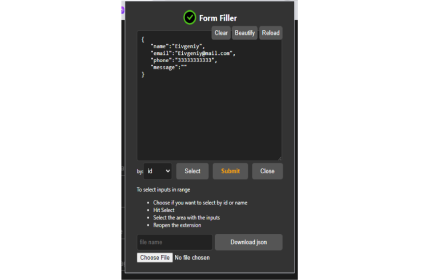
Automate form filling, extract and generate JSON data, and simplify QA testing with Form Filler
363
★ 4.0

Form Filler Extension
Auto-fill forms with realistic dummy data
28
★ 5.0

FormFiller
Intelligent form filling with smart field detection. Save time with context-aware data generation for any web form.
75
★ 5.0

SupaFill
Fill everything in a snap.
97
★ 5.0

AutoFill Pro
AutoFill Pro: The ultimate form filler for developers & QA. Automate data entry, replay complex form states, and speed up testing.
101

autoformx
An extension that fills your form quickly and easily
3

QuickFill
Instantly fill inputs with meaningful test data - built for developers and QA engineers!
8
★ 5.0

Filler
Fill forms with fake data, save profiles, and refill instantly.
49
★ 5.0
Data sourced from the Chrome Web Store · last verified Jun 8, 2026.