
Search in Incognito
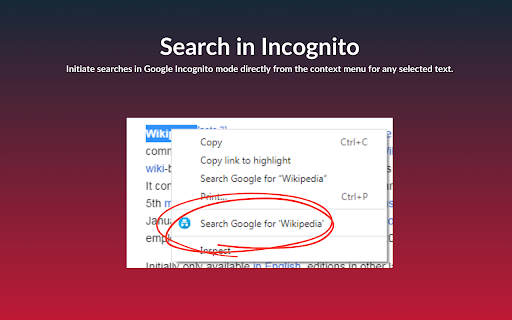
Initiate searches in Google Incognito mode directly from the context menu for any selected text.
As of June 2026, Search in Incognito has 44 users in the Productivity category.
Usersup 22.2 percent+22.2%
44
44
Ratingno change0%
—
— reviews
Reviewsno change0%
—
Version
0.1
Manifest V3
History
3 snapshotsTracking since Apr 23, 2026.
View as table
| Date | Users | Rating | Reviews | Version |
|---|---|---|---|---|
| Apr 23, 2026 | 36 | — | — | 0.1 |
| May 12, 2026 | 39 | — | — | 0.1 |
| Jun 7, 2026 | 41 | — | — | 0.1 |
| Now | 44 | — | — | 0.1 |
Permissions & access
- Permissions
- contextMenuswindows
- Host access
- None declared
Screenshots
About
Search in Incognito offers a swift and private way to search the web directly from any webpage you’re browsing. By enabling you to instantly search for highlighted text in Google using Incognito mode, it ensures your searches remain confidential and your browsing experience seamless.

Key Features:
- Enhanced Privacy: Initiate searches in Google Incognito mode directly from the context menu for any selected text, keeping your search activities private.

- Simple and Intuitive: Avoid the hassle of manual steps to search in privacy. With just a right-click, transform your browsing experience into one that prioritizes convenience and efficiency.

- Efficient Access: Utilize the custom context menu item “Search Google for ‘%s'” to start your private searches without interrupting your browsing flow.

- Minimalist and Fast: Designed to operate discreetly in the background, our extension is lightweight, ensuring that your browser’s performance remains optimal.

How to Use Search in Incognito:
- Install the extension from the Chrome Web Store.
- Highlight text on any webpage that you wish to search.
- Right-click the selected text and choose “Search Google for ‘%s'” from the context menu.
- An Incognito window will instantly open with your Google search results, maintaining your privacy.

Why Search in Incognito?

Privacy is a necessity in the digital era. Whether you’re conducting sensitive research, planning a surprise, or simply prefer keeping your searches to yourself, Search in Incognito is your go-to tool for maintaining online privacy. It offers an effortless way to ensure your search queries don’t influence future search suggestions or saved history.
Technical
- Version
- 0.1
- Manifest
- V3
- Size
- 18.52KiB
- Min Chrome
- 88
- Languages
- 1
- Featured
- No
Metadata
- ID
- bljeigdihghfpmanlibhencafbaohbef
- Developer ID
- uc9a8af0ef29a78fe26a24c17f2f8ff8b
- Developer Email
- [email protected]
- Created
- Feb 9, 2024
- Last Updated (Store)
- Feb 9, 2024
- Last Scraped
- Jun 7, 2026
- Website
- —
- Support URL
- —
- Privacy Policy
- —
Similar extensions
Alternatives to Search in Incognito, ranked by description similarity.

Go Incognito!
Go Incognito is a convenient and user-friendly Google extension that streamlines the process of searching in incognito mode. With…
34
★ 5.0

Searchin' Private Secure Browsing
Your Ultimate Extension for Safe and Convenient Web Browsing
65

Text Selection Search
Search selected text in Google
27

Search with DuckDuckGo
Search with DuckDuckGo in Chrome
3.0K
★ 2.6

Right Click Search Incognito
Add right click menu option: search highlighted text in incognito
372
★ 4.3

Open Incognito
Tools for opening tabs in incognito mode
2

New incognito window
Provides a quick access to the secure incognito mode.
718
★ 5.0
Select and Search
Select and Search on Google
6
Data sourced from the Chrome Web Store · last verified Jun 7, 2026.