One-Click-Copy
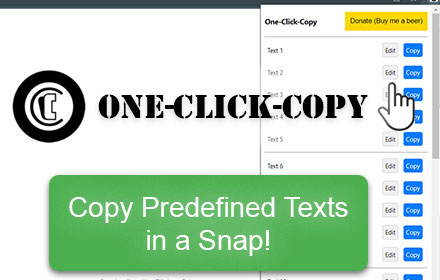
This One Click Copy extension will copy predefined text. Developed by Thomas Santiago
As of June 2026, One-Click-Copy has 796 users and a 4.33/5 rating from 6 reviews in the Productivity category.
Usersup 5.9 percent+5.9%
796
796
Ratingno change0%
4.33
6 reviews
Reviewsno change0%
6
Version
1.4.0
Manifest V3
History
8 snapshotsTracking since Apr 1, 2026.
View as table
| Date | Users | Rating | Reviews | Version |
|---|---|---|---|---|
| Apr 1, 2026 | 752 | 4.33 | 6 | 1.4.0 |
| Apr 10, 2026 | 798 | 4.33 | 6 | 1.4.0 |
| Apr 22, 2026 | 781 | 4.33 | 6 | 1.4.0 |
| May 2, 2026 | 804 | 4.33 | 6 | 1.4.0 |
| May 10, 2026 | 788 | 4.33 | 6 | 1.4.0 |
| May 19, 2026 | 841 | 4.33 | 6 | 1.4.0 |
| May 28, 2026 | 816 | 4.33 | 6 | 1.4.0 |
| Jun 6, 2026 | 798 | 4.33 | 6 | 1.4.0 |
| Now | 796 | 4.33 | 6 | 1.4.0 |
Permissions & access
- Permissions
- clipboardWritestorage
- Host access
- None declared
Screenshots

About
One-Click-Copy Basic: Your Clipboard Companion, Now Even Better!

Tired of repetitive copy-pasting? "One-Click-Copy" is here to streamline your workflow! With the newly updated version 1.4.0, managing and accessing your most-used text snippets has never been easier or more efficient.

(Upgrade to "One-Click-Copy Enhanced": Experience even more powerful clipboard management features with our enhanced version. Enjoy instant delete, undo capabilities, pop-out access, additional predefined text snippets, and seamless CSV import/export—all designed for the ultimate convenience and steadfast data privacy. Discover how "One-Click-Copy Enhanced" can transform your productivity. Take a look today by visiting:
https://chrome.google.com/webstore/detail/one-click-copy-2/jbjmjbhcgjnigggmonfeahdekhkemkip)

What's New in v1.4.0:
• Minor Bug Fixed

What's New in v1.3.0:
• Bug Fixed: Corrected an issue with exporting and importing text snippets containing commas.
• Added: Pop-out window feature
• Added: Logo in header
• Added: Direct link to "One-Click-Copy Enhanced" Chrome Web Store page

What's New in v1.2.1:
• Text Overflow Bug Fixed

What's New in v1.2:
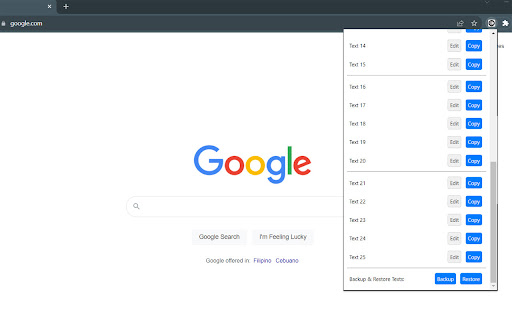
• Expanded Storage: Now save up to 25 predefined text snippets!
• Backup/Restore Feature: Safeguard your saved texts by exporting to CSV and restore them whenever needed. For peace of mind, it's best to use the Backup feature once you've finalized all your predefined texts.
• New Logo: Introducing our refreshed One-Click-Copy logo!
• Donate Button: Love the extension? You can now support us by buying us a beer through the new Donate button.

Key Features:
• Save Time: No more manual searching and copying. One click, and your text is in the clipboard!
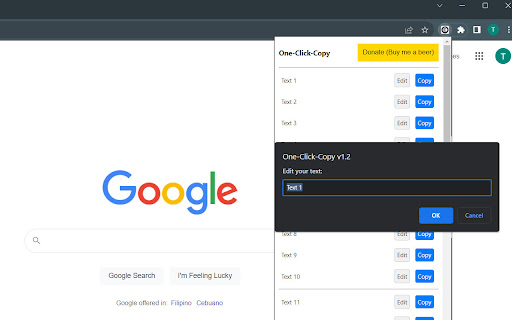
• Easy Management: Easily edit your saved texts right from the extension popup.
• Flexible Pop-out Window: Our pop-out window feature allows you to use "One-Click-Copy" even when you're not in your browser, making it easy to manage and use your snippets across different applications and tasks.
• Sync Across Devices: Changes you make on one device are automatically updated across all your Chrome instances.
• Data Privacy: Your snippets are yours alone. We do not collect any personal data or text snippets.

How to Use:
1. Open the extension popup by clicking the "One-Click-Copy" icon next to your address bar.
2. Use the "Edit" buttons to save your frequently used text snippets.
3. Click the "Copy" button next to each text to copy it to your clipboard.

Tips:
• Optimized for Multitasking: For Windows users with smaller screens, we recommend using Microsoft PowerToys' "Always On Top" feature to pin the "One-Click-Copy Basic" pop-out window. This allows you to keep your snippets visible and accessible while working across different applications. Enhance your productivity by downloading PowerToys at Github: https://github.com/microsoft/PowerToys

Made for convenience and efficiency, "One-Click-Copy" is the clipboard manager you didn't know you needed. Say goodbye to tedious routines and hello to a simplified, productive day!
Technical
- Version
- 1.4.0
- Manifest
- V3
- Size
- 21.64KiB
- Min Chrome
- 88
- Languages
- 1
- Featured
- Yes
Metadata
- ID
- bliihfiaeccnmellccdkmengggifnagn
- Developer ID
- u66e34a605006343d9ee531f8a795203e
- Developer Email
- [email protected]
- Created
- Sep 17, 2023
- Last Updated (Store)
- Jan 9, 2026
- Last Scraped
- Jun 6, 2026
- Website
- mywebfix.com
- Support URL
- https://mywebfix.com/
- Privacy Policy
- —
Similar extensions
Alternatives to One-Click-Copy, ranked by description similarity.
One-Click-Copy Enhanced
One Click Copy Enhanced: A simple tool to save and copy frequently used text snippets, saving you time and effort.
330
★ 4.0

Easy Copy Paste Text
Easily copy and manage text snippets from web pages with rich text support and Google Drive sync.
312
★ 5.0

CopyPad Pro
A lightweight notepad for managing and copying text snippets
18

ClipCaddy
Smart Clipboard Manager - Store and organize multiple clipboard items
—
★ 1.0

Clipboard Manager - Smart History Manager
Seamlessly capture, search, and manage your clipboard history. Secure, private, and efficient clipboard manager for productivity.
4

Clipboard PRO - Copy and Paste
Automatically saves all texts copied in the browser. Simple, fast and useful: copy again with one click and paste wherever you want.
96

Clipboard History – Best Clipboard Manager for Chrome
Automatically saves everything you copy. View, reuse, and manage your clipboard history easily.
6
★ 5.0

PasteIt
Capture multiple copied text snippets and use them to fill web forms.
83
★ 5.0
Data sourced from the Chrome Web Store · last verified Jun 6, 2026.