
Rally Time
Easily convert developer time to Rally Actual Points.
As of June 2026, Rally Time has 3 users in the Developer Tools category.
Usersdown 40.0 percent−40.0%
3
3
Ratingno change0%
—
— reviews
Reviewsno change0%
—
Version
1.0.0
Manifest V3
History
3 snapshotsTracking since Apr 23, 2026.
View as table
| Date | Users | Rating | Reviews | Version |
|---|---|---|---|---|
| Apr 23, 2026 | 5 | — | — | 1.0.0 |
| May 12, 2026 | 4 | — | — | 1.0.0 |
| Jun 7, 2026 | 4 | — | — | 1.0.0 |
| Now | 3 | — | — | 1.0.0 |
Permissions & access
- Permissions
- storage
- Host access
- None declared
Screenshots
About
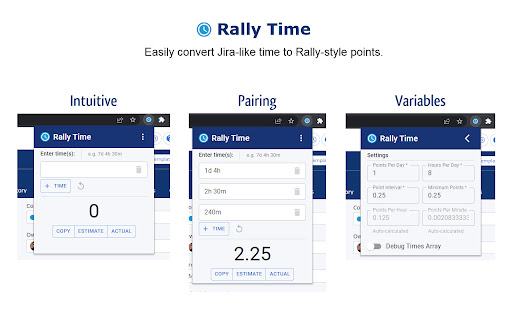
Easily convert Jira-like developer time to Rally-style points on any User Story.

Features:
- Enter shorthand time like "1d 5h 30m"
- Enter multiple times for group pairing
- Copy calculated points
- Set calculated points to Estimated Plan or Actual Points fields on a User Story
- Customize variables for calculating points in settings
- Saves settings to Chrome storage

Usage:
- Please refresh any old Rally tab that was opened before the plugin installed
- Pin the Rally Time extension to your Chrome for quick and easy access
- Click the Rally Time extension to open the pop-up
- Enter times in the input box, such as "7d 4h 30m"
- Currently only (d)ays, (h)ours, and (m)inutes are recognized
- You can enter unlimited times in a single input box, or click the "+ Time" button to add more input boxes, either way it will calculate to the same total result
- Use the Garbage button to clear individual input boxes or use the Reset button to clear all input boxes
- The final calculated points is the large number at the bottom
- The Copy button will copy the calculated score to your clipboard
- The Estimate button will send the calculated score to a "Plan Estimate" field - only on a full User Story Details page in Rally
- The Actual button will send the calculated score to a "Actual Points" field - only on a full User Story Details page in Rally
- For Agile point calculation settings, click the three dots button on the title bar of the pop-up
- From there, you can set the Points Per Day, Hours Per Day, Point Interval, and Minimum Points.
- Points Per Day: The equivalent of how many points a total work day is in your agile environment
- Hours Per Day: The total work hours per working day in your agile environment
- Point Interval: An interval at which points must be rounded closest to
- Minimum Points: The minimum points before zero that are allowed in your agile environment

Debugging:
- In the settings page of the pop-up, you can select the toggle "Debug Times Array" which will display an ordered list of the strings being inputted on the main pop-up page
- Right-click inspect element on your overall webpage and open the Console tab and look for a "[Rally Time] Content script started" message, this means that the content script to find the Rally fields will be available to run
- Right-click inspect element on the pop-up's page and open the Console tab to see calculation and storage messages in real-time as input is typed in either the main or settings page of the pop-up box

Copyright Notices:
*This extension is not affiliated with Jira which is a copyrighted product under Atlassian.
*This extension is not affiliated with Rally which is a copyrighted product under Broadcom, Inc.
Technical
- Version
- 1.0.0
- Manifest
- V3
- Size
- 642KiB
- Min Chrome
- 88
- Languages
- 1
- Featured
- No
Metadata
- ID
- blhcejchgndcipkllapoaifbeopdmill
- Developer ID
- ue7d74f709422f906e186c244a3625bda
- Developer Email
- [email protected]
- Created
- Jan 21, 2023
- Last Updated (Store)
- Feb 15, 2023
- Last Scraped
- Jun 7, 2026
- Website
- —
- Support URL
- —
- Privacy Policy
- —
Similar extensions
Alternatives to Rally Time, ranked by description similarity.

Jira Time Logger
Bulk log time entries to Jira Cloud from CSV files.
7
★ 5.0

JIRA Pulse Dashboard
Track and analyze team performance metrics from JIRA
18
★ 3.0

JIRA Kanban Story Points
This extension calculates the total number of story points per column on a JIRA Kanban board.
6

Spicker - TopTracker Time Analytics
Enhance your TopTracker experience with advanced time tracking analytics, custom hour requirements, and detailed reports.
22
★ 5.0

Jira Assistant: Worklog, Sprint report, etc
Help to track & upload work done on a Jira Ticket on timely basis and generate Worklog, Sprint and other custom reports.
80.0K
★ 4.8

SLA Time Tracker
Track workload deadlines with SLA-aware timers and keeps you on schedule
62
★ 5.0

Time Calculator
Quickly and easily add up hours and minutes.
32

Jira Release Manager
Centralize Jira release management in a Chrome side panel—create, edit, schedule, and archive releases quickly and efficiently.
16
Data sourced from the Chrome Web Store · last verified Jun 7, 2026.