
GitHub Media Formatter
Format image and video markdown in GitHub PR comments
As of June 2026, GitHub Media Formatter has — users in the Developer Tools category.
Usersno change0%
—
—
Ratingno change0%
—
— reviews
Reviewsno change0%
—
Version
1.0
Manifest V3
History
1 snapshotsTracking since Apr 20, 2026.
Not enough history yet for this metric — the chart fills in as we collect more snapshots.
View as table
| Date | Users | Rating | Reviews | Version |
|---|---|---|---|---|
| Apr 20, 2026 | 1 | — | — | 1.0 |
| Now | — | — | — | 1.0 |
Permissions & access
- Permissions
- None declared
- Host access
- https://github.com/*
Screenshots


About
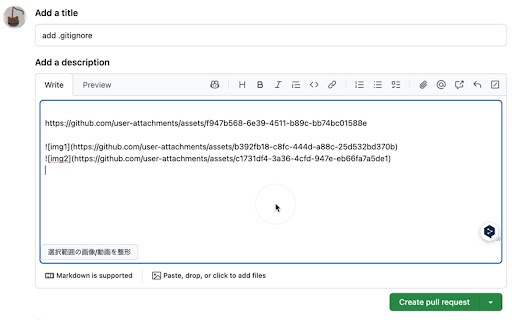
A Chrome extension that converts image Markdown in GitHub PR comments and Issues.

Features

 * Adds a Format Selected Images button to the text area on GitHub PR pages.
 * Select text and click the button to transform any image Markdown within your selection as follows:
 * If there is only 1 image: convert it to <img src="..." width="300">
 * If there are 2 images: convert them into a table with one row and two columns
 * If there are 3 images: convert them into a table with one row and three columns
 * If there are 4 or more images: display an error message

How to Use

1.	Open the comment area on a GitHub pull request or issue.
2.	Select the text that includes image Markdown.
3.	Click the Format Selected Images button (found on the Markdown toolbar or below the text area).
4.	The image Markdown within your selection will be automatically formatted.
Technical
- Version
- 1.0
- Manifest
- V3
- Size
- 38.48KiB
- Min Chrome
- 88
- Languages
- 1
- Featured
- No
Metadata
- ID
- blcmejdjjlkcioamdclfaipepcefokmn
- Developer ID
- u4eb9391e00b0f75eeac63fed1239f30e
- Developer Email
- [email protected]
- Created
- Apr 6, 2025
- Last Updated (Store)
- Apr 6, 2025
- Last Scraped
- Jun 6, 2026
- Website
- —
Similar extensions
Alternatives to GitHub Media Formatter, ranked by description similarity.

Github Comment Helper
Enhance GitHub comments with HTML media conversion and markdown table formatting tools
11
★ 5.0

GitHub to Markdown
Convert GitHub discussions, issues, and pull requests to clean, copyable markdown with one click
69
★ 5.0

GitHub Markdown Helper
Quickly format text in GitHub using right-click options. This extension helps in formatting plain text to markdown syntax
70
★ 5.0

Markdown Customizer
Open source tool for customizing markdown
3

GitHub Markdown Exporter
Export GitHub issues, discussions, pull requests, and wiki pages to markdown format
60
★ 5.0

GitHub Conventional Comments
A browser extension to help you write conventional comments.
100
★ 5.0

Github PR Tables
This extension renders a new button in github PR editor that allows pre-existing attachments to be placed inside a markdown grid of…
7

Copy as Markdown
Convert selected webpage content to Markdown and copy to clipboard
6
Data sourced from the Chrome Web Store · last verified Jun 6, 2026.