
Reverso Extractor
Facilitate the isolation of reverso examples for the purposes of creating flashcards to be uploaded to Anki or Quizlet
As of June 2026, Reverso Extractor has 485 users and a 5.00/5 rating from 1 reviews in the Education category.
Usersup 4.3 percent+4.3%
485
485
Ratingno change0%
5.00
1 reviews
Reviewsno change0%
1
Version
0.0.6
Manifest V3
History
3 snapshotsTracking since Apr 23, 2026.
View as table
| Date | Users | Rating | Reviews | Version |
|---|---|---|---|---|
| Apr 23, 2026 | 465 | 5.00 | 1 | 0.0.6 |
| May 12, 2026 | 484 | 5.00 | 1 | 0.0.6 |
| Jun 7, 2026 | 494 | 5.00 | 1 | 0.0.6 |
| Now | 485 | 5.00 | 1 | 0.0.6 |
Permissions & access
- Permissions
- storage
- Host access
- None declared
Screenshots

About
TL;DR: Create a list of Reverso Context example sentences and translations that can easily be imported into Anki or Quizlet

Note: this extension does not collect any user data. It is completely free.

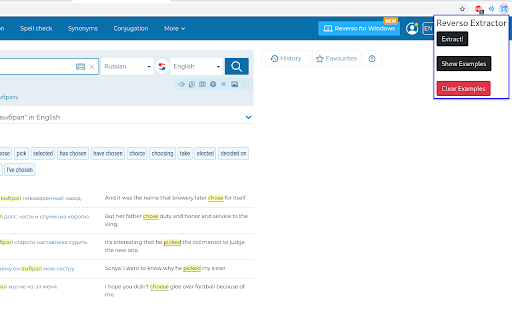
1) Go to Reverso Context and search a word or phrase in the language you are learning.
2) Click the extension's icon in the Chrome extensions toolbar and run the extension by pressing the "Extract!" button in the extension's popup window (or run the extension by pressing ctrl+m). At the top of the page, you will now see a list of examples and translations in an easy-to-read format in order of increasing length. Each example/translation pair will have a checkbox next to it.
3) Check the boxes of the examples you wish to turn into flashcards and press the "Select" button below the list. The extension will save these examples until you press the "Clear Examples" button in the extension popup window.
4) Repeat steps 1-3 to save as many examples as you like. Adding new saved examples does not overwrite previously saved examples.
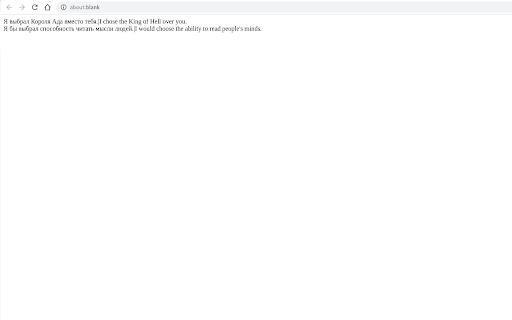
5) Click the "Show Examples" button in the extension popup window to view all saved examples. Each example/translation pair will be displayed on a new line separated by a vertical bar "|".
6) Use the import feature for Anki or Quizlet to import the examples you selected (see https://docs.ankiweb.net/importing.html or https://help.quizlet.com/hc/en-us/articles/360029977151-Creating-sets-by-importing-content).
Technical
- Version
- 0.0.6
- Manifest
- V3
- Size
- 47.37KiB
- Min Chrome
- 88
- Languages
- 1
- Featured
- Yes
Metadata
- ID
- blcmajbegeidcjkcogiemlijkldpieom
- Developer ID
- u0b8a1f4a48bfc8517e9c7812ee68070a
- Developer Email
- [email protected]
- Created
- Jun 16, 2021
- Last Updated (Store)
- Feb 19, 2024
- Last Scraped
- Jun 7, 2026
- Website
- —
- Support URL
- —
- Privacy Policy
- —
Similar extensions
Alternatives to Reverso Extractor, ranked by description similarity.

AI Language Helper
Chrome extension for language learning assistance
28
★ 5.0

Hemiglot - Duolingo Vocabulary Downloader
Export your Duolingo words list into a .txt or .csv file.
420
★ 4.8

Anki Vocabulary
Easily save words and get instant translations. Review, export for Anki, and accelerate language learning.
303
★ 4.0

DuoLingo Word Extractor
Extract words and meanings from Duolingo and view them in a simple table
122
★ 5.0

Readlang More Examples
Get AI-powered example sentences while practicing flashcards on Readlang. Supports OpenAI, Claude, Mistral, Gemini, and OpenRouter.
9

Anki Flashcard Generator
Select text, generate flashcard via backend, and save it to Anki.
1
★ 1.0

Flash Cardon
Language learning aid
20

LinguaSwap
Learn new words from foreign languages while browsing by replacing words with their translations
26
★ 5.0
Data sourced from the Chrome Web Store · last verified Jun 7, 2026.