
ReadFast - Speed Reading
Read faster with RSVP technology. Select text and double-click or right-click to speed read.
As of June 2026, ReadFast - Speed Reading has 1,000 users and a 2.87/5 rating from 38 reviews in the Workflow & Planning category.
Usersno change0%
1.0K
1,000
Ratingno change0%
2.87
38 reviews
Reviewsno change0%
38
Version
3.1.0
Manifest V3
Permissions & access
- Permissions
- contextMenusactiveTabscriptingstorageclipboardRead
- Host access
- http://*/*, https://*/*
Screenshots

About
ReadFast - Speed Reading with RSVP Technology

Dramatically improve your reading speed and comprehension using RSVP (Rapid Serial Visual Presentation) technology.

✨ How It Works

ReadFast works on any webpage with text content:

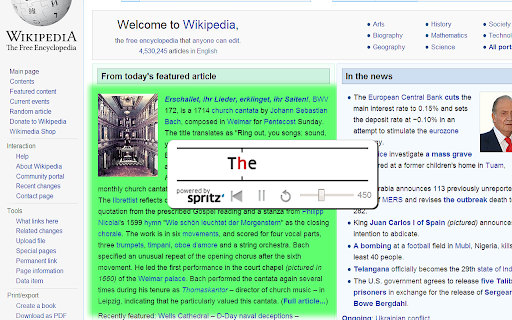
* Double-click any text to start speed reading
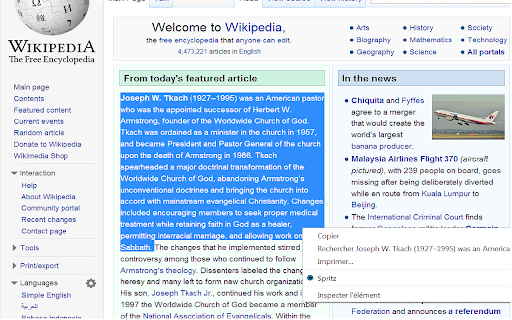
* Select text and right-click to read just that section
* No selection? The entire page will be displayed word-by-word
* From clipboard: Copy text from anywhere and press Ctrl+B to read content from outside the browser

⚡ Features

* Adjustable speed: Configure your reading pace via slider (up to 1000+ WPM)
* Customizable: Adjust colors, font size, vertical position, progress bar, and background transparency
* Full PDF support: Works seamlessly with PDF documents
* Keyboard shortcuts: Fully configurable via options menu

🎯 ORP Technology
ReadFast uses the Optimal Recognition Point (ORP) technique—displaying one word at a time with precise letter alignment so your eye doesn't need to move, allowing you to read at incredible speeds without sacrificing comprehension.

📋 RELEASE NOTES

Version 3.0
Manifest V3: Fully migrated to Chrome's modern extension standards for better security, performance, and future compatibility
Replace the spritz SDK that is no longer available by a custom OPR algorithm
Rebrand the product

RELEASE NOTES
2.5.0
-Added the Spritz from clipboard functionality. Just hit CTRL+B
-Added the possibility to change most of the colors

2.3.3
-You can now Spritz PDF without selecting text first

2.3.3
-Upgrade Spritz SDK to v2.0

2.3.2
-Added an optional progress bar

2.3
-Full PDF support
-Added an options menu to configure settings
-Font size is now configurable
-Added an option to hide background
-Vertical position is now configurable
-Added a close button

2.2
-Added the possibility to disable the double click detection from the BrowserAction icon or the keydoard shortcut Alt+S

2.1
-"Spritz the full page" now work on local content

2.0
-Added "Read the full page" context menu
-Added ESC key to close
-Fixed compatibility issue with Evernote Clearly
-Integration with Spritz SDK v1.2

1.3
- Integration of official Spritz SDK

1.2
- Added Pause functionnality
- Added Rewind 1 sentence
- Improved text readability by variation of the display speed according to words and sentences length
Technical
- Version
- 3.1.0
- Manifest
- V3
- Size
- 127KiB
- Min Chrome
- 88
- Languages
- 1
- Featured
- No
Metadata
- ID
- blbpafkooanpdcdcndkcckblghjddpke
- Developer ID
- u0753744a88d0d2a6f204f3b816da5091
- Developer Email
- [email protected]
- Created
- Apr 22, 2014
- Last Updated (Store)
- Feb 21, 2026
- Last Scraped
- Jun 3, 2026
- Website
- —
- Privacy Policy
- —
Similar extensions
Alternatives to ReadFast - Speed Reading, ranked by description similarity.

Readima
Readima simulates many reading techniques such as Meta Guiding, or RSVP to help you read faster with high comprehension.
769
★ 4.4

Quick Read: RSVP Speed Reader & Cloud OCR
Boost reading speed using RSVP. Auto-extract web articles, scan images/PDFs with OCR, and read distraction-free.
2

Speed Read
The lightning-fast speed reader for Chrome. Read news, emails, and blogs at up to 900 WPM with zero distractions.
12
★ 5.0

Fast Reader
Unleash Fast Reader to be a speed reader. Improve your reading wpm and concentration with this fast reading app.
261
★ 4.6

Speed Reader
Word-by-word speed reading with ORP focus point and dark mode
1.0K
★ 4.3

Read fast - Speed Reading Extension
A beautiful speed reading extension
5.0K
★ 4.2

The Read Time: Speed Reading & Listening Software
Enhance your reading & learning efficiency with adjustable speed controls
4.0K
★ 4.7

ReadSoFast - Speed Reading with Voice
Play text at sprint speed - RSVP reading with voice. Video-player controls, TTS, teleprompter, keyboard shortcuts, customisable.
6
Data sourced from the Chrome Web Store · last verified Jun 3, 2026.