
Sift - Save and ask
Save anything from the web. Ask your library questions and get cited answers.
As of June 2026, Sift - Save and ask has 7 users in the Productivity category.
Usersno change0%
7
7
Ratingno change0%
—
— reviews
Reviewsno change0%
—
Version
0.4.0
Manifest V3
90-day change · In the last 90 days this extension 2 version updates, changed permissions.
History
5 snapshotsTracking since May 11, 2026.
View as table
| Date | Users | Rating | Reviews | Version |
|---|---|---|---|---|
| May 11, 2026 | — | — | — | 0.1.0 |
| May 22, 2026 | — | — | — | 0.1.0 |
| May 29, 2026 | 4 | — | — | 0.3.0 |
| Jun 5, 2026 | 6 | — | — | 0.3.0 |
| Jun 11, 2026 | 6 | — | — | 0.4.0 |
| Now | 7 | — | — | 0.4.0 |
Changelog
- May 22, 2026description
Sift saves any page to your personal library with one click, then lets you search it in plain English using AI.
                                                                                                                                                      Most read-later tools just archive links. Sift actually understands what you saved. Ask "what did I read about productivity last week?" or "do I have anything on healthier snacks?" and get a direct answer with sources, not a list of titles to scroll through.

How it works
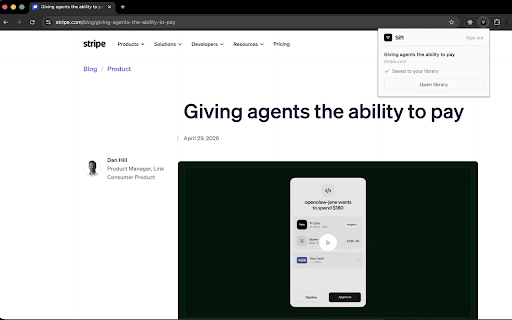
  1. Click the Sift icon on any page you want to keep.
  2. Sift saves the link and quietly reads the full content in the background.
  3. Open your library at sifthq.io and ask questions in plain English. Sift searches across everything you've saved and answers directly, with inline citations linking back to the original pages.
                                                                                                                                                      What it's good for
  - Articles and blog posts you want to reference later
  - Documentation, guides, and tutorials
  - Research threads across multiple sources
  - Anything you find yourself re-googling
                                                                                                                                                    No folders. No tags. No manual organisation. Search is the only navigation you need.

Sift is free to use. Sign in at sifthq.io to get started.
Sift remembers what you save so you don't have to. Save any page with one click, then ask your library questions in plain English and get answers with citations. Most save-it-for-later tools just archive links. Sift actually understands what you saved. Ask "what did I read about productivity last week?" or "do I have anything on healthier snacks?" and get a direct answer with sources, not a list of titles to scroll through. How it works: 1). Click the Sift icon to save the page you're on, or right-click any link to save it without opening it. 2). Sift saves the link and quietly reads the full content in the background. 3). Open your library at sifthq.io and ask anything. Sift draws only from what you've saved, with inline citations linking back to the original pages. What it's good for: - Articles and essays you want to come back to - Documentation, guides, and tutorials - Research threads across multiple sources - Anything you find yourself re-googling The more you save, the more your library knows. Connections between saves surface on their own, so you find things you forgot you had. Sift is free to start, with AI search included. No folders. No tags. No manual organisation. Just save, then ask.
- May 22, 2026short_description
Save it. Find it later. That's it.
Save anything from the web. Ask your library questions and get cited answers.
- May 22, 2026name
Sift
Sift - Save and ask
- May 22, 2026permissions
storage, cookies, activeTab, tabs
storage, cookies, activeTab, contextMenus, notifications
Permissions & access
- Permissions
- storagecookiesactiveTabcontextMenusnotifications
- Host access
- https://sifthq.io/*, https://clerk.sifthq.io/*, https://api.sifthq.io/*
Screenshots

About
Sift remembers what you save so you don't have to. Save any page with one click, then ask your library questions in plain English and get answers with citations.

Most save-it-for-later tools just archive links. Sift actually understands what you saved. Ask "what did I read about productivity last week?" or "do I have anything on healthier snacks?" and get a direct answer with sources, not a list of titles to scroll through.

How it works:
1). Click the Sift icon to save the page you're on, or right-click any link to save it without opening it.
2). Sift saves the link and quietly reads the full content in the background.
3). Open your library at sifthq.io and ask anything. Sift draws only from what you've saved, with inline citations linking back to the original pages.

What it's good for:
- Articles and essays you want to come back to
- Documentation, guides, and tutorials
- Research threads across multiple sources
- Anything you find yourself re-googling

The more you save, the more your library knows. Connections between saves surface on their own, so you find things you forgot you had.

Sift is free to start, with AI search included.

No folders. No tags. No manual organisation. Just save, then ask.
Technical
- Version
- 0.4.0
- Manifest
- V3
- Size
- 969KiB
- Min Chrome
- 116
- Languages
- 1
- Featured
- No
Metadata
- ID
- bkfchpihaplneiidcdfkpokbecoehbnd
- Developer ID
- ubfef8b2be5129421cee8c7928a4d6891
- Developer Email
- [email protected]
- Created
- May 10, 2026
- Last Updated (Store)
- Jun 4, 2026
- Last Scraped
- Jun 11, 2026
- Website
- sifthq.io
- Support URL
- —
- Privacy Policy
- http://sifthq.io/privacy
Data sourced from the Chrome Web Store · last verified Jun 11, 2026.