Claude powertools - Enhance Your Claude AI Experience
Claude powertools
As of June 2026, Claude powertools - Enhance Your Claude AI Experience has 661 users and a 5.00/5 rating from 2 reviews in the Workflow & Planning category.
Usersup 21.1 percent+21.1%
661
661
Ratingno change0%
5.00
2 reviews
Reviewsno change0%
2
Version
1.1
Manifest V3
History
3 snapshotsTracking since Apr 23, 2026.
View as table
| Date | Users | Rating | Reviews | Version |
|---|---|---|---|---|
| Apr 23, 2026 | 546 | 5.00 | 2 | 1.1 |
| May 12, 2026 | 601 | 5.00 | 2 | 1.1 |
| Jun 7, 2026 | 663 | 5.00 | 2 | 1.1 |
| Now | 661 | 5.00 | 2 | 1.1 |
Permissions & access
- Permissions
- cookiesstorage
- Host access
- https://claude.ai/*
Screenshots
About
This program will not work with Claude's Projects feature update, as the structure of the site has changed. A new update to match the structure will be coming soon. -3rd July 2024-

Unlock the full potential of your conversations with Claude AI using Claude Powertools, the ultimate extension for power users. This powerful toolbox equips you with advanced features to customize and streamline your Claude experience.

### Key Features:

#### Custom Instruction Injector
- **Effortless Customization:** Easily inject custom instructions or prompts before starting a chat by clicking the blue button next to the prompt input field.
- **Personalized Behavior:** Tailor Claude's responses with your personalized guidelines and preferences. This ensures that Claude behaves exactly how you want it to during conversations.
- **Quick Access:** Save frequently used instructions for quick access and reuse. Your custom instructions are stored locally, making them readily available whenever you need them.

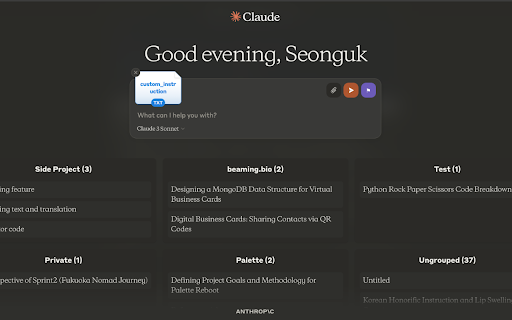
#### Chat History Manager
- **Structured Organization:** Organize your chat conversations into structured groups or categories for better manageability.
- **Topical Grouping:** Get a clear overview of recent and important chats with topical grouping. This helps you quickly find and refer to specific conversations.
- **Easy Navigation:** Easily navigate between chat groups and expand to view more details, maintaining a tidy and well-organized chat history.
- **Enhanced Searchability:** Simplify the process of finding older conversations by grouping them under meaningful categories.

### How to Use:

#### Custom Instructions
1. **Inject Instructions:** Click the blue button next to the prompt input field to open the custom instruction injector.
2. **Enter Instructions:** Type in your custom instructions or prompts.
3. **Save and Reuse:** Save these instructions for future use. They will be stored locally and can be quickly accessed whenever needed.

#### Grouping Conversations
1. **Name Your Groups:** In the chat title, add the group name followed by `::` and then the chat title. For example, `Project Alpha::Meeting Notes` will group the chat under "Project Alpha".
2. **View Groups:** Your conversations will now be displayed in groups, making it easier to manage and find specific chats.

Harness the power of customization, organization, and productivity – install Claude Powertools today and take your Claude AI experience to new heights!
Technical
- Version
- 1.1
- Manifest
- V3
- Size
- 140KiB
- Min Chrome
- 88
- Languages
- 1
- Featured
- No
Metadata
- ID
- bkanngdinjghfcfgpcbdjckpajacpnbb
- Developer ID
- u5d82ff317dc92f18973b720a0bc3a79b
- Developer Email
- [email protected]
- Created
- Apr 17, 2024
- Last Updated (Store)
- Jul 3, 2024
- Last Scraped
- Jun 7, 2026
- Website
- —
- Support URL
- —
- Privacy Policy
- —
Similar extensions
Alternatives to Claude powertools - Enhance Your Claude AI Experience, ranked by description similarity.

ClaudePower - Supercharge Claude.ai
Folders, search, export, prompt library, and productivity tools for Claude.ai
11

ChatGPT Folders, Search, Bookmarks - ChatFolderz: AI Chat Organizer Tool.
Organize your AI conversations into Folders, Bookmark key discussions, Search, Prompts Library and more...
42
★ 1.5

Promptris - Prompt Builder & Manager for ChatGPT & Claude
Build prompts with blocks. Save them. Use them anywhere.
941
★ 4.6

Pin Prompts - For ChatGPT and Claude
A Chrome extension to help users pin down prompts in ChatGPT and Claude.
103

ChatGPT, Claude, Gemini to PDF
Export chats from ChatGPT, Claude, and Gemini to PDF. Use a Notion-style editor to edit content before exporting.
13

Multi-AI Router
Route prompts to ChatGPT, Gemini, and Claude from a unified side panel. Clipboard-first, no automation.
6
★ 5.0

Claude Auto‑Continue
Automatically clicks or types “continue” when Claude pauses at max length.
260

ChatGPT Folders, Search & Prompts - Easy Folders: Projects & Chat Organizer
ChatGPT with Organized Projects, Folders, Search, Bookmarks, Prompts Manager, Prompts Library, Custom Instruction Profiles.
10.0K
★ 4.0
Data sourced from the Chrome Web Store · last verified Jun 7, 2026.