
Regex finder
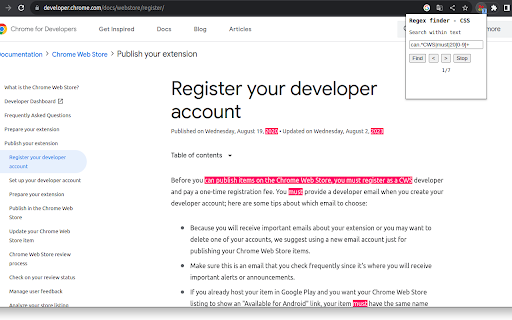
Regex finder based on CSS Custom Highlight API. Type a valid regex in the search field to highlight matches on the page.
As of June 2026, Regex finder has 93 users in the Developer Tools category.
Usersdown 1.1 percent−1.1%
93
93
Ratingno change0%
—
— reviews
Reviewsno change0%
—
Version
0.0.0.1
Manifest V3
History
3 snapshotsTracking since Apr 23, 2026.
View as table
| Date | Users | Rating | Reviews | Version |
|---|---|---|---|---|
| Apr 23, 2026 | 94 | — | — | 0.0.0.1 |
| May 12, 2026 | 95 | — | — | 0.0.0.1 |
| Jun 7, 2026 | 90 | — | — | 0.0.0.1 |
| Now | 93 | — | — | 0.0.0.1 |
Permissions & access
- Permissions
- activeTabscripting
- Host access
- None declared
Screenshots



About
Regex finder is a find/search tool that uses the new CSS Custom Highlight API. Dynamic web pages like YouTube should work in addition to static pages. The extension is targeted at advanced users who are already familiar with regex matching.

No bells and whistles are included. Matches are highlighted using red background color. Total match count is displayed to user.

Instructions:
Navigate to a web page and click the extension icon.
Type in a valid regex and press Enter or Find button to start matching.
Press the Stop button to remove highlights and to stop program execution.
Press Enter or Find to restart.
Press Next or Prev buttons to navigate through matches.
Use Chrome Task manager (Ctrl + Esc) in case of CPU consuming regex.

Known limitations:
- iframes are not supported
- soft hyphens may cause problems if not included in regex
- textarea elements are not supported because of restrictions in API. For instance, GitHub seems to use textarea in it's 'code' page.
- only tested with some English and Scandinavian websites
- currently there are "g" and "i" flags hard coded in regex object constructor, meaning global search and ignore case.
- hardcoded 9000 maximum matches.
Technical
- Version
- 0.0.0.1
- Manifest
- V3
- Size
- 21.64KiB
- Min Chrome
- 88
- Languages
- 1
- Featured
- No
Metadata
- ID
- bjnioomanlbaahlfnkfjbjjfaecagbll
- Developer ID
- u86895dd821d4f15bf7d0072e8a9692fe
- Developer Email
- [email protected]
- Created
- Nov 5, 2023
- Last Updated (Store)
- Nov 5, 2023
- Last Scraped
- Jun 7, 2026
- Website
- —
- Support URL
- —
- Privacy Policy
- —
Similar extensions
Alternatives to Regex finder, ranked by description similarity.

Regular Expression Tester
Use Regular Expression Tester as a regex validator to check regex patterns and for online regular expression matching on web pages.
85
★ 4.8

Regex Highlighter
Highlight text on any webpage using regular expressions. Easily navigate between matches.
464
★ 3.0

Regex Tester Pro
Test, debug and master regex in your browser. AI-powered generation, multi-flavor support, and real-time match highlighting.
39
★ 4.8

Regex Search
Search web pages using regular expressions with an easy-to-use interface
10

Regex Checker LU
A simple regex checker for testing regular expressions.
5

find+ | Regex Find-in-Page Tool
A find-in-page extension with support for regular expressions.
10.0K
★ 4.2

Super Regex Generator
A tool for advanced REGEX operations tailored for SEO tasks.
7

Findr | A better Ctrl + F
Like Ctrl + F, but with the features you wish it had
345
★ 1.0
Data sourced from the Chrome Web Store · last verified Jun 7, 2026.