
Text Hoarder
Reader view, save articles, and see stats of your reading habits
As of June 2026, Text Hoarder has 25 users in the Productivity category.
Usersno change0%
25
25
Ratingno change0%
—
— reviews
Reviewsno change0%
—
Version
1.0.4
Manifest V3
History
9 snapshotsTracking since Apr 16, 2026.
View as table
| Date | Users | Rating | Reviews | Version |
|---|---|---|---|---|
| Apr 16, 2026 | — | — | — | 1.0.4 |
| Apr 22, 2026 | 17 | — | — | 1.0.4 |
| Apr 27, 2026 | 21 | — | — | 1.0.4 |
| May 4, 2026 | 17 | — | — | 1.0.4 |
| May 10, 2026 | 13 | — | — | 1.0.4 |
| May 15, 2026 | 15 | — | — | 1.0.4 |
| May 21, 2026 | 10 | — | — | 1.0.4 |
| May 28, 2026 | 9 | — | — | 1.0.4 |
| Jun 4, 2026 | 17 | — | — | 1.0.4 |
| Now | 25 | — | — | 1.0.4 |
Permissions & access
- Permissions
- identitystorageactiveTabscripting
- Host access
- None declared
Screenshots


About
Features:
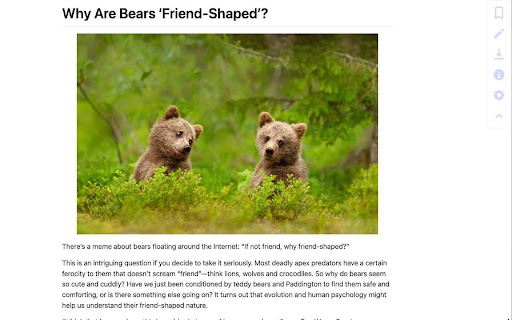
- Customizable reader mode
  - Bypass flashing ads, distracting elements, scrolljacking and other inconveniences of modern day web browsing
  - Automatically enter reader mode for configured webpages
  - Download simplified page as HTML, markdown or plain text
  - Print simplified page or convert it to PDF using browser's print dialog
- Save articles to a private GitHub repository as Markdown files
  - Generate stats based on saved articles to see your reading habits (most common websites, popular topics, count of articles saved per year)
  - Cleanup saved articles for use with any text-to-speech software
Technical
- Version
- 1.0.4
- Manifest
- V3
- Size
- 352KiB
- Min Chrome
- 88
- Languages
- 1
- Featured
- No
Metadata
- ID
- bjknebjiadgjchmhppdfdiddfegmcaao
- Developer ID
- u9ff8159c4ec20c9d13a158c74da5ca0a
- Developer Email
- [email protected]
- Created
- Jun 9, 2024
- Last Updated (Store)
- Mar 1, 2026
- Last Scraped
- Jun 4, 2026
- Website
- —
Similar extensions
Alternatives to Text Hoarder, ranked by description similarity.

Reader Mode
A stunning, minimalist reader mode extension.
7

Immersive Reader
Provides a clean, focused reading experience by extracting the core content of a webpage.
143

CleanRead
Distraction-free reading mode for any article. One click to clean, beautiful typography.
3

ReadEasy - Read, Save, Edit Web Articles
Read, Save, Edit, Highlight, Merge web articles (incl chatGPT, claude conversations) or any content in a distraction-free format
28
★ 5.0

Artiful: Text to Speech / Read aloud / Listen
Read, Listen, Summarize, Download Articles
46
★ 4.2

READR – Clean page, one click
Turn any article into a clean, distraction-free reading view. Export as PDF with Pro.
22

Still Reader
Distraction-free reader mode with optional AI summary.
2

View as Markdown
Extract web page content and display it as Markdown in an in-page reader.
2
Data sourced from the Chrome Web Store · last verified Jun 4, 2026.