
FlexiCopyToggle
Edge-docked sliding drawer for table data copying and OCR screen snipping. Less intrusive, always accessible.
As of June 2026, FlexiCopyToggle has 14 users in the Productivity category.
Usersup 40.0 percent+40.0%
14
14
Ratingno change0%
—
— reviews
Reviewsno change0%
—
Version
3.1
Manifest V3
90-day change · In the last 90 days this extension 2 version updates.
History
7 snapshotsTracking since Apr 20, 2026.
View as table
| Date | Users | Rating | Reviews | Version |
|---|---|---|---|---|
| Apr 20, 2026 | 10 | — | — | 2.0 |
| Apr 25, 2026 | 12 | — | — | 2.0 |
| May 3, 2026 | 12 | — | — | 2.0 |
| May 19, 2026 | 13 | — | — | 2.0 |
| May 28, 2026 | 12 | — | — | 2.0 |
| Jun 4, 2026 | 12 | — | — | 3.0 |
| Jun 10, 2026 | 15 | — | — | 3.1 |
| Now | 14 | — | — | 3.1 |
Permissions & access
- Permissions
- contextMenusclipboardWritestorageactiveTabtabs
- Host access
- <all_urls>
Screenshots
About
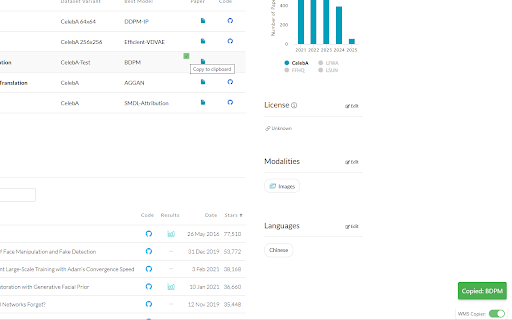
FlexiCopyToggle makes working with data tables effortless by adding one-click copy functionality to any cell while respecting your workflow. Perfect for warehouse management systems, inventory platforms, and data-heavy websites.

Key features:
- Adds copy buttons that appear when hovering over table cells
- Conveniently toggle the extension on/off with a small switch in the corner
- Works with WMS platforms, logistics systems, and any website with tabular data
- Visual feedback with notifications when content is copied
- Maintains the original page functionality when disabled

Stop struggling with unselectable table data! FlexiCopyToggle enhances your productivity by making it easy to extract information from data tables without interfering with normal page interactions. Toggle it off when selecting rows is needed, and back on when you need to copy cell contents.

Ideal for warehouse operators, inventory managers, logistics professionals, data analysts, and anyone who needs to quickly copy information from web tables.

Install FlexiCopyToggle today and transform your data workflow with flexible, controllable copy functionality.
Technical
- Version
- 3.1
- Manifest
- V3
- Size
- 34.43KiB
- Min Chrome
- 88
- Languages
- 1
- Featured
- No
Metadata
- ID
- bjkdjailengcodlelpcikooomdbhpfli
- Developer ID
- udac4faeef608d07b7c05a60be2b6db4d
- Developer Email
- [email protected]
- Created
- May 5, 2025
- Last Updated (Store)
- Jun 1, 2026
- Last Scraped
- Jun 10, 2026
- Website
- —
- Support URL
- —
- Privacy Policy
- https://flexicopytoggle.com/privacy-policy.html
Similar extensions
Alternatives to FlexiCopyToggle, ranked by description similarity.

Table Column Copy
Elite Table Copying: Smart data extraction, productivity dashboard, and instant onboarding.
1.0K
★ 5.0

Copy as CSV
Copy any HTML table from a webpage to the clipboard as CSV format.
100

Selectable
Select and copy specific cell data from tables.
10
★ 5.0

ClickCopier — Click to Copy & Clipboard Manager with History
Click to copy clipboard manager with history. Alt+Click text, images, fields. Pin, edit, mask, export — in Chrome's side panel.
27
★ 5.0

Table Extractor
Detect HTML tables on any webpage and export them as CSV — copy or download.
—

Table Extractor
Copy tables from any webpage and save them as CSV, JSON, XML, HTML and XLSX files
6

Capture Table
The Ultimate Web Table Extraction Tool – Compatible with 99% of Websites and UI Frameworks!
Effortlessly extract tables from any…
292
★ 5.0

Table Capture – Copy Tables to CSV
Extract tables from webpages and copy as CSV. Powered by Search Vector.
130
★ 5.0
Data sourced from the Chrome Web Store · last verified Jun 10, 2026.