
Clear Browsing Data
Delete browsing data directly from the browser toolbar. Clear cookies, history and cache with a single click.
As of June 2026, Clear Browsing Data has 30,000 users and a 4.11/5 rating from 38 reviews in the Developer Tools category.
Usersup 50.0 percent+50.0%
30.0K
30,000
Ratingup 1.2 percent+1.2%
4.11
38 reviews
Reviewsup 5.6 percent+5.6%
38
Version
5.1.2
Manifest V3
90-day change · In the last 90 days this extension gained 10.0K users, 2 version updates.
History
6 snapshotsTracking since Apr 17, 2026.
View as table
| Date | Users | Rating | Reviews | Version |
|---|---|---|---|---|
| Apr 17, 2026 | 20.0K | 4.06 | 36 | 5.1.0 |
| Apr 23, 2026 | 20.0K | 4.08 | 37 | 5.1.0 |
| Apr 27, 2026 | 30.0K | 4.08 | 37 | 5.1.0 |
| May 8, 2026 | 30.0K | 4.11 | 38 | 5.1.0 |
| Jun 6, 2026 | 20.0K | 4.11 | 38 | 5.1.0 |
| Jun 23, 2026 | 20.0K | 4.11 | 38 | 5.1.1 |
| Now | 30.0K | 4.11 | 38 | 5.1.2 |
Changelog
- Jun 6, 2026description
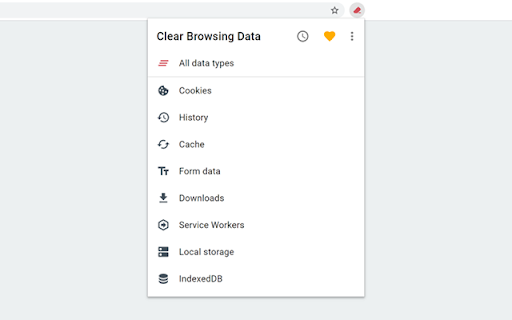
Clear Browsing Data is a browser extension which enables you to delete browsing data, such as cookies, history and cache, directly from the browser toolbar. The toolbar button can be configured to clear all browsing data with a single click, or to show a list of data types available for clearing.

Clear Browsing Data is an open source project made possible thanks to a community of awesome supporters. If you'd like to support the continued development of the extension, please check out https://armin.dev/go/patreon

The extension also supports closing and reloading tabs, these features can be configured from the extension's options.

Supported data types:
  • Cookies
  • Browsing history
  • Cached images and files
  • Cache storage data
  • Autofill form data
  • Download history
  • Service Workers
  • Local storage data
  • IndexedDB data
  • Web SQL data
  • Website file systems
  • Application Cache

The data types and their order can be customized from the extension's options.

The extension is also available for Edge and Firefox: https://github.com/dessant/clear-browsing-data#readme

The developer does not collect any personal data from this extension, visit the extension's privacy policy for more information.

Reviews are not monitored for bug reports, please use GitHub for issues and feature requests.

https://github.com/dessant/clear-browsing-data
Clear Browsing Data is a browser extension which enables you to delete browsing data, such as cookies, history and cache, directly from the browser toolbar. The toolbar button can be configured to clear all browsing data with a single click, or to show a list of data types available for clearing.

Clear Browsing Data is an open source project made possible thanks to a community of awesome supporters. If you'd like to support the continued development of the extension, please check out https://armin.dev/go/patreon.

The extension also supports closing and reloading tabs, these features can be configured from the extension's options.

Supported data types:
  • Cookies
  • Browsing history
  • Cached images and files
  • Cache storage data
  • Autofill form data
  • Download history
  • Service Workers
  • Local storage data
  • IndexedDB data
  • Web SQL data
  • Website file systems
  • Application Cache

The data types and their order can be customized from the extension's options.

The extension is also available for Edge and Firefox: https://github.com/dessant/clear-browsing-data#readme

The developer does not collect any personal data from this extension, visit the extension's privacy policy for more information.

Reviews are not monitored for bug reports, please use GitHub for issues and feature requests.

https://github.com/dessant/clear-browsing-data
Permissions & access
- Permissions
- browsingDatanotificationsstorage
- Host access
- None declared
Screenshots

About
Clear Browsing Data is a browser extension which enables you to delete browsing data, such as cookies, history and cache, directly from the browser toolbar. The toolbar button can be configured to clear all browsing data with a single click, or to show a list of data types available for clearing.

Clear Browsing Data is an open source project made possible thanks to a community of awesome supporters. If you'd like to support the continued development of the extension, please check out https://armin.dev/go/patreon.

The extension also supports closing and reloading tabs, these features can be configured from the extension's options.

Supported data types:
  • Cookies
  • Browsing history
  • Cached images and files
  • Cache storage data
  • Autofill form data
  • Download history
  • Service Workers
  • Local storage data
  • IndexedDB data
  • Web SQL data
  • Website file systems
  • Application Cache

The data types and their order can be customized from the extension's options.

The extension is also available for Edge and Firefox: https://github.com/dessant/clear-browsing-data#readme

The developer does not collect any personal data from this extension, visit the extension's privacy policy for more information.

Reviews are not monitored for bug reports, please use GitHub for issues and feature requests.

https://github.com/dessant/clear-browsing-data
Technical
- Version
- 5.1.2
- Manifest
- V3
- Size
- 472KiB
- Min Chrome
- 123.0
- Languages
- 1
- Featured
- Yes
Metadata
- ID
- bjilljlpencdcpihofiobpnfgcakfdbe
- Developer ID
- uffe0be7d28562c67a7ecc39c743b6e71
- Developer Email
- [email protected]
- Created
- Sep 24, 2017
- Last Updated (Store)
- Jun 16, 2026
- Last Scraped
- Jun 23, 2026
- Website
- armin.dev
Similar extensions
Alternatives to Clear Browsing Data, ranked by description similarity.

Clear Site Data
Quickly clear site data for the current tab. Control what to remove: cookies, cache, local storage, and more.
124

Clear Cache & Cookies
Clear cache and cookies for the current website with just one click. Easily manage and delete browsing data.
243
★ 5.0

Clear Site Data
A Chrome extension to clear cookies and local storage for the current site and reload the page.
74
★ 5.0

Clear Cache
Clear your cache and browsing data with a single click of a button.
1.0K
★ 5.0

Clear Cache Plus
Effortless, intuitive browser data control—right from your toolbar.
15

Cache Clear
Inspect and selectively clear browser storage. Built for developers.
5

Cache Cleaner — One Click Clear
Clear cache, cookies, and storage for the current site only. No full browser wipe needed.
9

Clear Site Data
Clear cookies, local/session storage, cache, etc., for the current tab with one click.
17
★ 5.0
Data sourced from the Chrome Web Store · last verified Jun 23, 2026.