
Tab Suspender — Auto Sleep Inactive Tabs & Save RAM
Automatically suspend inactive tabs to free memory and speed up Chrome. Set a timeout, whitelist sites you trust, suspend on demand.
As of July 2026, Tab Suspender — Auto Sleep Inactive Tabs & Save RAM has — users in the Productivity category.
Usersno change0%
—
—
Ratingno change0%
—
— reviews
Reviewsno change0%
—
Version
1.0.0
Manifest V3
History
1 snapshotsTracking since Jul 4, 2026.
Not enough history yet for this metric — the chart fills in as we collect more snapshots.
View as table
| Date | Users | Rating | Reviews | Version |
|---|---|---|---|---|
| Jul 4, 2026 | — | — | — | 1.0.0 |
| Now | — | — | — | 1.0.0 |
Permissions & access
- Permissions
- tabsstoragealarms
- Host access
- None declared
Screenshots


About
Tab Suspender keeps Chrome fast by putting tabs you're not using to sleep — so your memory goes to the tabs you actually have open.

When a tab sits unused past your chosen timeout, Tab Suspender suspends it. The tab stays right where it is and reloads instantly the moment you click back. Nothing is closed, nothing is lost.

FEATURES
• Auto-suspend — inactive tabs are put to sleep automatically to reclaim RAM.
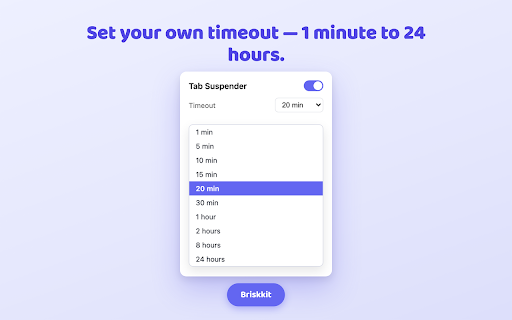
• Choose your timeout — from 1 minute up to 24 hours, whatever fits how you browse.
• Per-site whitelist — add domains (like your email or docs) that should never sleep.
• Suspend on demand — one click puts every inactive tab to sleep right now.
• Smart protection — the active tab, pinned tabs, and tabs playing audio are never suspended.
• Live badge — see how many tabs are currently suspended at a glance.
• On / off switch — pause Tab Suspender any time from the popup.

PRIVACY
Tab Suspender runs entirely in your browser. It does not read page content, does not track your browsing, and sends nothing off your device. Your timeout and whitelist are stored locally in Chrome. No account, no analytics, no data collection.

Made by Briskkit — a set of small, sharp browser tools.
Technical
- Version
- 1.0.0
- Manifest
- V3
- Size
- 38.63KiB
- Min Chrome
- 88
- Languages
- 1
- Featured
- No
Metadata
- ID
- bjfpobpnnelbpjljkjhoppcagiphnmen
- Developer ID
- u5e70ac363155354568aca7047af4f1c5
- Developer Email
- [email protected]
- Created
- Jul 3, 2026
- Last Updated (Store)
- Jul 3, 2026
- Last Scraped
- Jul 4, 2026
- Website
- —
- Support URL
- —
Data sourced from the Chrome Web Store · last verified Jul 4, 2026.