
Kloo - Link Shortener
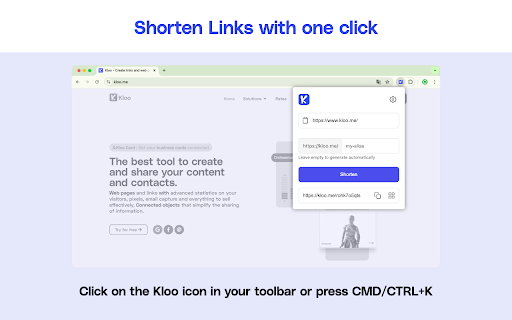
Shorten your links quickly and easily with Kloo. Generate QR codes and share your links in one click.
As of June 2026, Kloo - Link Shortener has 63 users and a 4.50/5 rating from 2 reviews in the Workflow & Planning category.
Usersno change0%
63
63
Ratingno change0%
4.50
2 reviews
Reviewsno change0%
2
Version
1.3.1
Manifest V3
History
3 snapshotsTracking since Apr 23, 2026.
View as table
| Date | Users | Rating | Reviews | Version |
|---|---|---|---|---|
| Apr 23, 2026 | 63 | 4.50 | 2 | 1.3.1 |
| May 12, 2026 | 74 | 4.50 | 2 | 1.3.1 |
| Jun 7, 2026 | 61 | 4.50 | 2 | 1.3.1 |
| Now | 63 | 4.50 | 2 | 1.3.1 |
Permissions & access
- Permissions
- storageclipboardWriteclipboardReadcontextMenusactiveTabscriptingnotifications
- Host access
- https://kloo.me/*, <all_urls>
Screenshots


About
🔥 KEY FEATURES

✨ Instant Shortening
• Shorten the link from the tab
• Right-click on any hyperlink to shorten it instantly
• Select a link and shorten it with one click
• Automatically copy the short link to your clipboard

🎯 Intuitive Interface
• Smart context menu that appears only for valid links
• Sleek notifications to confirm every action
• Convenient keyboard shortcut (Ctrl+K / Cmd+K) for quick extension access

⚡️ Advanced Features
• Smart link validation
• Link customization
• Support for HTTP and HTTPS protocols
• Secure link management via the Kloo API
• QR code generation

🛠️ Customization
• Comprehensive options page to configure the extension
• Manage your Kloo API key
• Customize notifications

🔒 SECURITY & PRIVACY
• No personal data collected
• Secure link processing via HTTPS
• API key securely stored locally

💡 USAGE
1. Right-click on a link → "Shorten this link and copy"
2. Or select a link → Right-click → "Shorten this link and copy"
3. The short link is automatically copied to your clipboard!
4. Click on the Kloo extension icon or invoke via keyboard shortcut
5. Paste an already copied link and shorten it.

🌟 BENEFITS
• Significant time savings
• Non-intrusive interface
• Seamless integration into your browsing experience
• Perfect for professionals and individuals

📱 COMPATIBILITY
• Works on all websites
• Compatible with all operating systems
• Seamlessly integrates with any Chromium-based browser

🔧 TECHNICAL SUPPORT
• Responsive support
• Regular updates
• Comprehensive documentation available

Simplify your link sharing with Kloo – The extension that makes your links shorter and more elegant!
Technical
- Version
- 1.3.1
- Manifest
- V3
- Size
- 138KiB
- Min Chrome
- 88
- Languages
- 2
- Featured
- Yes
Metadata
- ID
- bjfckligpmnaefadlbbfkpkeadkkaklp
- Developer ID
- u2292d01d43254021448cb9f76bf6f73f
- Developer Email
- [email protected]
- Created
- Oct 24, 2022
- Last Updated (Store)
- Jan 14, 2025
- Last Scraped
- Jun 7, 2026
- Website
- kloo.me
- Support URL
- https://docs.kloo.me
- Privacy Policy
- https://www.kloo.me/politique-de-confidentialite/
Similar extensions
Alternatives to Kloo - Link Shortener, ranked by description similarity.

BTT.li AI Powered Link Shortener
AI-powered link shortening with auto-login, UTM builder, QR codes, and advanced analytics - Shorten links instantly!
5

URL Shortener
Shorten URLs with one click
8

URL Shortener
Fastest way to shorten URLs with the TinyURL API. Click the icon to shorten the current URL & generate a QR Code, or input your own.
283
★ 5.0

OkShort URL Shortener
Simple Extension that will shorten any link on a web page with the OkShort API for fast, and easy sharing.
13
★ 5.0

Gather Links
Quickly gather important links directly in your browser!
74
★ 5.0

FreeShortURL - White-Label URL Shortener, QR Code Maker & Link Tracker
Create white-label short links, QR codes, and track performance effortlessly with FreeShortURL. Boost your digital strategy!
28
★ 5.0

Link Saver
Easily save, manage, and share your links with just a click
383
★ 4.8

YOURLS Link Shortener
Shorten links using your YOURLS server. Specify host and key and start shortening.
473
★ 5.0
Data sourced from the Chrome Web Store · last verified Jun 7, 2026.