
Split View for Chrome
Split websites in one tab with dual, quad, or custom layouts. Resize panes, save layouts, and restore your exact setup.
As of June 2026, Split View for Chrome has 96 users in the Workflow & Planning category.
Usersup 33.3 percent+33.3%
96
96
Ratingno change0%
—
— reviews
Reviewsno change0%
—
Version
8.0
Manifest V3
History
9 snapshotsTracking since Apr 1, 2026.
View as table
| Date | Users | Rating | Reviews | Version |
|---|---|---|---|---|
| Apr 1, 2026 | 72 | — | — | 8.0 |
| Apr 16, 2026 | 78 | — | — | 8.0 |
| Apr 24, 2026 | 90 | — | — | 8.0 |
| May 1, 2026 | 85 | — | — | 8.0 |
| May 8, 2026 | 88 | — | — | 8.0 |
| May 12, 2026 | 110 | — | — | 8.0 |
| May 18, 2026 | 104 | — | — | 8.0 |
| May 27, 2026 | 112 | — | — | 8.0 |
| Jun 5, 2026 | 89 | — | — | 8.0 |
| Now | 96 | — | — | 8.0 |
Permissions & access
- Permissions
- tabsstoragedeclarativeNetRequestwebNavigation
- Host access
- <all_urls>
Screenshots
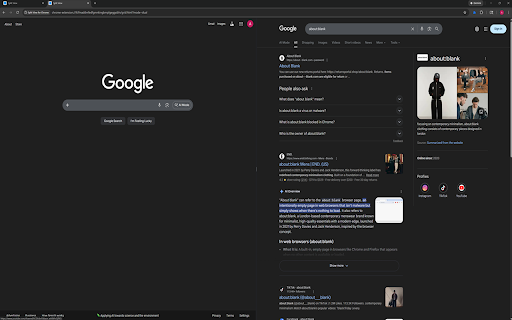


About
Core Features

    Dual view (2 panes), quad view (4 panes), and custom layouts (1-16 panes).
    Drag-resize grid splitters.
    Per-pane navigation controls (back, reload, URL bar).
    Live URL tracking — address bar updates automatically when you click links inside panes.
    Two close behaviors:
        Close and compact horizontally.
        Close and compact vertically.
    Save named layouts and reload them later.
    Restore Last Session — reopen your last split view exactly as it was.
    Dark mode and optional nav bar visibility.

Popup Controls

    Quad View (4): opens a 4-pane split view.
    Dual View (2): opens a 2-pane split view.
    Custom panes (1-16) + Launch Custom Split: opens a split view with the requested pane count.
    Reset Split Sizes: resets splitter sizes for the active split tab.
    Restore Last Session: reopens your last closed split view with all URLs and layout intact.
    Show Nav Bar: toggles pane nav bars on/off.
    Dark Mode: toggles dark/light appearance.
    Layout name: optional name used when saving.
    Save Current Layout: saves current split URLs + layout geometry.
    Load Selected Layout: launches a saved layout.
    Delete Selected Layout: removes a saved layout.

In-Grid Pane Controls

    Back: navigates pane history backward.
    Reload: reloads pane URL.
    Address bar: enter URL or search query (press Enter). Updates automatically when you click links.
    Close pane (horizontal): closes pane and compacts with row-aligned panes.
    Close pane (vertical): closes pane and compacts with column-aligned panes.

Keyboard Shortcuts

    Alt+S: launch quad view.
    Alt+D: launch dual view.
    Alt+H: toggle nav bar visibility.
Technical
- Version
- 8.0
- Manifest
- V3
- Size
- 69.26KiB
- Min Chrome
- 88
- Languages
- 1
- Featured
- No
Metadata
- ID
- bjdgkgjjlkdmcpckjimfaonoedembdbn
- Developer ID
- ub40c904663eead24329dc85ba57f7783
- Developer Email
- [email protected]
- Created
- Feb 5, 2026
- Last Updated (Store)
- Feb 12, 2026
- Last Scraped
- Jun 5, 2026
- Website
- —
Similar extensions
Alternatives to Split View for Chrome, ranked by description similarity.

SplitView — Split Screen & Side by Side Tabs for Multi Window Browsing
Split screen extension — tile browser windows side by side in one click. 6 layouts, multi-monitor, keyboard shortcuts, instant undo.
653
★ 5.0

Control Space
A kanban-style tab manager to browse, organise, search and switch tabs with one simple shortcut.
226
★ 4.4

Tab Splitter
Split your browser tab into two panes
—
★ 1.0

Tabify
Tabify is an all-in-one solution for making the most of your browsing experience
121
★ 5.0

Tab Resize - split screen layouts
The ORIGINAL Tab Resize. Split Screen made easy. Resize the CURRENT tab and tabs to the RIGHT into layouts on separate windows.
1.0M
★ 4.3
Simple Tab Manager
Simple tab manager that allows you to easily manage and sort tabs.
965
★ 3.7

Where Is My Tab
Quickly search and switch between open tabs with Ctrl+Shift+F
—

Vertical Tabs | Quick Tabs Management
Management your tabs with sidebar, easy to do quick search, pin, group, drag, close your tabs.
—
Data sourced from the Chrome Web Store · last verified Jun 5, 2026.