
usum — AI YouTube Summary
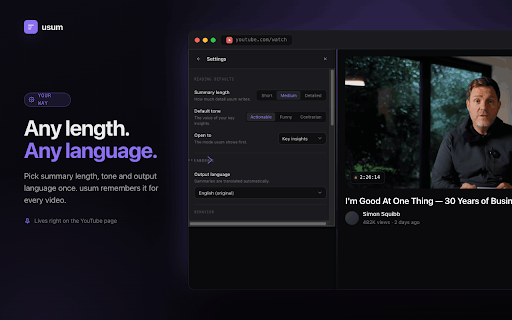
One-click AI summaries, timestamped chapters, comment digests and transcripts for any YouTube video.
As of June 2026, usum — AI YouTube Summary has — users in the Productivity category.
Usersno change0%
—
—
Ratingno change0%
—
— reviews
Reviewsno change0%
—
Version
0.1.12
Manifest V3
History
1 snapshotsTracking since Jun 18, 2026.
Not enough history yet for this metric — the chart fills in as we collect more snapshots.
View as table
| Date | Users | Rating | Reviews | Version |
|---|---|---|---|---|
| Jun 18, 2026 | — | — | — | 0.1.12 |
| Now | — | — | — | 0.1.12 |
Permissions & access
- Permissions
- storageidentity
- Host access
- https://api.usum.io/*
Screenshots


About
a clean panel to any YouTube watch page and turns the video into something you can read in seconds.

  Four ways to digest any video:

• Insights: the key points, grouped by theme. Stop scrubbing through a two-hour video to find the

• Insights: the key points, grouped by theme. Stop scrubbing through a two-hour video to find the one thing you needed.
• Chapters: an auto-generated, timestamped outline. Click any timestamp to jump straight there.
• Comments: a digest of the comment section, so you get the crowd's take without scrolling.
• Transcript: the full, searchable transcript with clickable timestamps.

How it works
usum reads the captions that already exist on the video. No audio is uploaded, nothing is downloaded. Open a video, open the panel, pick a mode.

Privacy first
Transcripts are sent to our backend only to produce your summary, then discarded. Nothing is stored, nothing is sold, nothing is used to train models, and nothing is tied to your Google account. An anonymous device id keeps your settings and usage count.

usum does one job: summarizing the YouTube video you are watching.
Technical
- Version
- 0.1.12
- Manifest
- V3
- Size
- 341KiB
- Min Chrome
- 88
- Languages
- 1
- Featured
- No
Metadata
- ID
- bilpkikjfclhmgdccicjldnpadegfche
- Developer ID
- u14fbc5f2f726a669172e5d7fcae1632a
- Developer Email
- [email protected]
- Created
- Jun 17, 2026
- Last Updated (Store)
- Jun 17, 2026
- Last Scraped
- Jun 18, 2026
- Website
- —
- Support URL
- —
- Privacy Policy
- https://usum.io/privacy
Data sourced from the Chrome Web Store · last verified Jun 18, 2026.