
RecBooker - Drop In AutoBooker and Notifier
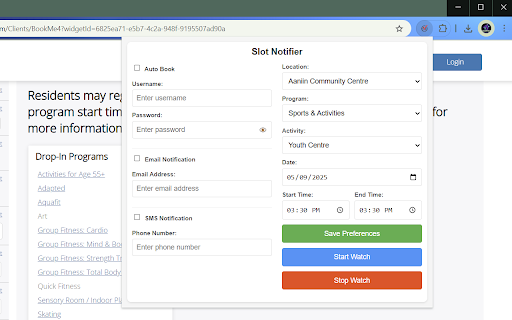
Automatically monitor and notify you of available drop-in program slots at your local community centre.
As of June 2026, RecBooker - Drop In AutoBooker and Notifier has 44 users in the Productivity category.
Usersup 41.9 percent+41.9%
44
44
Ratingno change0%
—
— reviews
Reviewsno change0%
—
Version
1.3
Manifest V3
90-day change · In the last 90 days this extension 1 version update, changed permissions.
History
8 snapshotsTracking since Apr 1, 2026.
View as table
| Date | Users | Rating | Reviews | Version |
|---|---|---|---|---|
| Apr 1, 2026 | 31 | — | — | 1.2 |
| Apr 29, 2026 | — | — | — | — |
| May 7, 2026 | 30 | — | — | 1.3 |
| May 11, 2026 | 43 | — | — | 1.3 |
| May 17, 2026 | 49 | — | — | 1.3 |
| May 23, 2026 | 43 | — | — | 1.3 |
| May 30, 2026 | 45 | — | — | 1.3 |
| Jun 13, 2026 | 41 | — | — | 1.3 |
| Now | 44 | — | — | 1.3 |
Changelog
- Apr 29, 2026description
(empty)
Never Miss an Activity Slot Again
Stay organized with a personal browser assistant designed to help you manage your schedule on local recreation portals. This tool monitors availability for drop-in programs so you can find openings for badminton, swimming, or fitness without manual refreshing.

Key Features
Schedule Monitoring: Automatically checks availability for your selected programs on compatible booking portals.

Real-Time Alerts: Receive a notification the moment a slot becomes available via:

Chrome desktop notifications

Email alerts

SMS (via third-party integration)

Reservation Assistance: Streamline the checkout process by automating repetitive navigation steps.

Note: This feature utilizes the payment methods already securely saved within your existing portal account. This extension does not access, collect, or store financial information or credit card data.

How It Works
Select Your Activity: Set a "watch" for the specific program and time you are interested in.

Background Check: The extension periodically refreshes a browser tab to check the public schedule on your behalf.

Smart Match: It identifies slots that match your specific preferences (activity, location, and time).

Completion: Once a match is found and the alert is triggered, the monitor pauses so you can review your schedule.
- Apr 29, 2026short_description
(empty)
Automatically monitor and notify you of available drop-in program slots at your local community centre.
- Apr 29, 2026name
Unknown
RecBooker - Drop In AutoBooker and Notifier
- Apr 29, 2026category
(empty)
productivity/tools
- Apr 29, 2026host_permissions
(empty)
*://cityofmarkham.perfectmind.com/*, *://www.textnow.com/*, https://script.google.com/*
- Apr 29, 2026permissions
(empty)
alarms, notifications, storage, scripting, webNavigation, cookies
- Apr 1, 2026description
Never Miss a Drop-In Again
Stay ahead of the crowd with our Chrome extension that automatically monitors and alerts you when drop-in program slots become available on cityofmarkham.perfectmind.com. Whether you’re into badminton, swimming, or fitness, you’ll always have the best chance to book your spot.

Key Features:

Auto Scraping: Constantly scans the Markham drop-in schedule for your selected programs.

Instant Notifications: Get notified the moment a slot becomes available via:

Chrome desktop notifications

Email

SMS (text message)

Auto Booking: Automatically reserves your spot—no need to monitor the site manually.

Note: Auto booking requires a saved payment method in your markham.ca account. No credit card information is ever collected or stored by the extension.

Who It’s For:
This extension is perfect for active users who want to save time, avoid missing out on limited spots, and enjoy a smooth, hands-free booking experience. It’s simple, secure, and efficient.

How It Works:

Watch Setup: Start monitoring a program by enabling a “watch.”

Background Scanning: Every two minutes, the extension opens a pinned, inactive browser tab to check the drop-in schedule on your behalf.

Smart Matching: It looks for program slots that match your saved preferences (activity, location, time).

If a Slot is Found:

If Auto Booking is enabled, your spot is automatically secured using your saved Markham account payment method.

Whether auto booking is used or not, you receive an instant notification via your chosen method (Chrome, email, or SMS).

Completion and Reset:

Once your request is fulfilled (booked or found), the watch alarm stops.

The extension header switches to "OFF" to confirm the task is complete.

If No Slot is Found: The tab closes quietly and the process repeats in two minutes.

Let the extension do the work for you—no refreshing, no guesswork, no missed chances. Just set your preferences and go about your day.
(empty)
- Apr 1, 2026short_description
Automatically monitor and notify you of available drop-in program slots on cityofmarkham.perfectmind.com
(empty)
- Apr 1, 2026name
Markham Drop-In Auto Booker & Notifier
Unknown
- Apr 1, 2026category
productivity/tools
(empty)
- Apr 1, 2026host_permissions
*://cityofmarkham.perfectmind.com/*, *://www.textnow.com/*, https://script.google.com/*
(empty)
- Apr 1, 2026permissions
alarms, notifications, tabs, storage, scripting, webNavigation, cookies
(empty)
Permissions & access
- Permissions
- alarmsnotificationsstoragescriptingwebNavigationcookies
- Host access
- *://cityofmarkham.perfectmind.com/*, *://www.textnow.com/*, https://script.google.com/*
Screenshots
About
Never Miss an Activity Slot Again
Stay organized with a personal browser assistant designed to help you manage your schedule on local recreation portals. This tool monitors availability for drop-in programs so you can find openings for badminton, swimming, or fitness without manual refreshing.

Key Features
Schedule Monitoring: Automatically checks availability for your selected programs on compatible booking portals.

Real-Time Alerts: Receive a notification the moment a slot becomes available via:

Chrome desktop notifications

Email alerts

SMS (via third-party integration)

Reservation Assistance: Streamline the checkout process by automating repetitive navigation steps.

Note: This feature utilizes the payment methods already securely saved within your existing portal account. This extension does not access, collect, or store financial information or credit card data.

How It Works
Select Your Activity: Set a "watch" for the specific program and time you are interested in.

Background Check: The extension periodically refreshes a browser tab to check the public schedule on your behalf.

Smart Match: It identifies slots that match your specific preferences (activity, location, and time).

Completion: Once a match is found and the alert is triggered, the monitor pauses so you can review your schedule.
Technical
- Version
- 1.3
- Manifest
- V3
- Size
- 69.5KiB
- Min Chrome
- 88
- Languages
- 1
- Featured
- No
Metadata
- ID
- biikmbeokbjfaamdmhgnmlfjhndoijnp
- Developer ID
- u4791c7ab6c31268d31f061fca29e3bd1
- Developer Email
- [email protected]
- Created
- May 11, 2025
- Last Updated (Store)
- Apr 17, 2026
- Last Scraped
- Jun 13, 2026
- Website
- —
- Support URL
- —
- Privacy Policy
- —
Similar extensions
Alternatives to RecBooker - Drop In AutoBooker and Notifier, ranked by description similarity.

Slotify: Easy Scheduling
Slotify makes appointment scheduling simple and effortless
—

Automated Booking
Automatically book slots on multiple tabs with unique query parameters.
24

Plexistow
This extension books warehouse shift automatically.
119

Parking BOXX Timer
Never get a parking ticket again. Simple parking timer with desktop notifications.
28
★ 5.0

Twitch Auto Drops & Points Claimer
Automatically claims Twitch Drops and Channel Points rewards while you watch streams.
2.0K
★ 3.6

ResBooker
Effortless Restaurant Reservations at Your Fingertips!
109
★ 5.0

Time Management
Manage Your Time More Effectively– have a timer to track each task you have and be able to search using Yahoo search engine
135
★ 5.0

Auto Page Visit
Automatically visit websites on schedule. Perfect for daily rewards, points, or updates you don't want to miss.
67
★ 5.0
Data sourced from the Chrome Web Store · last verified Jun 13, 2026.