
Browser Lock
Browser Lock instantly locks your Chrome browser with a PIN to keep your tabs and data private.
As of June 2026, Browser Lock has 694 users and a 4.33/5 rating from 12 reviews in the Privacy & Security category.
Usersdown 1.0 percent−1.0%
694
694
Ratingno change0%
4.33
12 reviews
Reviewsno change0%
12
Version
1.3.1
Manifest V3
History
10 snapshotsTracking since Apr 1, 2026.
View as table
| Date | Users | Rating | Reviews | Version |
|---|---|---|---|---|
| Apr 1, 2026 | 701 | 4.33 | 12 | 1.3.1 |
| Apr 8, 2026 | 725 | 4.33 | 12 | 1.3.1 |
| Apr 19, 2026 | 704 | 4.27 | 11 | 1.3.1 |
| Apr 24, 2026 | 691 | 4.33 | 12 | 1.3.1 |
| May 2, 2026 | 732 | 4.33 | 12 | 1.3.1 |
| May 8, 2026 | 718 | 4.33 | 12 | 1.3.1 |
| May 13, 2026 | 703 | 4.33 | 12 | 1.3.1 |
| May 19, 2026 | 709 | 4.33 | 12 | 1.3.1 |
| May 25, 2026 | 726 | 4.33 | 12 | 1.3.1 |
| Jun 4, 2026 | 755 | 4.33 | 12 | 1.3.1 |
| Now | 694 | 4.33 | 12 | 1.3.1 |
Permissions & access
- Permissions
- storagetabswebNavigationalarmsidle
- Host access
- https://api.gumroad.com/*
Screenshots

About
🔒 Browser Lock – Password Protect & Secure Your Browser

Keep your browser private and protected with Browser Lock, the easiest way to lock your browser with a password or PIN. Stop anyone from seeing your history, tabs, or settings on shared computers. Whether you’re at home, work, or school, Browser Lock keeps your personal data safe.

⚙️ Key Features

Password & PIN Protection: Lock your entire browser or specific tabs in one click.

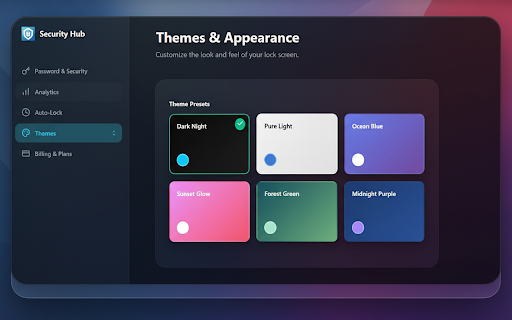
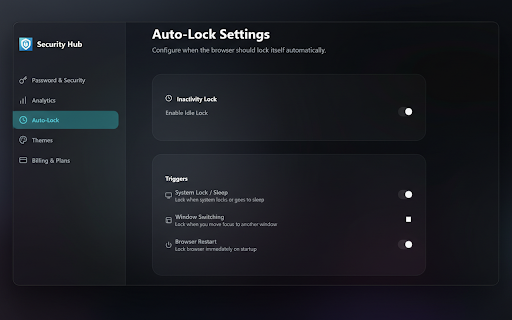
Auto-Lock & Timeout: Browser locks automatically after inactivity — perfect for shared devices.

Kiosk Mode: Enable secure single-session browsing on public or workplace computers.

Tab Lock: Protect only the tabs you choose (like banking or email).

Privacy First: No browsing data collected — your information stays on your device.

💡 Why Choose Browser Lock

If you’ve ever wondered, “Can I bypass LockDown Browser?” — the answer is no, and you shouldn’t. Browser Lock isn’t made for cheating or bypassing secure exam browsers; it’s built for personal privacy and security.

This locked browser ensures that no one can open your tabs or see your history without your permission. Think of it as your own browser with lock, giving you total control over access.

❓ FAQ

Q: What is Browser Lock?
A: Browser Lock is a security extension that lets you protect your browser with a password or PIN. Once enabled, no one can open or use your browser without entering the correct code.

Q: Can I bypass LockDown Browser with this extension?
A: No — Browser Lock is designed for privacy and everyday use, not for bypassing security software like LockDown Browser.

Q: Is this a locked browser or a lock for any browser?
A: It’s a lock that works with your existing browser. Once activated, it behaves like a locked browser until you unlock it.

Q: Does Browser Lock slow down my browser?
A: Not at all — it runs lightly in the background and activates only when needed.
Technical
- Version
- 1.3.1
- Manifest
- V3
- Size
- 199KiB
- Min Chrome
- 88
- Languages
- 1
- Featured
- No
Metadata
- ID
- bidfgkmhifpkholnpjopknnjglchjpfb
- Developer ID
- ub47274dcc6a751833003ec471f9c0078
- Developer Email
- [email protected]
- Created
- Oct 19, 2025
- Last Updated (Store)
- Feb 19, 2026
- Last Scraped
- Jun 4, 2026
- Support URL
- https://browser-lock.innvexia.com
Similar extensions
Alternatives to Browser Lock, ranked by description similarity.

Browser Lock Pro - Browser Password Lock Extension | Chrome Browser Locker
Browser Lock Pro secures Chrome with password lock, auto-lock protection, privacy security, and browser access control.
115
★ 4.0

LockMyTab – Secure PIN Lock for Tabs
Protect your privacy by locking individual browser tabs with a secure 4-digit PIN. Secure, fast, and easy to use.
8

ChromeLock | Browser Password Lock Extension - ChromeLock.net
Lock your browser with one click. Protect your privacy and data with password protection, auto-lock, and keyboard shortcuts.
5.0K
★ 4.8

SecureTab - Browser Privacy Lock
Secure your browser with password protection, auto-lock, and privacy controls. Perfect for shared computers and public spaces.
181
★ 3.0

Google Chrome Password lock
Use Google Chrome Password lock to protect your browser. Add this extension, set Chrome password, and lock your browser and tabs.
30.0K
★ 4.7

TabGuard
Lock specified sites behind a password.
1
★ 5.0

Browser Profiles Authentication - Secure Profile Lock
Password protection for all Browser Profiles
199
★ 2.0

Tab Lock Pro - Secure Your Tabs
Lock tabs with password, PIN or Face ID. Tab Vaults, Quick Peek, Privacy Reports & more. Keep your sensitive tabs private.
111
★ 4.2
Data sourced from the Chrome Web Store · last verified Jun 4, 2026.