RSVP Speed Reader
Read anything at speed. Select text on any page and read it with Rapid Serial Visual Presentation.
As of June 2026, RSVP Speed Reader has 13 users and a 5.00/5 rating from 2 reviews in the Productivity category.
Usersno change0%
13
13
Ratingno change0%
5.00
2 reviews
Reviewsno change0%
2
Version
1.0.0
Manifest V3
History
10 snapshotsTracking since Apr 3, 2026.
View as table
| Date | Users | Rating | Reviews | Version |
|---|---|---|---|---|
| Apr 3, 2026 | — | — | — | 1.0.0 |
| Apr 17, 2026 | — | — | — | 1.0.0 |
| Apr 23, 2026 | 4 | 5.00 | 2 | 1.0.0 |
| Apr 27, 2026 | 5 | 5.00 | 2 | 1.0.0 |
| May 5, 2026 | 7 | 5.00 | 2 | 1.0.0 |
| May 16, 2026 | 8 | 5.00 | 2 | 1.0.0 |
| May 22, 2026 | 9 | 5.00 | 2 | 1.0.0 |
| May 29, 2026 | 12 | 5.00 | 2 | 1.0.0 |
| Jun 5, 2026 | 10 | 5.00 | 2 | 1.0.0 |
| Jun 11, 2026 | 11 | 5.00 | 2 | 1.0.0 |
| Now | 13 | 5.00 | 2 | 1.0.0 |
Permissions & access
- Permissions
- contextMenusstoragesidePanelactiveTab
- Host access
- <all_urls>
Screenshots


About
SHORT DESCRIPTION
──────────────────────────────────────
Read anything on the web up to 3x faster. Select text, right-click, and RSVP reads it word by word.


LONG DESCRIPTION
──────────────────────────────────────

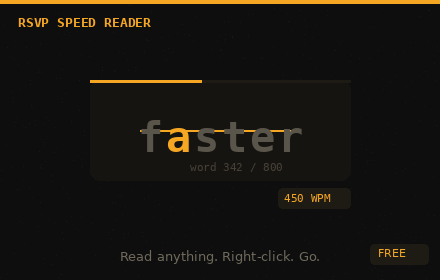
RSVP Speed Reader lets you read faster without any gimmicks. Select any text on any webpage, right-click, and the extension flashes each word directly in front of your eyes — one at a time, at whatever speed you choose. No more scanning lines, losing your place, or getting distracted. Just you and the words.

This technique is called Rapid Serial Visual Presentation (RSVP). Instead of your eyes moving across a page, the words move to your eyes. The result is faster reading with better focus — especially useful for long articles, research papers, and anything you need to get through quickly.


FEATURES

→ Right-click any selected text to read it instantly
   Highlight a paragraph, an article, or a full page — right-click and hit "Read with RSVP" to start immediately.

→ Adjustable speed from 50 to 900 WPM
   Start slow and work your way up. Most people read at 200–300 WPM. With practice, RSVP readers regularly hit 500–700 WPM with full comprehension.

→ ORP highlighting for maximum comprehension
   Each word displays with its Optimal Recognition Point highlighted — the single letter your brain anchors to first. This is the same technique used by professional speed reading tools and makes fast reading feel natural, not strained.

→ PDF upload and text paste support
   Not just webpages. Drop in a PDF or paste any text and read it at speed. Great for documents, reports, and anything outside the browser.

→ Reading history with unlimited storage
   Every session is saved automatically. Pick up exactly where you left off — the reader remembers your position, your speed, and what you were reading. Export your full history as a JSON file anytime.

→ Fully keyboard driven
   Space to play and pause. Arrow keys to skip forward or back. Bracket keys to adjust speed on the fly. Everything works without touching the mouse once you start.

→ 100% free, no account required
   No sign up. No subscription. No data collection. Install and read.


WHO IS IT FOR

Students working through dense reading lists. Professionals drowning in articles and reports. Anyone with ADHD who finds traditional reading hard to sustain. Researchers who need to process large volumes of text quickly. Anyone who just wants to read more in less time.


PRIVACY

RSVP Speed Reader does not collect, transmit, or store any of your data outside your own browser. Your reading history lives entirely on your device. Nothing is sent anywhere.
Technical
- Version
- 1.0.0
- Manifest
- V3
- Size
- 394KiB
- Min Chrome
- 88
- Languages
- 1
- Featured
- No
Metadata
- ID
- bibhkllmlfcfljbfjojllfihmpgmnbjd
- Developer ID
- u62cfc84bfc4ee1223219c982fb3f3349
- Developer Email
- [email protected]
- Created
- Apr 2, 2026
- Last Updated (Store)
- Apr 2, 2026
- Last Scraped
- Jun 11, 2026
- Website
- —
- Support URL
- —
- Privacy Policy
- —
Data sourced from the Chrome Web Store · last verified Jun 11, 2026.