
OOTD — Only One-Click Transcript Downloader
No sign-in. No tracking. No ads. Just the transcript.
As of June 2026, OOTD — Only One-Click Transcript Downloader has 1 users in the Productivity category.
Usersno change0%
1
1
Ratingno change0%
—
— reviews
Reviewsno change0%
—
Version
1.1.0
Manifest V3
History
2 snapshotsTracking since May 25, 2026.
Not enough history yet for this metric — the chart fills in as we collect more snapshots.
View as table
| Date | Users | Rating | Reviews | Version |
|---|---|---|---|---|
| May 25, 2026 | — | — | — | 1.1.0 |
| Jun 7, 2026 | — | — | — | 1.1.0 |
| Now | 1 | — | — | 1.1.0 |
Permissions & access
- Permissions
- activeTabscripting
- Host access
- https://www.youtube.com/*
Screenshots

About
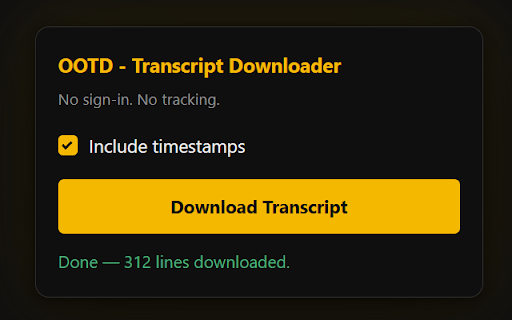
OOTD is the minimalist’s solution for grabbing YouTube transcripts instantly. Whether you’re conducting deep research or need a clean text file to feed into ChatGPT, Claude, or Gemini, OOTD does one thing perfectly: it gives you the raw data you need in a single click.

Why Choose OOTD?
AI-Ready Text: Downloads clean, plain text (.txt) files specifically formatted for easy ingestion by Large Language Models (LLMs).

True One-Click Experience: No pasting URLs or waiting for external sites—just open a video and hit download.

Privacy First: No sign-ins, no tracking, and no ads. The extension runs entirely in your browser; your data never leaves your machine.

Flexible Formatting: Toggle timestamps off for a seamless block of text (perfect for AI prompts) or keep them on for easy reference.

Lightweight & Secure: Built on Manifest V3 using minimal permissions (activeTab, scripting, and downloads) and no external API calls.

Perfect For:
AI Power Users: Quickly summarize 2-hour podcasts or technical tutorials by feeding the transcript directly into an AI.

Researchers & Students: Save time on note-taking with instant, offline-ready text files.

Content Creators: Repurpose video content into blog posts or social media threads without the manual typing.

How to Use
Navigate to any YouTube video.

Click the OOTD extension icon.

Check or uncheck Include timestamps.

Click Download Transcript.

How It Works
OOTD is designed for speed and reliability. It pulls transcript data directly from the YouTube page—trying internal caption tracks first for speed and falling back to the transcript panel if needed. It works perfectly with both manual transcripts and auto-generated captions.

The OOTD Promise
"Small tools that do one thing well."

Developed by Nick Tan, OOTD is built for those who value their time, their privacy, and their workflow. Stop fighting with "free" tools that harvest your data and start downloading what you need instantly.
Technical
- Version
- 1.1.0
- Manifest
- V3
- Size
- 12.87KiB
- Min Chrome
- 88
- Languages
- 1
- Featured
- No
Metadata
- ID
- biahhoopnncpkajmngbfifpdmamhelnk
- Developer ID
- ud6e5ec8d7d073bb6a39316d31acc45fa
- Developer Email
- [email protected]
- Created
- May 24, 2026
- Last Updated (Store)
- May 24, 2026
- Last Scraped
- Jun 7, 2026
- Website
- —
- Support URL
- —
- Privacy Policy
- https://nick-tan.com/ootd-transcript-downloader/
Data sourced from the Chrome Web Store · last verified Jun 7, 2026.